
Technoline WS 9120 Manual
PDF manual · 24 Pages
English



Quick check
Incorrect answer, please try again.
Chat with your Technoline WS 9120 manual using AI
Get instant AI answers from your Technoline WS 9120 manual
Ask anything about the Technoline WS 9120. Answers come from this manual, with the pages they are based on.
WS 9120 Maintenance Schedule
The stored MIN/MAX temperature and humidity values are automatically reset daily at 00:00.
Remove exhausted batteries immediately and replace with a complete set of new alkaline batteries only.
Ask a Question
Do you recommend WS 9120?
Yes NoFrequently Asked Questions
Press and hold MODE for 3 seconds to enter time setting. Use UP or DOWN to adjust the hour (blinking), press MODE to switch to minutes, then use UP or DOWN to set minutes and press MODE to exit.
Is this answer helpful?
While viewing the temperature, press the DOWN button to toggle the display between Celsius (°C) and Fahrenheit (°F).
Is this answer helpful?
Press MAX/MIN to cycle between maximum and minimum recorded temperature and humidity. Stored MIN/MAX values are automatically reset daily at 00:00; there is no manual reset button.
Is this answer helpful?
Press MODE to view alarm time, hold MODE for 3 seconds to enter alarm-setting mode, adjust hours and minutes with UP/DOWN, press UP to toggle alarm ON/OFF. Press SNZ/LIGHT when the alarm sounds to activate snooze; SNZ/LIGHT also turns on the backlight.
Is this answer helpful?
The device uses 2 × AAA alkaline batteries (not included). Install with correct polarity, replace the full set at once, never mix old and new batteries, remove exhausted batteries promptly, and recycle them according to local regulations.
Is this answer helpful?
No. The unit is designed for indoor use only. Avoid exposing it to rain, high humidity, direct sunlight, extreme temperatures, dust or shocks, and do not immerse it in water.
Is this answer helpful?
Advantages and Disadvantages
Advantages

- Clear, simple interface for time, calendar, alarm and climate readings.
- Battery-powered (2×AAA) for flexible indoor placement without wiring.
- Records daily max/min temperature and humidity; resets automatically at midnight.
- Supports 12/24-hour format and °C/°F display for regional preferences.
- Snooze function and backlight for convenient alarm and low-light viewing.
Disadvantages

- Indoor use only; not weatherproof for outdoor placement.
- Requires regular battery replacement and proper disposal of used cells.
- Limited measurement ranges (0–50°C, 20–99% RH) may not suit extreme environments.
- No rechargeable battery support; mixing old and new cells can cause issues.
- Basic feature set without wireless app integration or remote sensors.
Product Specification
Design
digital
Temperature
indoor
Humidity
indoor
Forecast technology
Barometer
Other displays
Time, Day of the week
Alarms
Alarm time
Placement
Tabletop device
Power supply
2x AAA battery
Color
black, silver
Product Description
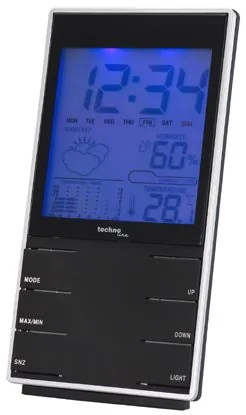
Technoline WS 9120 Wireless Weather Station Digital
The Technoline WS 9120 Wireless Weather Station Digital offers a compact, user-friendly way to monitor indoor climate and time information. Featuring a clear LCD, the unit displays temperature and humidity within practical ranges (0–50°C and 20–99% RH) with 1°/1% resolution. It runs on two AAA batteries, making it easy to place anywhere indoors without wiring.
Key features and usage
Setting the clock, calendar and alarm is done through intuitive MODE, UP and DOWN buttons. Hold MODE for three seconds to enter setting modes: adjust hours and minutes, then press MODE to step through year, month and day when configuring the calendar. Alarm setup follows the same flow, with UP toggling the alarm on or off.
The station records daily maximum and minimum temperature and humidity values accessible via the MAX/MIN button; those records automatically reset at midnight. The display supports 12/24-hour formats (hold UP for three seconds in time mode) and temperature units can be switched between °C and °F using the DOWN button. A SNZ/LIGHT button provides snooze when the alarm sounds and activates the display light for quick viewing in low light.
Practical benefits
This device is intended for indoor use and is helpful for everyday home monitoring: track room comfort, maintain better sleep routine with the alarm and snooze functions, and review daily temperature and humidity extremes to adjust ventilation or heating. Its battery operation and simple controls suit users who want a no-fuss, reliable display of basic environmental data.
Build and safety notes
The WS 9120 is lightweight and should be protected from shocks, extreme temperatures, direct sunlight, dust and moisture. Do not immerse the unit in water or expose it to corrosive materials. Battery guidance stresses using alkaline batteries only, replacing a full set at once, not mixing old and new cells, and removing exhausted batteries promptly. Recycle batteries and the device responsibly per local regulations.
Notes:
- Indoor use only; avoid exposure to moisture and high heat.
- Uses 2 × AAA alkaline batteries (not included).
- MAX/MIN values reset daily at 00:00.
Search for 67,706 Manuals online


Type-in Brand or Model
maria_k
9 months ago
How accurate is the humidity measurement? Does it match a more expensive test device?
Manual.ly
9 months ago
Based on customer feedback, the humidity readings are very precise. One reviewer compared the device directly with a more expensive borrowed test instrument and found the measurements to be consistent. If you want the most reliable results, place the device away from direct drafts, heat sources, and sudden temperature changes, and let it stabilize for a short time before taking readings.