
Technoline WL 1030 Manual
PDF manual · 86 Pages
English



Quick check
Incorrect answer, please try again.
Chat with your Technoline WL 1030 manual using AI
Get instant AI answers from your Technoline WL 1030 manual
Ask anything about the Technoline WL 1030. Answers come from this manual, with the pages they are based on.
WL 1030 Maintenance Schedule
Place the monitor in a well-ventilated area (near 400 ppm CO2) for at least one hour per day to allow automatic baseline calibration to function correctly.
Unplug the device. Clean the surface with a soft cloth moistened only with mild soap and water. Avoid strong agents like benzene or thinner.
Ask a Question
Do you recommend WL 1030?
Yes No
Klaus Schmidt
4 months ago
Is the instruction manual included in the box and is the interface intuitive for daily use?
Frequently Asked Questions
The monitor uses a smart chip to automatically calibrate itself to the minimum CO2 level detected over a continuous seven-day period. To ensure accuracy, place the device in a well-ventilated area for at least one hour daily.
Is this answer helpful?
If the power is interrupted, the display and backlight turn off. However, the internal memory chip saves all your settings, so the device will resume normal operation immediately once power is restored.
Is this answer helpful?
Yes, you can enable or disable the acoustic alarm for high CO2 alerts using the ALARM CO2 button. When active, the device emits a continuous beep that accelerates as CO2 levels rise above the set threshold.
Is this answer helpful?
While viewing the Max/Min or average readings, press and hold the MEM button. This will reset all stored records to dashes, and the monitor will begin collecting new data for the next 24-hour cycle.
Is this answer helpful?
The device measures relative humidity between 20% and 95%. You can set custom visual alerts for low and high humidity levels within this range.
Is this answer helpful?
Relevant CO2 data will be displayed within 2.5 minutes of turning on the device. However, it takes up to 24 hours for the monitor to fully calibrate and display the most accurate CO2 values.
Is this answer helpful?
Advantages and Disadvantages
Advantages

- Accurate NDIR sensor technology for reliable CO2 detection
- Triple-color display provides immediate visual feedback on air quality
- Stores max/min/average data for the last 24 hours
- Automatic baseline calibration reduces long-term sensor drift
- Customizable alarm thresholds for CO2 and humidity
Disadvantages

- Requires 24 hours to display fully corrected CO2 data after setup
- Acoustic alarm only activates for high CO2 alerts, not low ones
- Humidity alerts are visual only without sound
- Must be plugged into AC power to function continuously
- Manual calibration requires access to a known 400 ppm environment
Product Specification
Type
digital
Temperature
indoor
Humidity
indoor
Weather Forecast
no
Other Displays
Humidity
Placement
Desktop
Power Supply
Mains
Color
black
Product Description
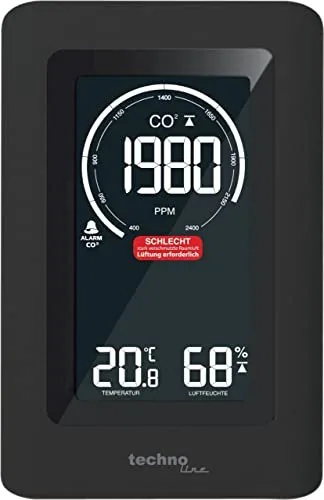
Technoline WL 1030 Air Quality Monitor Digital
The Technoline WL 1030 Air Quality Monitor Digital is a sophisticated device designed to ensure optimal indoor air quality by continuously tracking carbon dioxide levels, temperature, and relative humidity. This monitor utilizes a non-dispersive infrared (NDIR) gas sensor to provide accurate CO2 detection across a wide range of 400 to 5000 PPM. Its user-friendly interface features a triple-color display that instantly communicates air quality status through intuitive color coding, guiding users on when to ventilate their space.
One of the standout features of this digital monitor is its ability to store historical data. It retains maximum, minimum, and average values for the last 24 hours, allowing users to analyze trends over time. The device also calculates time-weighted averages for both 15-minute and 8-hour periods, providing a comprehensive view of air quality fluctuations throughout the day. Users can customize alert thresholds for both high and low CO2 levels as well as humidity ranges, with optional acoustic alarms to warn of dangerous conditions.
Calibration is streamlined with an automatic baseline feature that adjusts the sensor based on the lowest CO2 reading detected over seven days, provided the unit is placed in a well-ventilated area daily. For precise needs, manual calibration is also supported. The monitor includes a built-in memory chip to preserve settings even during power outages, ensuring seamless operation once electricity is restored. With adjustable backlight brightness and a stable table stand design, the WL 1030 fits perfectly into any home or office environment, promoting healthier living spaces.
Key Highlights
This device helps prevent issues like drowsiness, poor concentration, and headaches associated with stale air. By offering real-time feedback and actionable ventilation recommendations, it empowers users to maintain a safe and comfortable indoor atmosphere.
Important Notes
- Ensure the device is placed away from direct sunlight and moisture.
- Do not use harsh chemicals for cleaning; use a soft cloth with mild soap and water.
- Always unplug the unit before performing maintenance or cleaning.
Search for 67,706 Manuals online


Type-in Brand or Model
Freya Clarke
6 months ago
Does the air quality sensor effectively detect CO2 spikes during gatherings and alert users to ventilate?
Manual.ly
5 months ago
Yes, the TECHNOLINE WL 1030 is designed to monitor indoor air quality accurately. As noted by users, it reliably detects rising CO2 levels when multiple people are present and triggers an alarm to remind you to ventilate the room. The device is easy to operate and comes with a manual for setup.