
Techly IDATA KVM-HDMI4U 2-Port Manual
PDF manual · 2 Pages
English



Quick check
Incorrect answer, please try again.
Chat with your Techly IDATA KVM-HDMI4U 2-Port manual using AI
Get instant AI answers from your Techly IDATA KVM-HDMI4U 2-Port manual
Ask anything about the Techly IDATA KVM-HDMI4U 2-Port. Answers come from this manual, with the pages they are based on.
Ask a Question
Do you recommend IDATA KVM-HDMI4U 2-Port?
Yes NoFrequently Asked Questions
No, the provided documentation specifies support for 4K at 30Hz resolution. It handles standard PC UXGA 1920x1200 well. This limitation applies to 4K refresh rates but maintains clarity for general usage.
Is this answer helpful?
Yes, it is compatible with game consoles as an HDMI source. You must ensure a PC with a USB port is connected for the switching mechanism to function properly.
Is this answer helpful?
You can use the front push button, an IR remote command, or specific keyboard hotkeys. The hotkeys involve Caps Lock combinations to toggle between PC1 and PC2 instantly.
Is this answer helpful?
Yes, there is one main USB port for keyboard and mouse. Additionally, there is an extra USB 2.0 port for sharing other devices like drives.
Is this answer helpful?
Yes, it supports audio output formats like Dolby True HD. You can connect headphones to the audio port to listen through the shared display audio if supported.
Is this answer helpful?
The switching mechanism will not function if none of the sources are a PC with a USB port. At least one connected device must be a PC for logic.
Is this answer helpful?
Clean only with a dry cloth and do not use solvents. Do not open the housing to avoid electric shock. Ensure proper power supply to prevent damage.
Is this answer helpful?
Advantages and Disadvantages
Advantages

- Supports up to 4K at 30Hz resolution for high-quality video sharing between devices without losing quality.
- Includes an additional USB 2.0 port for sharing peripherals like printers or storage with over-current protection.
- Metal housing construction ensures better RF shielding and physical durability during long term usage.
- Compatible with Windows, Mac, and Linux operating systems ensuring versatile connectivity options.
- Supports advanced audio formats like Dolby True HD and DTS-HD Master Audio for rich sound.
Disadvantages

- Resolution limited to 4K at 30Hz which might not be sufficient for high refresh rate gaming.
- Requires at least one connected device to be a PC with a USB port for the switching mechanism.
- Audio output requires physical connection limiting wireless audio solutions for mobile or remote setups.
- Only supports 2x1 switching which lacks expandability for larger environments or multi-monitor needs.
- Power adapter is specific to 5V at 2A and cannot be easily replaced with generic high voltage units.
Product Specification
Type
KVM switch
Ports
2
Monitor
HDMI
Keyboard/Mouse
USB
Audio
2x Jack (3.5mm)
LAN
N/A
Resolution
3840x2160@30Hz
Features
1-port USB 2.0 Hub
Product Description
Unlocking Seamless Multi-Computer Control with Techly IDATA KVM-HDMI4U 2-way
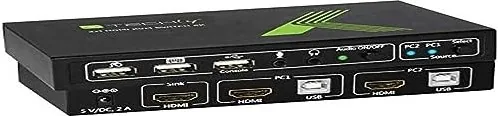
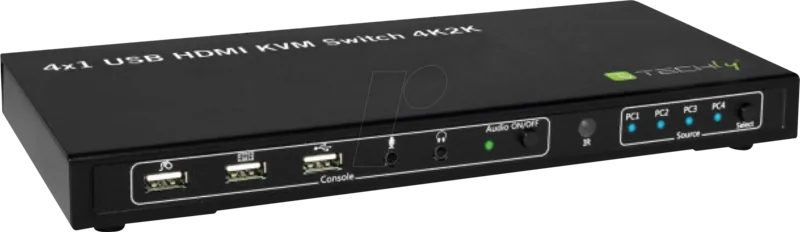
Managing multiple computing devices often leads to a cluttered desk with excess monitors and keyboards. The Techly IDATA KVM-HDMI4U 2-way offers a streamlined solution for sharing one display and peripheral input among two computers. This guide outlines how to maximize efficiency using the Techly IDATA KVM-HDMI4U 2-way Manual instructions found in standard product documentation. It simplifies the experience of managing dual systems without needing extra hardware.
Simplify Your Workspace
Imagine controlling two personal computers or a PC and a gaming console without reaching for separate input devices. This device allows you to share an HDMI display, USB keyboard, mouse, and even a microphone between two sources. Whether you are running Windows, Mac, or Linux, cross-platform compatibility ensures a smooth workflow. The metal housing provides excellent RF shielding, protecting your data signals from interference while maintaining durability. It is ideal for home offices where space is at a premium and cleanliness is key. You can easily toggle between machines to work or play.
High-Performance Video and Audio
Visual fidelity is crucial for modern tasks and entertainment. This switch supports resolutions up to 4K at 30Hz and standard PC UXGA 1920x1200. It handles high-definition audio formats like Dolby True HD and DTS-HD Master Audio, ensuring your entertainment setup remains immersive. With a video bandwidth up to 3Gb/s and compliance with HDMI 1.4 and HDCP standards, connectivity is robust and secure. Users can switch sources via the front push button, infrared remote, or specific keyboard hotkeys. The LED indicators provide clear visual feedback on which HDMI source is currently selected and active for your audio system.
Effortless Configuration and Control
Setup is designed for immediate use right out of the box. Connect your monitor to the HDMI output port. Link your peripherals like the USB keyboard and mouse to the designated ports on the switch. HDMI inputs connect directly to your computers using included cables. An additional USB 2.0 port is available for sharing other devices with over-current protection. Powering up one system allows you to verify the connection before activating the second device ensures proper initialization. The Hotkey feature is powerful, allowing you to cycle through connected PCs using the Caps Lock key combinations quickly without touching the device. The included quick installation guide walks users through every step to ensure stability and correct wiring.
Safety and Maintenance
To ensure longevity, keep the unit dry and clean with a dry cloth only. Avoid solvents that might damage the casing. Safety precautions warn against opening the metal housing to prevent electric shock risks. Proper disposal follows WEEE directive standards to protect the environment. With the CE mark, Techly guarantees compliance with European safety directives. This tool transforms a chaotic desk into a productive, organized workstation for professionals and gamers alike. The power adapter provides reliable power at 5V/2A to keep the switch running continuously throughout your workday. Regular checks on cable connections will maintain optimal signal integrity over time.
Search for 67,732 Manuals online


Type-in Brand or Model