
Techly ICA-TR17T2 Manual
PDF manual · 8 Pages
English



Quick check
Incorrect answer, please try again.
Chat with your Techly ICA-TR17T2 manual using AI
Get instant AI answers from your Techly ICA-TR17T2 manual
Ask anything about the Techly ICA-TR17T2. Answers come from this manual, with the pages they are based on.
Ask a Question
Do you recommend ICA-TR17T2?
Yes NoFrequently Asked Questions
The Techly ICA-TR17T2 supports a maximum weight of 35.77 pounds (approximately 16.2 kg). Ensure your television does not exceed this limit to maintain safety.
Is this answer helpful?
This mount is designed for televisions ranging from 17 inches to 60 inches in size, provided they adhere to the specified VESA mounting patterns.
Is this answer helpful?
Basic tools like a screwdriver are included or required for tightening the safety bolts. No specialized power tools are needed for standard assembly.
Is this answer helpful?
It is recommended to inspect the bracket and tripod legs at least every three months to ensure all connections remain secure and the structure is safe.
Is this answer helpful?
While the tripod legs offer some adjustment, it is best used on a flat, stable surface to prevent tipping and ensure the safety of the mounted television.
Is this answer helpful?
Advantages and Disadvantages
Advantages

- Supports TVs from 17 to 60 inches with a 35.77 lb weight capacity
- Universal VESA 400x400mm compatibility for most modern screens
- Portable tripod design requires no wall mounting or drilling
- Includes all necessary hardware for easy self-installation
- Durable black finish suitable for professional and home use
Disadvantages

- Requires careful assembly to ensure stability and safety
- Must perform regular maintenance checks every three months
- Limited to floor placement only, not suitable for ceiling mounts
- Maximum weight limit restricts use with very heavy commercial displays
- Assembly instructions require attention to avoid incorrect fitting
Product Specification
Type
Floor
Number of Monitors
1
Screen Size
17-60"
Mobility
Tiltable (-10 degrees, +10 degrees), Swivel (360 degrees)
Max Load
77.16 lbs
VESA
75x75, 100x100, 200x200, 300x300, 400x200, 600x400
Shelves
0
Features
Cable Management
Color
Black
Dimensions (WxDxH)
17.24x74.8x17.24 in
Weight
15.48 lbs
Product Description
Techly ICA-TR17T2: The Ultimate Portable TV Mounting Solution
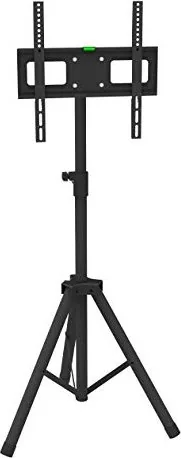
The Techly ICA-TR17T2 represents a pinnacle in mobile entertainment setups, designed specifically for users who demand flexibility and stability without compromise. This universal portable TV mount tripod transforms any location into a personal cinema or presentation space. Engineered to support screens ranging from 17 inches up to 60 inches, it caters to a vast array of display sizes while maintaining a sleek black finish that complements modern aesthetics.
Constructed with robust hardware, this device supports a maximum load of 35.77 pounds, ensuring that even larger televisions remain secure during use. The inclusion of a VESA 400x400mm mounting pattern makes it compatible with numerous standard television models. The design prioritizes ease of installation, allowing users to set up their viewing experience quickly without the need for complex tools or permanent wall fixtures. Whether for outdoor events, conference rooms, or living room versatility, the ICA-TR17T2 offers a reliable foundation.
Safety is paramount in the engineering of this product. The manual emphasizes strict adherence to assembly guidelines to prevent accidents. Users are advised to inspect all components upon unboxing and ensure no parts are damaged before proceeding. Regular maintenance checks every three months are recommended to verify the structural integrity of the bracket and tripod legs. The system includes specific safety bolts that must be tightened carefully to prevent slippage, ensuring long-term durability and user safety.
Key Features
This mount stands out due to its portability and adaptability. It eliminates the need for drilling holes or fixing heavy brackets to walls, making it ideal for renters or temporary setups. The sturdy construction handles the weight of large screens effortlessly, providing a stable platform for viewing content in various environments.
Important Notes
Always ensure the surface where the tripod is placed is flat and stable. Do not over-tighten screws as this may damage the threads or the screen. Keep the instruction manual handy for future reference regarding maintenance and troubleshooting.
Search for 67,732 Manuals online


Type-in Brand or Model