
Tech 21 SansAmp PSA 2.0 Manual
PDF manual · 12 Pages
English



Quick check
Incorrect answer, please try again.
Chat with your Tech 21 SansAmp PSA 2.0 manual using AI
Get instant AI answers from your Tech 21 SansAmp PSA 2.0 manual
Ask anything about the Tech 21 SansAmp PSA 2.0. Answers come from this manual, with the pages they are based on.
Ask a Question
Do you recommend SansAmp PSA 2.0?
Yes NoFrequently Asked Questions
Select a program location, adjust the knobs to your desired tone, and press the Save button twice. The display will cycle through numbers before settling on your new program number.
Is this answer helpful?
Yes, the unit is fully compatible with bass guitars. It includes specific factory presets tailored for bass tones and handles the lower frequency range effectively.
Is this answer helpful?
The Tip carries the full SansAmp signal including speaker simulation, while the Ring connection carries the signal without speaker simulation for clean recording options.
Is this answer helpful?
Press the Up and Down footswitches simultaneously to activate Performance Mode. This assigns your first three program slots to the three main footswitches for quick access.
Is this answer helpful?
No, you can toggle the speaker simulation on or off within each individual program setting using the dedicated switch or by configuring it in the memory.
Is this answer helpful?
You can overwrite any program except 00 and 50 which are permanent bypass. To prevent accidents, you can enable Preset Protection Writer in the Special Page menu.
Is this answer helpful?
Advantages and Disadvantages
Advantages

- 100% analog circuitry delivers authentic tube amplifier emulation with organic dynamics
- Versatile performance mode allows instant access to three custom programs via footswitches
- Comprehensive MIDI support enables remote control and complex mapping configurations
- Dual TRS output offers simultaneous speaker-simulated and raw signal paths for recording
Disadvantages

- Knob positions do not visually reflect stored values until turned, requiring learning curve
- Digital control of analog pots can produce minor zipper noise during adjustment
- Factory presets may require significant tweaking to match specific gear interactions
- No user-serviceable parts inside, limiting repair options if internal components fail
Product Specification
Type
Preamp
Features
analog, MIDI In, XLR Out
Product Description
Master Your Tone with the Tech 21 SansAmp PSA 2.0 Manual
The Tech 21 SansAmp PSA 2.0 stands as a testament to decades of innovation in guitar and bass signal processing. Originally introduced as a rackmount unit that became a staple in countless studio recordings and live tours, this device has been reimagined into a compact pedal format without sacrificing its legendary sound quality. This manual guides you through unlocking the full potential of an instrument that bridges the gap between analog warmth and digital flexibility.
At the heart of the PSA 2.0 is 100% analog circuitry designed to emulate the punchy, responsive, and organic sounds of tube amplifiers. While the core tone generation remains purely analog, the unit incorporates digital memory for storing presets and handling MIDI commands. This hybrid approach ensures that your signal retains the natural dynamics and harmonic richness of a real amplifier while offering the convenience of modern programmability. Whether you are recording direct tracks, enhancing existing mixes, or driving a power amp on stage, this unit delivers consistent quality from small clubs to large arenas.
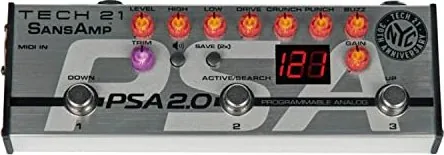
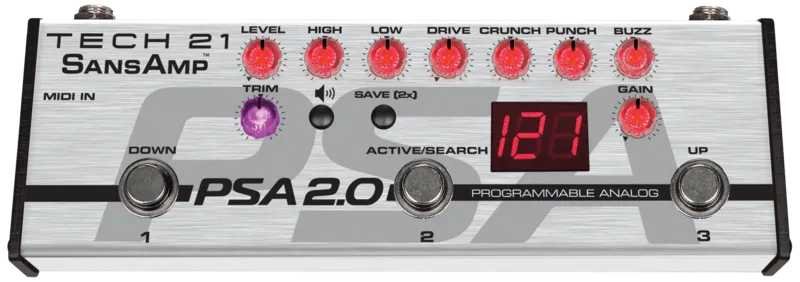
The control surface mimics a sophisticated amplifier, allowing players to adjust tonality, gain structure, and harmonic content intuitively. Features like Buzz, Punch, Crunch, and Drive offer granular control over low-end break-up, midrange character, and top-end crunch. The active shelving EQs provide precise shaping, while the Level and Trim controls ensure optimal signal flow regardless of your setup. With 49 factory presets and 77 user memory locations, you can store your custom tones and recall them instantly with zero lag time.
For live performances, the Performance Mode transforms the unit into a three-channel stompbox, giving you instant access to your three favorite sounds via dedicated footswitches. The unit also features comprehensive MIDI capabilities, allowing for remote program changes, mapping, and advanced configuration through the Special Page functions. From speaker simulation options that allow for stereo recording setups to protective measures against accidental edits, the PSA 2.0 is built for the serious musician who demands reliability and versatility.
Notes
- The unit uses a universal 9V DC power supply with interchangeable prongs for global use.
- Speaker simulation can be engaged or disengaged per preset, with a dedicated ring output for non-simulated signals.
- The LED display provides visual feedback on program numbers, edit modes, and special function settings.
- A one-year limited warranty covers defects in materials and workmanship for the original purchaser.
Search for 67,706 Manuals online


Type-in Brand or Model