


TCL TS7000 Manual
PDF manual · 44 Pages
English



Quick check
Incorrect answer, please try again.
Chat with your TCL TS7000 manual using AI
Get instant AI answers from your TCL TS7000 manual
Ask anything about the TCL TS7000. Answers come from this manual, with the pages they are based on.
TS7000 Maintenance Schedule
Maintain a spacing of 7.8 inches (20cm) or more around the product to ensure adequate ventilation and prevent overheating.
Protect the power cord from being walked on or pinched, particularly at plugs and where it exits the product.
Free maintenance reminders
Timed to your purchase date. Always free, unsubscribe anytime.
Ask a Question
Do you recommend TS7000?
Yes NoFrequently Asked Questions
Connect an HDMI cable (sold separately) between the TV’s HDMI ARC output and the sound bar’s HDMI ARC input. On compatible TCL TVs, enable T-Link in Settings > System options for optimal ARC control and audio routing.
Is this answer helpful?
Power on the sound bar, press the Bluetooth button on the unit or remote until the blue LED flashes slowly, enable Bluetooth on your device and select "TCL TS7000". If unavailable, press and hold the remote pairing button to enter rapid pairing mode.
Is this answer helpful?
The TS7000 supports USB music playback for MP3, WAV and FLAC files from drives up to 32GB. Insert the USB drive into the Type-A connector, switch the source to USB, then control playback with the remote.
Is this answer helpful?
Verify power and source selection, ensure cables are firmly connected (HDMI ARC/optical/AUX), raise the volume, and confirm the TV’s audio output settings (set optical to PCM if needed). Also check the sound bar is not muted.
Is this answer helpful?
Use the supplied wall-mount template, follow spacing guidance (at least 5 cm below TV center), drill holes, insert anchors and screws leaving 4 mm gap, then hang the unit. Ensure wall strength and use qualified installers if unsure.
Is this answer helpful?
Place the sound bar on a flat surface or mount it on the wall with at least 20 cm (7.8 in) clearance around it to ensure proper ventilation. Avoid placing it in enclosed built-in furniture that blocks vents.
Is this answer helpful?
Open the battery compartment, remove old batteries, insert two new AAA batteries with correct polarity, and close the compartment. Remove batteries if the remote won’t be used for over a month to avoid leakage.
Is this answer helpful?
Advantages and Disadvantages
Advantages

- Multiple input options: HDMI ARC, optical, AUX, USB and Bluetooth 4.2 for flexible connections.
- Compact, lightweight design (920 x 98 x 64 mm, 2.48 kg) fits under TVs or on walls easily.
- Simple remote with dedicated EQ presets (News/Movie/Music) for quick sound tailoring.
- USB playback supports common formats (MP3, WAV, FLAC) and drives up to 32GB.
- IR pass-through maintains TV remote functionality when the bar blocks the TV sensor.
Disadvantages

- Frequency response starts at 150 Hz, so deep bass may be limited without a subwoofer.
- Bluetooth is version 4.2 with modest max transmit power; range and stability may vary.
- No built-in subwoofer—may lack low-end impact for immersive home theater listeners.
- Remote range/angle limited (about 6m/30°), requiring direct line to the sensor for consistent control.
- Limited advanced audio features (no Dolby Atmos support listed) for high-end setups.
Product Specification
Type
Soundbar
Channels
2.0
Power
80W Peak
Audio Decoder
Dolby Digital
HDR
no
Video Connections
1x HDMI In
Audio Connections
1x Digital Audio In (optical), 1x AUX In (0.14in jack)
Other Connections
1x USB-A
Wireless
Bluetooth
Color
black
Dimensions
32.28x2.52x3.86in (WxHxD)
Consists of
Soundbar
Product Description
TCL TS7000 — Powerful, Compact Sound Bar
The TCL TS7000 offers a streamlined audio upgrade for TVs and living spaces needing clear, room-filling sound without complexity. Designed with simple connectivity and a slim profile, the TS7000 blends modern features like HDMI ARC, optical and AUX inputs, USB playback and Bluetooth 4.2 into an easy-to-install package. Its 920 mm width and lightweight construction make it suitable for placement on stands or wall mounting beneath TVs.
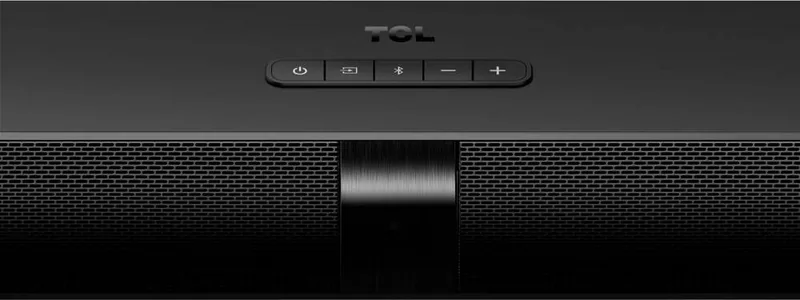
Built for everyday home entertainment, the TS7000 focuses on practical convenience: quick source switching, a responsive remote with preset EQ modes (News, Movie, Music), and straightforward LED indicators for status and source feedback. Bluetooth pairing supports A2DP and AVRCP for wireless music streaming and basic remote control of playback, while USB playback supports MP3, WAV and FLAC files from drives up to 32GB.
Safety and installation are emphasized, with clear recommendations for ventilation, secure wall mounting, correct power handling and battery care for the remote. Installation instructions include a wall-mount template, anchor and screw guidance, and advice to pre-connect cables before hanging if preferred. The sound bar also includes an IR pass-through to keep TV remote functions accessible when the bar might block the TV sensor.
Technically, the TS7000 operates on AC 100–240V, consumes 25W (≤0.5W standby), and covers a frequency response suited for dialogue and general media (150 Hz–20 kHz). Bluetooth 4.2 ensures compatible wireless streaming within roughly a 10-meter range. The unit’s compact dimensions, modest weight (2.48 kg) and easy-to-follow user interface make it a practical upgrade for many TV setups.
Whether you need clearer TV dialogue, enhanced movie sound, or a simple wireless speaker for music, the TCL TS7000 delivers accessible features with user-friendly controls and multiple wired/wireless connection options.
Notes
- Supports USB playback up to 32GB (MP3, WAV, FLAC).
- Bluetooth pairing: press pairing button or hold remote pairing for rapid discoverability.
- Use HDMI ARC and enable T-Link on TCL TVs for best audio integration.
- Maintain 20 cm ventilation clearance and follow wall-mount guidance to avoid tipping or overheating.
Search for 67,706 Manuals online


Type-in Brand or Model
et70
10 months ago
My new soundbar arrived and after unpacking, connecting, and trying another outlet it shows no sound at all. What should I check before returning it?
Manual.ly
10 months ago
Sorry about that. Please try these quick checks: (1) Confirm the power cable is fully seated in both the soundbar and the wall outlet. (2) Make sure the soundbar input is set correctly (Bluetooth vs. TV/USB), and that the source device output is not muted. (3) If using Bluetooth, delete the device pairing on your phone and pair again, then raise the soundbar volume. (4) Power-cycle the soundbar (unplug 30 seconds, plug back in) and try again. (5) If you are using TV connections, verify the cable type and that the TV audio output is set to external speakers/ARC. If it still produces no sound, contact support with your order number so we can arrange a replacement or service.