
TCL Tab 10s Manual
PDF manual · 72 Pages
English



Quick check
Incorrect answer, please try again.
Chat with your TCL Tab 10s manual using AI
Get instant AI answers from your TCL Tab 10s manual
Ask anything about the TCL Tab 10s. Answers come from this manual, with the pages they are based on.
Ask a Question
Do you recommend Tab 10s?
Yes NoFrequently Asked Questions
You can update the system by navigating to Settings, selecting System, and then choosing System Update. Touch Check for Updates to find the latest Firmware Over The Air upgrade available for your device.
Is this answer helpful?
Yes, turn on Bluetooth in the Settings menu under Bluetooth & device connection, then pair it with headphones or speakers. Ensure the device is visible and follow the pairing confirmation on the screen.
Is this answer helpful?
Use the provided charger in normal conditions between 0°C and 40°C. Allow it to charge fully before first use, and avoid exposing the tablet to extreme temperatures during charging sessions.
Is this answer helpful?
Yes, you can insert a microSD memory card into the designated slot to increase available space for files, photos, and applications without needing cloud storage immediately.
Is this answer helpful?
If the screen becomes unresponsive, press and hold the Power key for at least 10 seconds to force a reboot. Alternatively, reset the device to factory settings if normal methods fail.
Is this answer helpful?
You can set a screen lock using a pattern, PIN, or password in the Security settings. Additionally, enable Smart Manager to protect against threats and review App Permissions to control data access.
Is this answer helpful?
Yes, you can make calls by inserting a SIM card and using the Phone call application. You can also use VoIP services via Duo or other internet calling apps if you have Wi-Fi access.
Is this answer helpful?
Advantages and Disadvantages
Advantages

- Large 10-inch Full HD Display for sharp visuals
- Extended Battery Life with 8000mAh capacity
- USB Type C port for fast charging and data
- microSD expansion slot for storage growth
- Android 10 OS with smart features
Disadvantages

- 32GB internal storage may be modest for media heavy users
- 3GB RAM limits heavy multitasking performance
- Charging time can be lengthy for full capacity
- Plastic build may feel less premium
Product Specification
CPU
MediaTek MT8768, 4x 2.00GHz (ARM Cortex-A53) + 4x 1.50GHz (ARM Cortex-A53)
RAM
3GB LPDDR4
Storage
32GB Flash
Graphics
PowerVR GE8320 (iGPU)
Display
10.1 inches, 1920x1200, 224ppi, Multi-Touch, IPS
Ports
1x USB-C 2.0 (480Mb/s, Power), 1x 3.5mm Jack
Wireless
Wi-Fi 5 (WLAN 802.11a/b/g/n/ac), Bluetooth 5.0
Navigation
GPS
Card Reader
microSDXC (up to 256GB)
Camera
5 Megapixel (front), 8 Megapixel (rear)
Operating System
Android 10
Battery
Li-Polymer, 8000mAh, 3.8h Runtime
Dimensions
9.49x6.24x0.33 inches
Weight
1.08 lbs (Tablet)
Color
grey/black (Matte Grey)
Features
Light sensor, Proximity sensor, Accelerometer, Hall sensor
Note
Different country versions possible.
Product Description
Discover the Versatility of the TCL Tab 10s
The TCL Tab 10s represents a significant leap in affordable tablet technology. Designed for media consumption, productivity, and communication, this device balances performance with ease of use. At its core lies the Android 10 operating system, ensuring access to the latest applications and updates available through the Google Play Store. Whether you stream video, browse the web, or manage important tasks, this tablet delivers a smooth experience.
Display and Design
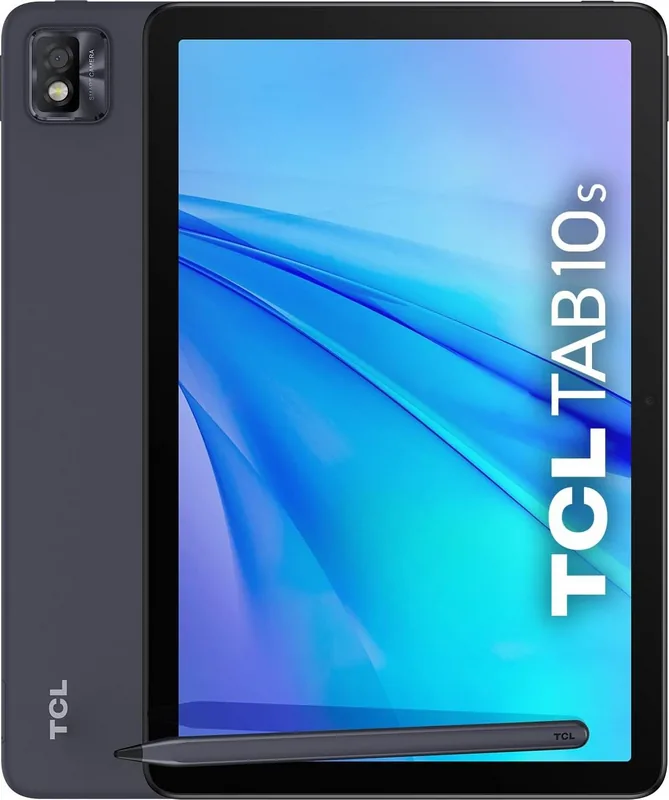
One of the standout features is the large 10-inch display with 1920 by 1200 resolution. The Full HD screen brings content to life with vibrant colors and sharp details. The design accommodates a comfortable grip while housing essential connectivity ports. You will find a USB Type C port for charging and data transfer, alongside headphone jacks for audio output. The rear camera captures quality images at 8 megapixels, while the front lens supports 5 megapixels for video calls. This hardware foundation allows for versatile usage without heavy bulk.
Performance and Battery Life
Powering this device is a MediaTek MT8768 processor paired with 3GB of RAM and 32GB of internal storage. While 32GB may seem modest, the inclusion of a microSD memory card slot allows for significant expansion to suit media storage needs. Users should consult resources for optimal performance tips. An 8000mAh battery powers the tablet for extended periods, reducing the frequency of charging sessions. Charging via the provided charger ensures energy is replenished efficiently, though complete initial charging is recommended to calibrate the battery indicator accurately. The USB port also facilitates data transfer between the tablet and computer systems for seamless data management.
Connectivity and Features
Connectivity options include Wi-Fi standards a/b/g/n/ac and Bluetooth 5.0 for seamless pairing with accessories. The tablet supports GPS for navigation applications and mobile networks for internet access on the go. Security features allow users to set screen locks, patterns, or PINs. Smart Manager optimizes the system to protect against threats and preserve battery levels automatically. Additionally, the Clock application offers world clocks, alarms, and timers for managing daily schedules effectively.
Applications and Usability
Pre-installed Google applications significantly enhance productivity. You can surf the internet using Chrome, manage emails with Gmail, or map your travels with Maps. The Play Store serves as the official hub to download and install new applications seamlessly. For entertainment, YouTube allows you to stream videos and music videos almost instantly. Duo provides a platform for video chats with verified phone numbers. The Settings menu offers deep customization for network, Bluetooth, display, and privacy settings to tailor the experience to your preferences.
Conclusion and Guidance
Finding the right setup guide can help you maximize your investment. The detailed instructions within the TCL Tab 10s Manual provide step-by-step guidance for initial setup, application management, and troubleshooting common issues. From adjusting network settings to calibrating sound, this interface is intuitive. With features like Firmware Over The Air upgrades, keeping software current is effortless. The tablet serves as a versatile companion for work and leisure, combining utility with modern standards. Always ensure you follow proper care instructions to maintain battery health and functionality. Regular maintenance ensures longevity and optimal performance over time.
Search for 67,706 Manuals online


Type-in Brand or Model