
TCL MTRO100BT Manual
PDF manual · 12 Pages
English



Quick check
Incorrect answer, please try again.
Chat with your TCL MTRO100BT manual using AI
Get instant AI answers from your TCL MTRO100BT manual
Ask anything about the TCL MTRO100BT. Answers come from this manual, with the pages they are based on.
Ask a Question
Do you recommend MTRO100BT?
Yes NoFrequently Asked Questions
Press and hold the power button for about 2 seconds to power on. If they do not turn on, the battery is likely low. Charge the headphones using the supplied micro USB cable, and use a certified 5V USB adapter. During charging, the LED turns white and turns off when fully charged.
Is this answer helpful?
Make sure your smartphone is turned on first and that Bluetooth is enabled before powering on the headphones. The headphones reconnect automatically to the last connected device, but if you power on in the wrong order you may need to reconnect manually from your phone.
Is this answer helpful?
First, charge the headphones if the battery is low. Next, keep the phone within Bluetooth operating range and reduce interference by removing unnecessary nearby Bluetooth devices. If needed, remove the headphones from the phone's pairing list and pair again from scratch.
Is this answer helpful?
Follow the manual pairing steps and connect manually again. Enter pairing mode by pressing and holding until the blue and white LED flashes alternately, then select TCL MTRO100BT on your phone and use the pairing password 0000 if requested.
Is this answer helpful?
Check that your phone is actively set to route music to the headphones. After connecting, select the audio output for Bluetooth headphones on your smartphone, then start playback again. If you are unsure, consult your phone's audio output settings.
Is this answer helpful?
Crackling usually comes from distance or connection stability. Ensure your phone is within Bluetooth range and reduce obstacles between the devices. If your phone does not support the needed Bluetooth profiles, audio quality may suffer.
Is this answer helpful?
Follow your local waste regulations for electronic products. The integrated rechargeable battery should not be treated as normal household waste. For recycling guidance, use TCL's support or recycling references provided in the materials.
Is this answer helpful?
Advantages and Disadvantages
Advantages

- Replaceable earcaps (including M size) help achieve a better in-ear fit for comfort and stability.
- Easy wireless control for music and calls, including play/pause, skip, answer, hang up, and mute.
- Voice assistant support for Siri and Google Assistant, activated directly from the headphones.
- Auto reconnection to the last paired smartphone or Bluetooth device for faster listening.
Disadvantages

- First-time charging requires about 5 hours, which is longer than many modern earbuds.
- Charging uses micro USB rather than USB-C.
- Limited to saving up to 8 connected devices; connecting more replaces the earliest one.
- No water-resistance rating is stated; exposure to splashing or dripping should be avoided.
Product Specification
Design
Earphones (In-Ear)
Style
ear-hookless, neckband
Acoustic design
closed
Microphone
Cable microphone
Wireless
Bluetooth 5.0
Cable
Flat cable
Control
3-button remote control
Battery life
18h, 130h (Standby)
Battery
USB Micro-B charging port, 2h charging time, Quick charge function (15min for 3h operating time)
Frequency range
10Hz-22kHz
Impedance
16Ω
Sensitivity
107dB
Driver
0.34 in
Weight
0.04 lb
Product Description
TCL MTRO100BT Manual: Wireless Comfort, Clear Calls, and Smart Control
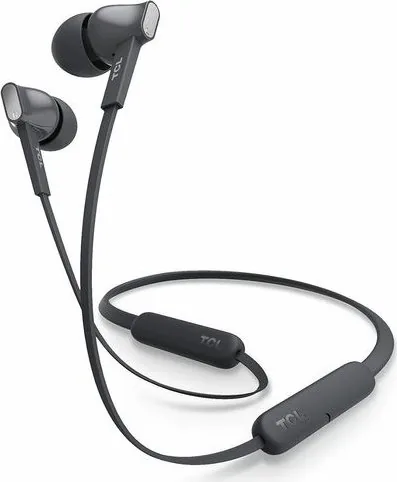
The TCL MTRO100BT are compact wireless in-ear headphones designed for everyday listening and hands-free calling. Once paired, they deliver wireless music and phone conversations with straightforward controls and voice assistant support, helping you move between listening and calls without reaching for your phone.
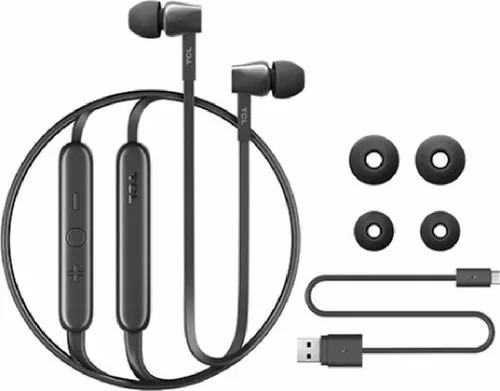
Inside the box, you get the TCL MTRO100BT headphones with M-size earcaps, three pairs of replaceable earcaps for a better fit, a USB charging cable (micro USB), and quick-start materials. The headphone controls are built for quick use: you can raise or lower volume, skip tracks, play or pause, and manage calls with dedicated button actions.
Setup and charging that make sense
Before the first session, charge the battery for about 5 hours to reach optimum capacity. After that, a normal charge typically takes around 2 hours. During charging, the LED indicator turns white and switches off when the battery is fully charged. For safety, only use a certified 5V USB adapter, and avoid exposing the battery to excessive heat.
Pairing and connection
Pairing is manual at first use. Press and hold the main button for around 5 seconds until the blue and white LED flashes alternately. On your phone, enable Bluetooth, select TCL MTRO100BT, and enter the pairing password if prompted (0000). The headphones can remember up to 8 previously connected devices, and when you power them on, they reconnect automatically to the last device.
Music, voice assistant, and calls
Music control is designed to be simple: use the buttons to skip forward, skip back, and play or pause. For voice assistance, you can activate Siri or Google Assistant with a long press, then speak through the built-in microphone. Call functions include mute/unmute, answer/hang up, reject incoming calls, and switch between callers. You can also change the voice prompt language (English or Mandarin Chinese) using a power-on button combination.
Notes for everyday use
- The headphones are not intended to be submerged; avoid splashing and dripping.
- If they fail to connect within 5 minutes, they switch off automatically to save battery.
- For best performance, keep your phone within Bluetooth range to reduce crackling or audio dropouts.
Pros and cons (based on the provided information)
Pros
- Replaceable earcaps for improved comfort and fit
- Supports music control and call control from the headphones
- Voice assistant support (Siri and Google Assistant)
- Auto-reconnect to the last connected device
Cons
- Uses micro USB charging (not USB-C)
- First-time charging takes about 5 hours
- Limited device memory (up to 8 paired devices)
- No explicit water-resistance rating; avoid water exposure
Key results
- Fast day-to-day control for music playback, volume, and track skipping
- Reliable pairing workflow with manual first-time setup and auto reconnection
- Hands-free calling with microphone mute, answer, hang up, and call switching
- Voice assistant support with selectable English or Mandarin Chinese prompts
Search for 67,706 Manuals online


Type-in Brand or Model