
TCL Moveaudio S600 Manual
PDF manual · 17 Pages
English



Quick check
Incorrect answer, please try again.
Chat with your TCL Moveaudio S600 manual using AI
Get instant AI answers from your TCL Moveaudio S600 manual
Ask anything about the TCL Moveaudio S600. Answers come from this manual, with the pages they are based on.
Ask a Question
Do you recommend Moveaudio S600?
Yes NoFrequently Asked Questions
Open the charging case, ensure earbuds are charged, then use Google Fast Pair (Android 6.0+ with Play Services) or enable Bluetooth on your device and select MOVEAUDIO S600. For manual pairing, press and hold the case button for 3 seconds to enter pairing mode.
Is this answer helpful?
Long-press the touch area for about 3 seconds to toggle between Noise Cancelling, Transparency, and Off modes. You can also change modes in the TCL Connect app after pairing the earbuds with your phone.
Is this answer helpful?
Charge both earbuds fully, ensure they are seated correctly in the case, and reconnect them. If one remains silent, turn earbuds off and on, reset them by holding the case button for 10 seconds, and re-pair. Contact support if issue persists.
Is this answer helpful?
Press the case status button to view LED charge status (green ≥50%, amber <50%). Remove an earbud and place it back in the case to see its LED flash indicating its battery level. The TCL Connect app also shows detailed battery levels when paired.
Is this answer helpful?
A normal full charge takes about 2 hours after the first charge. Use the supplied USB-C cable and a certified USB adapter providing 5V and at least 0.5A. Fast-charge short sessions can provide significant playback quickly.
Is this answer helpful?
Some devices or apps introduce latency when streaming Bluetooth audio. This can cause visible audio-video sync delays. Try restarting the app/device, reducing distance or interference, or checking for firmware updates via the TCL Connect app.
Is this answer helpful?
Place both earbuds in the charging case with the lid open, then press and hold the case button for about 10 seconds. The case LED will flash amber three times; the earbuds will clear pairing data and re-enter pairing mode.
Is this answer helpful?
Advantages and Disadvantages
Advantages

- Active Noise Cancellation with Noise Cancelling, Transparency, and Off modes for flexible listening.
- Automatic on/off and wearing detection pause/resume for seamless hands-free use.
- TCL Connect app support for firmware updates, ANC control, and battery monitoring.
- Google Fast Pair support for quick Android setup and manual pairing option for other devices.
- USB-C charging case with quick-charge capability and clear LED battery indicators.
Disadvantages

- Charging case is not waterproof — must dry earbuds thoroughly before docking.
- No true multipoint connection; only one device active at a time.
- ANC can reduce battery life; recommended to disable when not needed.
- Occasional audio sync lag with video/games depending on device and app.
- May require fitting different ear tip sizes to achieve optimal ANC performance.
Product Specification
Design
Earbuds (In-Ear)
Form Factor
True Wireless, without ear hooks
Acoustic design
closed
Microphone
integrated
Wireless
Bluetooth 5.0, AAC
Control
Touch Control, Auto-Pause/Play
Battery life
6.2h (with ANC), 8h (without ANC), 32h (with charging case)
Battery
USB-C charging port, Charging case, wireless charging (Qi)
Driver
0.39 in
Features
active noise cancellation (ANC), Ambient Mode, water resistant (IP54)
Weight
0.12 lb
Product Description
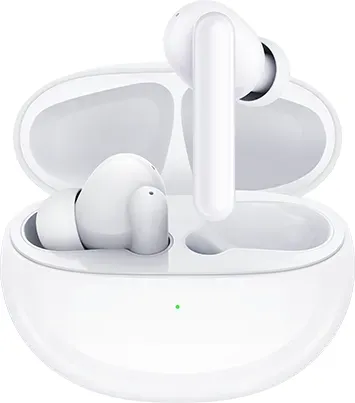
TCL Moveaudio S600 — Comfortable ANC True Wireless Earbuds
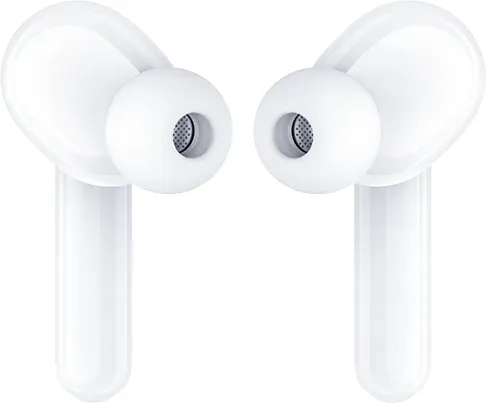
The TCL Moveaudio S600 delivers comfortable, feature-rich true wireless listening with active noise cancellation (ANC), intuitive touch controls, and reliable Bluetooth connectivity. Designed for everyday use, the Moveaudio S600 aims to balance sound quality, convenience, and battery life in a compact package. The earbuds come with a USB-C charging case, multiple ear tip sizes, and an app (TCL Connect) for pairing, firmware updates, and ANC mode control.
The earbuds power on automatically when the case is opened and off when closed, and they support Google Fast Pair for quick Android setup. Manual pairing is straightforward: open the case and hold the case button to enter pairing mode. The headphones remember up to 10 devices and reconnect automatically to the last paired device when both are on and in range.
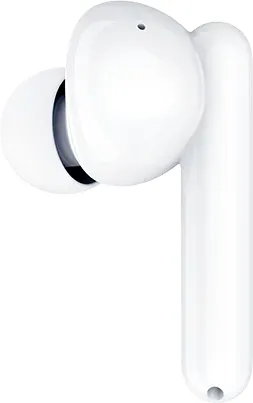
Each earbud features a touch control area for music playback, calls, and voice assistant activation. Tap and multi-tap gestures let you play/pause, skip tracks, answer or reject calls, and trigger Siri or Google Assistant. Wearing detection pauses playback when an earbud is removed and resumes when replaced (configurable in the TCL Connect app).
ANC is enabled by default and offers Noise Cancelling, Transparency, and Off modes. Long-press gestures toggle modes, or you can switch modes inside the TCL Connect app. ANC improves listening comfort in noisy environments but is recommended to be turned off to preserve battery when not needed. Firmware updates are delivered via the app when the earbuds are powered on and paired.
Charging is handled through the USB-C charging case. Earbuds charge automatically when seated in the case; LED indicators show charge status for both case and earbuds. A quick charge feature is noted (short fast-charge periods yield significant playback time), and battery-level feedback appears via LEDs and in the app. The product includes safety and battery handling guidance, water-resistance for earbuds (not the case), and instructions for responsible disposal and battery removal through authorized service centers.
Overall, the TCL Moveaudio S600 targets users who want straightforward setup, app-managed features, ANC for commuting or travel, and easy daily use with reliable touch controls and wearing detection.
Notes
- ANC is on by default; disable via touch long-press or the app to save battery.
- Use supplied USB-C cable and certified adapter (5V, ≥0.5A) for charging.
- Earbuds are water-resistant to splashes; charging case is not waterproof.
- Consult the app for firmware updates and battery levels.
Search for 67,706 Manuals online


Type-in Brand or Model