
TCL 10 TABMAX Manual
PDF manual · 59 Pages
English



Quick check
Incorrect answer, please try again.
Chat with your TCL 10 TABMAX manual using AI
Get instant AI answers from your TCL 10 TABMAX manual
Ask anything about the TCL 10 TABMAX. Answers come from this manual, with the pages they are based on.
Ask a Question
Do you recommend 10 TABMAX?
Yes NoFrequently Asked Questions
The TCL 10 TABMAX features a 1200×2000 FHD display and an 8000mAh battery designed for extended multimedia playback and general daily use. The battery supports typical usage scenarios and benefits from power-saving settings in System > Battery.
Is this answer helpful?
The tablet ships with 64GB of internal storage and 4GB of RAM. Storage can be expanded via a microSD card, subject to market availability, allowing more room for media, apps and documents.
Is this answer helpful?
Connectivity includes Wi‑Fi 802.11 a/b/g/n/ac, Bluetooth 5.0, GPS, USB Type‑C for charging and data transfer, and a 3.5mm audio jack. The tablet also supports tethering and casting over Wi‑Fi.
Is this answer helpful?
Yes. The tablet includes Google Duo for video calls, Gmail and Chrome for email and browsing, and Calendar and Clock for productivity. The 8MP front camera and the processor support everyday video conferencing and multitasking needs.
Is this answer helpful?
Software updates are handled via FOTA (Firmware Over The Air). Go to Settings > System > System Update and tap Check for updates. Keep default storage and follow on-screen instructions while downloading and installing updates.
Is this answer helpful?
Try charging for at least 20 minutes with the original charger, verify cable and port condition, and restart the device. If frozen, hold the Power key to reset. As a last resort, perform a factory reset via Recovery (Power + Volume Up) after backing up data.
Is this answer helpful?
Yes. Digital Wellbeing & parental controls are included in Settings, enabling app timers, usage monitoring and parental restrictions to manage screen time and app access for children.
Is this answer helpful?
Advantages and Disadvantages
Advantages

- Large 1200×2000 FHD display for crisp media playback and reading.
- Long 8000mAh battery enables extended usage and fewer charges.
- Expandable storage (microSD) plus 64GB internal and 4GB RAM for everyday multitasking.
- Modern connectivity: Wi‑Fi ac, Bluetooth 5.0, GPS and USB Type‑C.
- Comprehensive Android features: Google apps, security, Digital Wellbeing and accessibility.
Disadvantages

- Mid-range MT8788A processor may struggle with heavy gaming or intensive creative apps.
- Weight of 455g is noticeable for long handheld sessions compared with lighter tablets.
- Camera setup (13MP/8MP) suits casual use but won’t replace a dedicated camera.
- microSD availability varies by market; expansion not guaranteed everywhere.
- Android Q base may limit some newer OS features or future updates depending on support.
Product Specification
CPU
MediaTek Helio P22 (MT8768), 4x 2.00GHz (ARM Cortex-A73) + 4x 2.00GHz (ARM Cortex-A53)
RAM
4GB LPDDR4
Storage
64GB Flash
Graphics
ARM Mali-G72 MP3 (iGPU)
Display
10.4", 2000x1200, 224ppi, Multi-Touch, IPS
Ports
1x USB-C 2.0 (480Mb/s, Power connector)
Wireless
Wi-Fi 5 (WLAN 802.11a/b/g/n/ac), Bluetooth 5.0
Card Reader
microSDXC (up to 512GB)
Webcam
8 Megapixel, f/2.0 (front), 13 Megapixel, AF, f/1.8 (rear)
Operating System
Android 10
Battery
Li-Polymer, 8,000mAh
Dimensions
9.76x6.21x0.30in
Special Features
Light sensor, Proximity sensor, Accelerometer, Hall sensor
Note
Different country versions possible.
Product Description
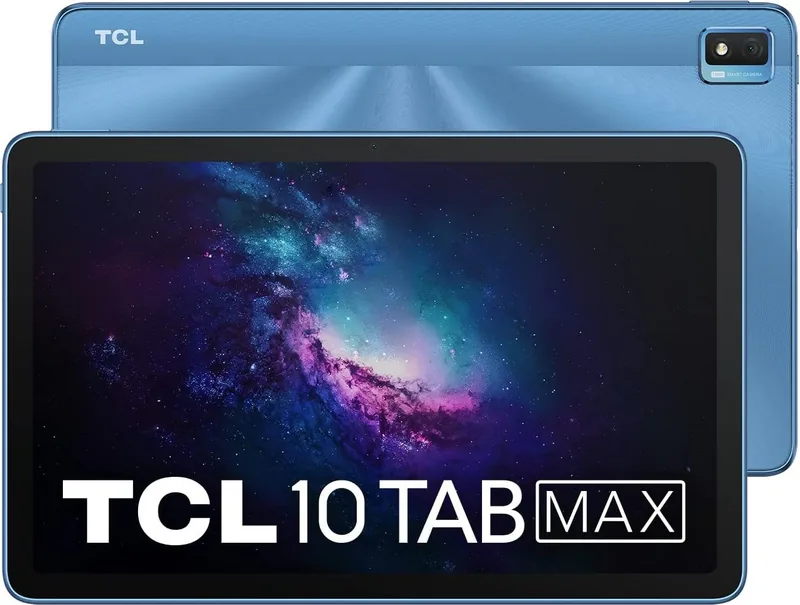
TCL 10 TABMAX — Powerful, Practical Tablet
The TCL 10 TABMAX is a mid-range Android tablet designed for everyday productivity, media consumption, and light creative work. With a roomy 1200×2000 FHD display and an 8000mAh battery, it balances long runtime with clear visuals for streaming, browsing, and reading. The tablet ships with Android Q-based features and essential Google apps preinstalled — Chrome, Gmail, Maps, YouTube, Play Store and Duo — giving users immediate access to browsing, email, navigation, video and video calling.
Under the hood the device uses an MT8788A processor paired with 4GB of RAM and 64GB of internal storage (expandable via microSD), providing smooth multitasking for common apps and straightforward workflows. Cameras include a 13MP rear shooter and an 8MP front camera for video calls and casual photos. Connectivity options cover modern needs: Wi‑Fi 802.11 a/b/g/n/ac, Bluetooth 5.0, GPS, USB Type‑C and a 3.5mm audio jack.
The tablet emphasizes usability with a full set of physical keys and navigation controls (Power, Volume, Home, Back, Recent Apps) and supports common gestures like auto-rotate, pinch-to-zoom, long-press options, drag-and-drop and one-finger zoom in the gallery. The on-screen Gboard offers flexible text input, symbol switching and orientation-aware layout. System settings are comprehensive, including network & internet, VPN and tethering, Bluetooth, display and sound, Smart Manager optimization tools, security options (screen lock, Smart Lock), privacy controls, digital wellbeing and accessibility features.
Built-in utilities like Calendar, Clock (alarms, timer, stopwatch), Calculator and a Support Centre make the tablet suitable for organization and troubleshooting. The Camera and Photos apps provide basic capture and editing tools, batch operations and simple sharing. Firmware updates can be managed via FOTA (System Update) to keep software current.
Practical considerations include a large battery for extended use, recommended charging and power-saving best practices, and a troubleshooting section covering common issues such as boot loops, charging problems, connectivity and factory resets. Physical dimensions (247.8 × 157.56 × 7.65 mm) and a 455 g weight make it portable enough for daily carry while still feeling substantial.
Notes:
- Expandable storage via microSD depends on market availability.
- Specifications may change; consult support resources for the latest info.
- Use original charging accessories where possible to ensure safety and performance.
Search for 67,706 Manuals online


Type-in Brand or Model