
Targus Ultraslim Chill Mat AWE69EU Manual
PDF manual · 29 Pages
English



Quick check
Incorrect answer, please try again.
Chat with your Targus Ultraslim Chill Mat AWE69EU manual using AI
Get instant AI answers from your Targus Ultraslim Chill Mat AWE69EU manual
Ask anything about the Targus Ultraslim Chill Mat AWE69EU. Answers come from this manual, with the pages they are based on.
Ask a Question
Do you recommend Ultraslim Chill Mat AWE69EU?
Yes NoDo you recommend Ultraslim Chill Mat AWE69EU?
Yes NoFrequently Asked Questions
The Chill Mat is powered through its USB cable. Connect the cable to an available USB port on the laptop to operate the cooling fans. No separate power adapter is described.
Is this answer helpful?
The stated requirement is a USB 1.1 or USB 2.0 compliant port. Use an available compatible port on the laptop for power.
Is this answer helpful?
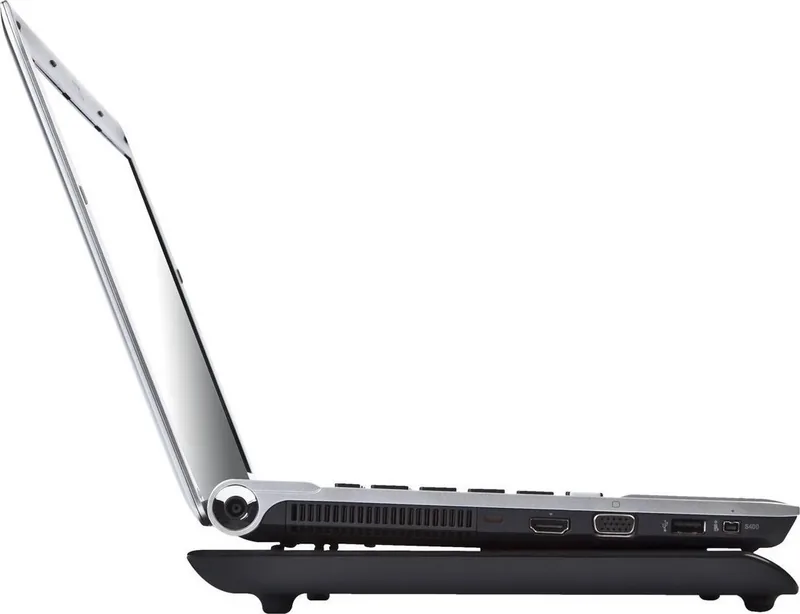
It can be placed on a stable surface such as a table or desk, and it is also intended for lap use. Position the laptop on top of the mat before connecting the USB cable.
Is this answer helpful?
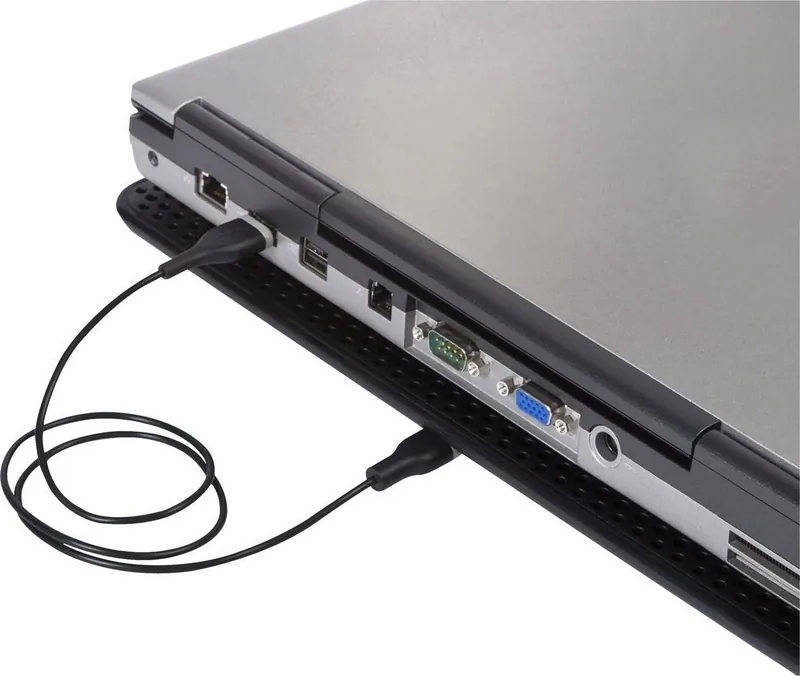
Place the Chill Mat on a suitable surface, position the laptop on the mat, then plug the mat's USB cable into an available laptop USB port. No software installation is mentioned.
Is this answer helpful?
Keep loose clothing, jewelry, and long hair away from the fans during use. This helps prevent possible injury and protects both the cooler and the laptop from damage.
Is this answer helpful?
No. The product information identifies the laptop as not included. The Chill Mat is an accessory designed to be used with a separate notebook computer.
Is this answer helpful?
Advantages and Disadvantages
Advantages

- USB-powered operation avoids the need for a separate power adapter.
- Designed for use on a desk, table, or lap for flexible everyday placement.
- Fan-assisted airflow is intended to support laptop cooling.
- Simple setup: place the laptop on the mat and connect the USB cable.
- Compatible with USB 1.1 and USB 2.0 compliant ports.
Disadvantages

- Requires an available USB port on the laptop while in use.
- Loose clothing, jewelry, and long hair must be kept away from the fans.
- Cooling performance can vary by laptop design and workload.
- The source material does not specify supported laptop sizes or fan speed.
- Laptop is not included.
Product Specification
Type
Laptop cooler
Compatibility
up to 16 in
Dimensions
14.57 x 0.98 x 10.63 in
Weight
14.46 oz
Product Description
Targus Ultraslim Laptop Chill Mat Notebook Cooler - Read, Download & Print Free
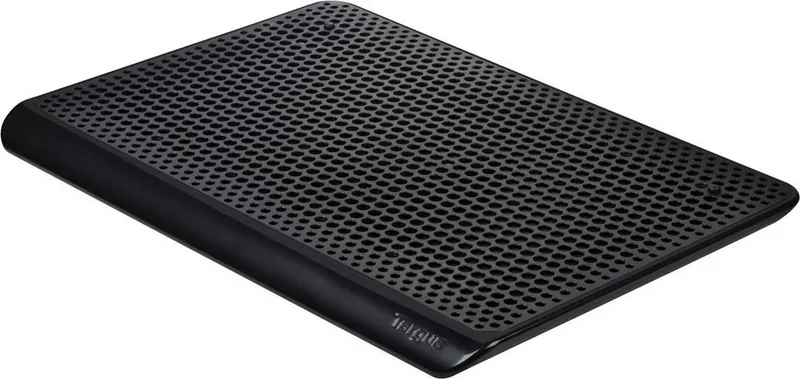
The Targus Ultraslim Laptop Chill Mat Notebook Cooler is a practical accessory for people who want a more comfortable laptop setup at home, at work, or while traveling. Designed to sit beneath a notebook, this cooling mat helps create a dedicated surface between the computer and the desk, table, or lap. Its straightforward USB-powered operation makes it easy to add extra airflow without requiring an external power adapter.
USB-Powered Cooling Support
The Chill Mat uses USB-powered fans positioned to support laptop cooling. Connect its integrated USB cable to an available USB 1.1 or USB 2.0 compatible port on the notebook, place the laptop on top, and the mat is ready to use. This simple connection approach keeps the setup tidy and makes the cooler convenient for mobile users who prefer not to carry additional charging equipment.
Flexible Placement for Daily Computing
Whether you are answering emails at a desk, watching content at a table, or working from a sofa, the Targus Chill Mat can be placed on a stable surface or used on the lap. The raised, separate platform can help make long laptop sessions feel more organized while the fans provide active airflow beneath the device. It is a useful companion for users whose notebooks tend to become warm during everyday tasks.
The cooler is especially suited to people who value an uncomplicated accessory. There is no software to install, no complex configuration, and no separate switch sequence described for operation. Simply set the mat down, position the laptop securely, and plug in the USB cable. The laptop remains the central part of the setup, while the Chill Mat provides supportive cooling from below.
Straightforward Care and Safe Use
For the best experience, keep the fan area clear while the mat is operating. Loose clothing, jewelry, and long hair should stay away from the moving fans to reduce the risk of injury or damage. Place the cooler on a level, stable surface and ensure the USB cable reaches the laptop port without being stretched or pinched.
Notes
- A laptop is required and is not included with the Chill Mat.
- The mat requires an available USB 1.1 or USB 2.0 compatible port.
- Product features and specifications may change without notice.
- Check the manufacturer's warranty terms for regional coverage and details.
For a compact, USB-connected way to support a cooler and more comfortable notebook workspace, the Targus Ultraslim Laptop Chill Mat Notebook Cooler offers a simple, travel-friendly solution.
Search for 67,732 Manuals online


Type-in Brand or Model