

Targus DOCK190EUZ Manual
PDF manual · 60 Pages
English



Quick check
Incorrect answer, please try again.
Chat with your Targus DOCK190EUZ manual using AI
Get instant AI answers from your Targus DOCK190EUZ manual
Ask anything about the Targus DOCK190EUZ. Answers come from this manual, with the pages they are based on.
Ask a Question
Do you recommend DOCK190EUZ?
Yes NoFrequently Asked Questions
The docking station supports DisplayPort 1.2 and HDMI 2.0 display connections, with listed resolutions up to 4096 x 2160. Connected screens can be configured to mirror the primary display or extend the desktop.
Is this answer helpful?
Yes, the USB-C upstream connection supports Power Delivery 2.0 Profile 4 with up to 60W charging. Your host computer must support USB-C Power Delivery 2.0 for charging to work.
Is this answer helpful?
Yes. The package includes a tethered USB-C to USB-A adapter for host devices without a USB-C connection. This gives compatible USB-A laptops another connection option.
Is this answer helpful?
The dock includes four USB 3.0 downstream ports and one USB-C downstream data port. One marked USB 3.0 port supports BC 1.2 and iOS device charging up to 2.4A.
Is this answer helpful?
No. The downstream USB-C port is specified for USB 3.0 data transfer only. Laptop charging is handled through the USB-C upstream port when the host supports Power Delivery 2.0.
Is this answer helpful?
Listed support includes Windows 7, 8, 8.1, and 10, macOS X 10.8 or later, Android 5.0 or later, Chromebooks, and Ubuntu 14.04.x LTS or 16.04 LTS on x86 platforms.
Is this answer helpful?
Advantages and Disadvantages
Advantages

- Supports DisplayPort and HDMI connections with resolutions up to 4096 x 2160.
- Provides up to 60W USB-C Power Delivery for compatible host computers.
- Includes four USB 3.0 ports, Gigabit Ethernet, audio, and a security lock slot.
- Compatible with USB-C, Thunderbolt 3, and USB-A hosts using the included adapter.
- Supports Windows, macOS, Android, Chromebooks, and selected Ubuntu systems.
Disadvantages

- Host device must support Power Delivery 2.0 to receive charging from the dock.
- The downstream USB-C port is for data transfer only and does not provide charging.
- DisplayLink software may be required for display, audio, and Ethernet functionality.
- Full performance may require updated display adapter and USB 3.0 drivers.
- Operating system support is limited to the versions specified by Targus.
Product Specification
Type
LAN adapter, USB hub, video adapter
Form factor
1x external, wired
Connection
1x USB-C 3.0 (socket, 5 Gb/s, USB-C with DisplayPort 1.2, USB PD 2.0 max. 60 W), 1x USB-C 3.0 (plug via cable, 5 Gb/s)
Ports
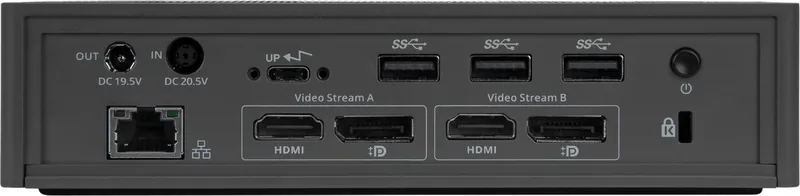
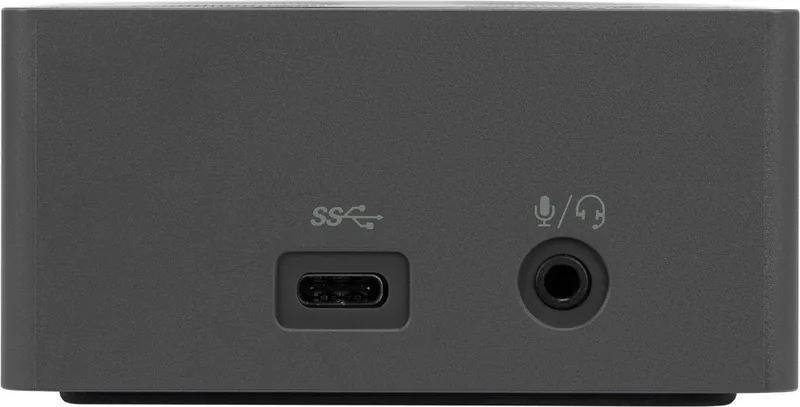
1x RJ-45, 1x USB-C 3.0 (socket), 4x USB-A 3.0 (socket), 2x HDMI 2.0 (socket) or 2x DisplayPort 1.2 (socket), 1x audio jack (socket)
Transfer
1x RJ-45 (10/100/1000Base-T), 1x USB-C 3.0 (socket, 5 Gb/s), 1x USB-A 3.0 (socket, 5 Gb/s, USB BC 1.2, 5 V/1.5 A/7.5 W), 3x USB-A 3.0 (socket, 5 Gb/s), 2x HDMI 2.0 (socket, max. 2x 4096x2160@60 Hz) or 2x DisplayPort 1.2 (socket, max. 2x 4096x2160@60 Hz), 1x audio jack (socket, 0.14 in)
Power supply
Power not supplied via connection, DC input (1x barrel connector, 20.5 V/5.8 A/120 W), external power adapter required and included
Chipset
DisplayLink DL-6950 (video adapter)
Dimensions
8.86 x 3.15 x 7.09 in (W x H x D)
Weight
2.43 lb
Case color
black
Compatibility
universal
Special features
on/off switch, USB-A adapter, security lock (Kensington Security Slot)
Manufacturer warranty
three years
USB notation
Link
Product Description
Targus Universal DV4K Docking Station - Read, Download & Print Free
The Targus Universal DV4K Docking Station is designed to turn a compatible laptop, desktop, Chromebook, or mobile device into a better connected workspace. With USB-C and Thunderbolt 3 connectivity, it brings display, network, audio, charging, and peripheral connections together through one central hub. The included USB-C to USB-A adapter also helps support systems that do not have a USB-C host connection.
Dual 4K Display Capability
This dock supports external displays through DisplayPort 1.2 and HDMI 2.0 connections, with resolutions up to 4096 x 2160. It is a practical choice for users who need more room for spreadsheets, design tools, video calls, research, or multiple applications. Depending on the setup, connected monitors can mirror the primary display or extend the desktop for a wider and more organized workflow.
One Dock for Everyday Peripherals
The Targus Universal DV4K Docking Station includes four USB 3.0 downstream ports for accessories such as keyboards, mice, storage drives, webcams, and other peripherals. One marked USB port supports BC 1.2 and iOS charging up to 2.4A. A dedicated downstream USB-C port is available for USB 3.0 data transfers.
For stable wired connectivity, the dock includes Gigabit Ethernet. It also provides a 3.5 mm audio input/output connection for a headset, making it suitable for home offices and shared workspaces. An LED power indicator, power button, and security lock slot add useful everyday control and protection.
Charging and Broad Compatibility
Through its USB-C upstream port, the dock supports Power Delivery 2.0 Profile 4 and can provide up to 60W charging to compatible host computers. A 120W AC power adapter is included to power the dock and attached equipment. Charging performance depends on the host device supporting USB-C Power Delivery 2.0.
The dock supports Windows, macOS, Android, ChromeOS, and selected Ubuntu versions. DisplayLink software may be required for display, audio, and Ethernet functions on certain systems. Updating display adapter and USB drivers can help achieve the best performance on Windows.
Notes
- Confirm that your host device supports USB-C or Thunderbolt 3.
- USB-C charging is limited to 60W maximum.
- The downstream USB-C port supports data transfer only.
- Check DisplayLink software requirements before configuring external displays.
Search for 67,732 Manuals online


Type-in Brand or Model