


Targus ACH214 Manual
PDF manual · 42 Pages
English



Quick check
Incorrect answer, please try again.
Chat with your Targus ACH214 manual using AI
Get instant AI answers from your Targus ACH214 manual
Ask anything about the Targus ACH214. Answers come from this manual, with the pages they are based on.
Ask a Question
Do you recommend ACH214?
Yes NoFrequently Asked Questions
This hub allows you to connect up to four USB 2.0 devices simultaneously, such as mice, keyboards, printers, and flash drives, to expand your computer's connectivity options without using additional ports.
Is this answer helpful?
No, the hub is a Plug and Play device. It will automatically operate when the USB cord is connected to the computer without requiring additional software installation or driver setup.
Is this answer helpful?
Yes, for easy portability, the cable wraps around and can be stored inside the hub itself. This feature ensures the cable does not get lost or damaged when carrying the device.
Is this answer helpful?
The hub supports Microsoft Windows from version 2000 through 10. It is also compatible with Mac OS X versions 10.12.4 through 10.13.6 for Apple users seeking connectivity expansion.
Is this answer helpful?
No, the hub draws power directly from the USB interface of the computer. You do not need a separate power adapter, making it convenient for travel and desk setups.
Is this answer helpful?
Yes, the product comes with a two-year limited warranty from Targus. This ensures quality assurance and provides support for customers in case of defects within the warranty period.
Is this answer helpful?
Yes, you can connect most standard USB 2.0 peripherals like mice, keyboards, printers, and flash drives. However, devices with high power requirements may not function correctly without external power.
Is this answer helpful?
Advantages and Disadvantages
Advantages

- Easy Plug and Play installation without drivers
- Compact design with cable storage for portability
- Connects up to four USB 2.0 devices
- Wide compatibility with Windows and Mac OS
- Built-in power with no extra adapter needed
Disadvantages

- Limited to USB 2.0 speed standards
- No external power supply for high power devices
- Cable storage may wear over extended use
- Not suitable for high bandwidth peripherals
- OS support lists specific older versions
Product Specification
Type
USB Hub
Form Factor
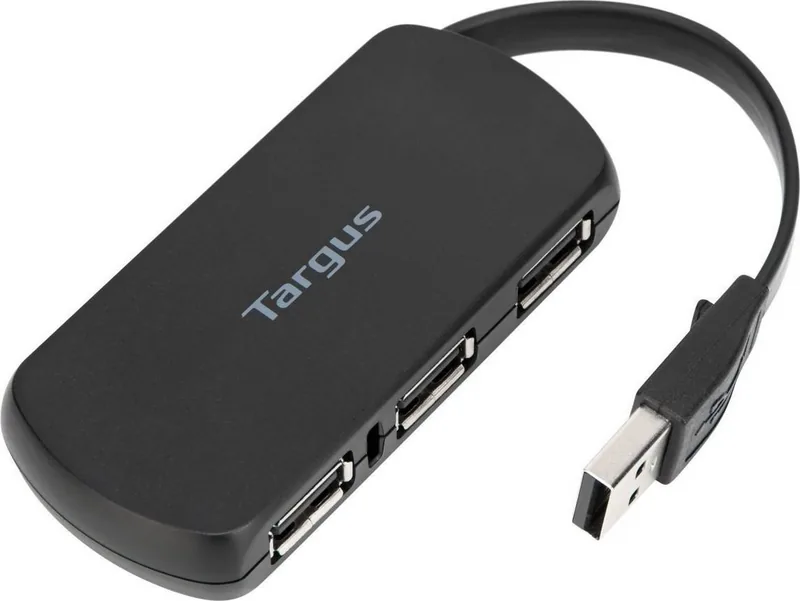
1x External Wired (Connection cable not detachable)
Interface
1x USB-A 2.0 (Plug via cable, 480Mb/s)
Ports
4x USB-A 2.0 (Ports)
Data Transfer
4x USB-A 2.0 (Ports, 480Mb/s)
Power Supply
Power supply only via interface
Dimensions
3.15x0.39x1.18in (WxHxD)
Weight
1.06oz
Casing Color
Black
Compatibility
Universal
Manufacturer Warranty
2 Years
USB Label
Left
Product Description
Enhancing Your Connectivity with the Targus USB Hub
In today's digital workspace, expanding your computer's peripheral capabilities is often essential for productivity. The Targus 4x USB-A 2.0 USB-Hub offers a practical solution for users who need to connect multiple devices simultaneously without constantly swapping cables. This compact hub is designed to simplify your setup while maintaining high reliability across various platforms. It serves as an excellent accessory for anyone looking to modernize their workstation or laptop configuration efficiently.
Portability and Design Excellence
One of the standout features of this device is its thoughtful design regarding portability. The cable is engineered to wrap around the hub body and store neatly within the unit itself. This means you do not need to pack an extra wire when traveling or moving between desks. The compact form factor ensures it fits easily into laptop bags or desk drawers. This storage mechanism protects the cable from damage when the device is not in use.
Performance and Broad Compatibility
The hub supports up to four USB 2.0 devices at once through a single connection. This makes it ideal for connecting standard peripherals such as mice, keyboards, printers, and flash drives. It operates on a plug-and-play basis, meaning no complex driver installations are required. Simply connect the USB cord to your computer, and it will automatically function. This reduces downtime associated with software configuration. Performance remains consistent under normal usage conditions.
It is compatible with a wide range of operating systems including Microsoft Windows (R) 2000 through 10. For Mac users, it supports Mac OS (R) X versions 10.12.4 to 10.13.6. This broad compatibility ensures that the device works seamlessly in most home and office environments. The hub draws power directly from the USB port, eliminating the need for a separate power adapter.
Reliable Support and Warranty
Targus stands behind this product with a two-year limited warranty. This commitment assures customers of the build quality and durability. If you encounter any technical questions, Targus provides global support resources to assist with setup or troubleshooting. The product also adheres to FCC rules for digital devices and EU directives for electronic components, ensuring safety and regulatory compliance.
Installation and Usage
Setting up the hub is straightforward due to its hardware design. There are no software requirements or installation discs needed. Users can simply plug the unit into an available USB port. The indicator lights confirm power and data transmission instantly. This ease of use supports quick deployment in dynamic workspaces.
Summary and Conclusion
In summary, integrating this hub into your workflow increases efficiency by giving you immediate access to additional ports. It is a smart investment for anyone needing to expand their USB connectivity without complexity. The device allows for seamless expansion while maintaining a low profile. It is a reliable choice for daily tasks. Whether for work or personal projects, this hub provides a stable connection point for your essential peripherals.
Search for 67,732 Manuals online


Type-in Brand or Model