Manual.ly Logo

Sygonix Wireless Room Thermostat with Display Manual

0.0 · 0 Ratings

PDF manual · 5 Pages

English

M: qwen/qwen3.5-flash-20260224
page

/ 5

Loading...
7c7f20df1446ce4a3bb94bf07133e537107c page 1
1
Please handle the product carefully. Jolts, impacts or a fall even from a low height can
damage the product.
Consult a technician when in doubt about the operation, safety or connection of the ap-
pliance.
If you have questions which remain unanswered by these operating instructions, contact
our technical support service or other technical personnel.
5.2 Installation/connection
Caution, safety hazard!
The product should only be installed and connected by people with relevant
electrical knowledge and experience! *)
If the product is not installed properly, you risk:
your own life;
the life of the person using the electrical device.
If the product is not installed properly, you risk severe damage to property, e.g. due to re. You
face the risk of personal liability for personal injury and material damage.
Always consult an electrician!
*) Technical knowledge required to perform the installation!
The following specialist knowledge is required for installation:
The “Five Safety Rules”: Disconnect from the mains; protect against accidental switch-on;
ensure there is no voltage; earth and short-circuit; cover or protect adjacent live parts.
Use of suitable tools, measuring devices and personal protective equipment, where neces-
sary.
Analysis of measurement results.
Use of electrical installation materials to meet the requirements for safe disconnection from
the power supply.
IP protection ratings.
Installation of electrical installation materials.
Type of power supply (TN system, IT system, TT system) and the corresponding con-
nection criteria (classic earthing, protective earthing, necessary additional measures, etc.)
If you do not have sufcient knowledge in all of the aforementioned topics, contact a specialist
and do not attempt to install or connect the product yourself.
Further warnings:
The construction of the product corresponds to the protection-class II (double or re-
inforced isolation). Ensure that the insulation of the housing is neither damaged nor
destroyed.
Before installing the switching module, disconnect all poles from the mains voltage
using a residual current device (RCD). There must be an appropriately rated fuse or
circuit breaker between the RCD and the product.
The device must be de-energised during installation and connection of the switching
module. Furthermore, turn off the automatic circuit breaker and the RCD to disconnect
all poles from the mains voltage. Secure it against unauthorised reconnection, e.g.
with a warning sign. Then check to ensure there is no voltage with a suitable measu-
ring device (e.g. a two-pole voltage tester).
Never connect the product to the power supply immediately after it has been transfer-
red from a cold room into a warm one (e.g., during transport). The condensation that
forms may destroy the device. Moreover, there is danger of electric shock!
Always let the product reach room temperature rst. Wait until the condensation has
evaporated. In some cases, this may take several hours. Only once the condensation
has evaporated should it be installed, connected to the power supply and put into use.
Do not use the product in rooms with adverse environmental conditions, where com-
bustible gases, vapours or dust are or may be present! This may cause an explosion!
5.3 Protection class
This device has an IP20 ingress protection rating and is suitable for dry rooms.
There is protection against touching live components and ingress from foreign particles
>12.5 mm.
There is no protection against water, combustible gases, and vapours.
Operating instructions
Wireless heating thermostat
Item no. 2735095
1 Intended use
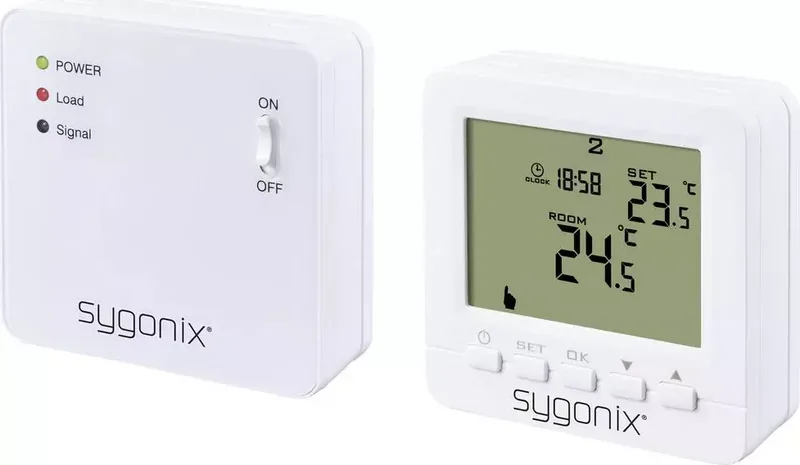
This product is a wireless heating thermostat intended for temperature control and can be
integrated into an electric heating system, such as oor heating or panel radiators.
You can schedule the room temperature precisely to the hour to suit your individual needs.
You can programme the room temperature for 7 days in advance. With six programmable time
settings a day, you can reduce your heating costs and adjust the temperature in your home to
your needs. You can save on heating costs when you are on holiday or away on business. The
holiday mode keeps the temperature in your home constant at a preset level.
The wireless heating thermostat is powered by two Mignon batteries (AA). The switching re-
ceiver is connected directly to the mains voltage. You can also connect a consumer operated
via the mains voltage supply to the switching receiver and switch it on or off through tempera-
ture control.
The heating thermostat has a built-in temperature sensor (probe) and allows connecting an
external sensor to the switching module. The product has a button lock feature that prevents
incorrect operation and a permanently installed decoupling capacitor for data backup in the
event of a power failure. This device has an IP20 ingress protection rating and is suitable for
dry rooms and indoor use. Do not use it outdoors. Contact with moisture, e.g. in bathrooms,
must be avoided under all circumstances.
For safety and approval purposes, do not rebuild and/or modify this product. If you use the
product for purposes other than those described above, the product may be damaged. In addi-
tion, improper use can result in short circuits, res, electric shocks or other hazards. Read the
instructions carefully and store them in a safe place. Make this product available to third parties
only together with its operating instructions.
This product complies with the statutory national and European requirements. All company and
product names contained herein are trademarks of their respective owners. All rights reserved.
2 Delivery content
Radio room thermostat
Switching module
4x Screw
Operating instructions
3 Up-to-date operating instructions
Download the latest operating instructions at www.conrad.com/downloads or scan the QR code
shown. Follow the instructions on the website.
4 Description of symbols
This symbol warns of dangerous voltage that can lead to injury from electric shock.
Read the information carefully.
The symbol with the exclamation mark in the triangle indicates important information
in this document. Always read this information carefully.
The product should only be used in dry, indoor locations. It must not get damp or
wet.
The product is designed according to protection Class II (reinforced or double insu-
lation, protective insulation).
Pay attention to the operating instructions!
5 Safety instructions
Read the operating instructions carefully and adhere in particular to the safety
instructions. If you do not heed the safety instructions and information on
proper handling in these operating instructions, we will assume no liability
for any resulting personal injury or property damage. Such cases will also
invalidate the warranty/guarantee.
5.1 General information
This product is not a toy. Keep it out of the reach of children and pets.
Do not leave packaging material lying around carelessly, as it could become a dangerous
plaything for children.
Protect the product from extreme temperatures, direct sunlight, strong jolts, high humidity,
moisture, ammable gases, vapours and solvents.
Do not expose the product to any mechanical stress.
If it is no longer possible to operate the product safely, take it out of operation and protect
it from any accidental use. Safe operation can no longer be guaranteed if the product:
– is visibly damaged,
– is no longer working properly,
– has been stored for extended periods in poor ambient conditions or
– has been subjected to any serious transport-related stress.

Chat with your Sygonix Wireless Room Thermostat with Display manual using AI

Get instant AI answers from your Sygonix Wireless Room Thermostat with Display manual

Ask anything about the Sygonix Wireless Room Thermostat with Display. Answers come from this manual, with the pages they are based on.

Ask a Question

0/1000

Do you recommend Wireless Room Thermostat with Display?

Yes No

Frequently Asked Questions

A

Enter the settings menu using the designated key sequence. Select the weekly program type P1, P2 or P3. Adjust the start times and temperatures for all six daily periods individually. Press the confirm button to save each setting before moving to the next time slot.

Is this answer helpful?

A

Yes, you can connect an external NTC sensor to terminals five and six on the switching module. The internal sensor manages the standard regulation cycle. The external sensor serves primarily as a limit sensor to prevent temperatures from becoming too high.

Is this answer helpful?

A

Battery life varies based on usage frequency and temperature. The display indicates when power is low. Use high quality alkaline AA batteries. The internal capacitor backs up stored data for approximately seven days during a power outage without draining the batteries.

Is this answer helpful?

A

Installation involves electrical wiring which carries risks. It is mandatory to turn off power at the main switch before connecting. Phase and neutral wires must be connected to inputs three and four on the receiver module. Professional assistance is recommended if you lack electrical qualifications.

Is this answer helpful?

A

This feature lowers heating energy usage while you are away. Access it by holding the setting button. Select the number of days for your absence and set a lower frost protection temperature. This prevents freezing without consuming full heating energy.

Is this answer helpful?

A

Yes, you can configure temperature limits in the system settings menu. Use code A8 to set frost protection levels or code AA for high temperature protection depending on the sensor type connected. This prevents the heating from exceeding safe thresholds.

Is this answer helpful?

A

Error code E1 indicates a problem with the internal sensor. First, turn the thermostat power off and then back on. If the error persists, the sensor has likely failed. Contact technical support for further diagnosis or replacement of the unit.

Is this answer helpful?

M: qwen/qwen3.5-flash-20260224

Advantages and Disadvantages

Advantages

  • Wireless control with range up to two hundred meters in ideal conditions
  • Six programmable time slots per day for precise scheduling
  • Built-in backup capacitor preserves settings during power outages
  • Keypad lock feature prevents accidental changes by children
  • Supports external NTC sensor for advanced temperature monitoring
VS

Disadvantages

  • Installation requires certified electrician knowledge and experience
  • Wireless range significantly reduced by walls and metal structures
  • IP20 rating means not suitable for wet rooms like bathrooms
  • Thermostat unit requires AA batteries that need periodic replacement
M: qwen/qwen3.5-flash-20260224

Product Specification

Type

Sensor, Actuator

Standard

Wireless Bus (434MHz)

Function

Heating Control, Temperature

Dimensions

3.39x3.39x1.18 in

Features

IP20, Display, battery-powered (2x AA)

M: qwen/qwen3.5-flash-20260224

Product Description

Discover Comfort with Sygonix Wireless Room Thermostat

Managing your home heating efficiency is crucial for modern living and cost savings. The Sygonix Wireless Room Thermostat with Display offers precise control for your electrical heating systems such as underfloor heating or panel radiators. This device allows you to plan room temperature hour by hour to suit your daily routine. You can set up to six programmable time settings per day across seven days in advance. This flexibility helps optimize heating costs while maintaining absolute comfort inside your apartment. For instance, you can save significant energy when traveling using the vacation mode which keeps temperature constant at a low level to prevent freezing without wasting fuel.

Features and Installation

The unit operates wirelessly with a range of up to two hundred meters in open fields where there are no obstructions. However, internal walls, concrete ceilings, or metal structures may considerably reduce this distance during actual operation. The thermostat runs on two AA batteries while the switching module plugs directly into mains voltage between ninety and two forty volts AC. The switching module capacity allows for up to three thousand watts of resistive load. It includes an internal temperature sensor and supports an external NTC sensor for advanced control scenarios. Safety is paramount as the device meets Class II insulation standards with double isolation. Installation should always be performed by qualified electricians to avoid risks like electric shock or fire hazards. The unit is designed exclusively for indoor dry rooms with IP20 protection rating. Ensure grounding is applied correctly if the load demands it. Mount the thermostat at about one point five meters height for best accuracy.

User Experience and Safety Protocols

Users appreciate the clear LCD display showing current time, week day and temperature settings. A keypad lock prevents accidental changes which is ideal for homes with curious children or pets. During power outages, a built-in capacitor backs up data for roughly seven days to ensure settings remain intact without losing programs. The vacation mode ensures your pipes do not freeze during long absences while minimizing energy bills effectively. Temperature limits can be adjusted in the system settings to prevent overheating or frost damage automatically. Always follow the manual strictly for safe wiring procedures involving the terminal block. Disconnect all power before starting installation work on the receiver unit. Avoid using moisture-prone areas like bathrooms or outdoors where water damage is possible. Contact technical support for error codes displayed on the screen to resolve sensor issues quickly and prevent damage. This thermostat combines functionality with strict safety compliance for reliable home management in any season. Regular maintenance involves wiping the casing with a dry soft cloth to remove dust. Ensure batteries are replaced when low power indicators appear on the screen to maintain connection stability.

M: qwen/qwen3.5-flash-20260224

© Copyright 2026 Manual.ly