
Sygonix SY-VS-400 Manual
PDF manual · 17 Pages
English


Quick check
Incorrect answer, please try again.
Chat with your Sygonix SY-VS-400 manual using AI
Get instant AI answers from your Sygonix SY-VS-400 manual
Ask anything about the Sygonix SY-VS-400. Answers come from this manual, with the pages they are based on.
Ask a Question
Do you recommend SY-VS-400?
Yes NoFrequently Asked Questions
Connect the camera to the Smart Life app using the same network and follow the on screen wizard to complete setup.
Is this answer helpful?
Yes, it supports integration with Amazon Alexa and Google Assistant for voice control and management.
Is this answer helpful?
You will receive a low battery alarm to notify you to replace the power source before it shuts down.
Is this answer helpful?
Yes, device sharing allows family members to view the feed securely without compromising account security settings.
Is this answer helpful?
Use a reset pin in the hole and hold until you hear an audio prompt to return to factory defaults.
Is this answer helpful?
Check for interference, restart the router, or use a wireless repeater to improve signal range effectively.
Is this answer helpful?
Yes, it has an IP65 rating for outdoor use against rain and dust.
Is this answer helpful?
Advantages and Disadvantages
Advantages

- IP65 Weather Resistance for outdoor use
- PIR Motion Detection reduces false alarms
- Smart Life App Integration for Android and iOS
- Two-Way Audio Talk mode support
- Compatible with Amazon Alexa and Google Assistant
Disadvantages

- Requires 2.4GHz Wi-Fi Frequency only
- Battery Dependent Power Supply system
- Dependent on Mobile Internet Data for remote access
- Limited Resolution on Low Bandwidth connections
- Sensitive to Physical Reset Required for errors
Product Specification
Resolution
1920x1080 Pixels (25 fps)
Lens
0.11 inches
Viewing Angle
110 deg (horizontal)
Connections
1x USB
Wireless
Wi-Fi 4 (802.11b/g/n)
Storage
1x microSD Slot (max. 128GB)
Microphone
Built-in
Speaker
Built-in
Lighting
IR Lighting (16.40 ft)
Power Source
Battery (Li-Ion, 5000mAh)
Ingress Protection
IP65
Housing
Suitable for outdoor use
System Control & Operation
Mobile App (Android, iOS)
Zone & Analysis Features
Motion Detection
Manufacturer Warranty
3 Years
Product Description
Enhancing Home Security with Modern Technology
Comprehensive Surveillance Solutions
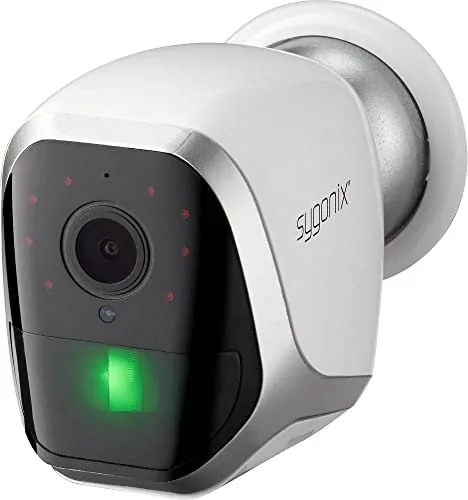
Protecting your property has never been easier thanks to advanced wireless technology. The Sygonix WLAN IP Security Camera delivers high-quality video recording suitable for both indoor and outdoor environments. Operating at an IP65 rating, it withstands various weather conditions while maintaining clear visibility. Connectivity relies on a standard Wi-Fi network which allows remote access from anywhere using a mobile phone.
Smart App Integration
Managing the device is intuitive through the Smart Life application available for Android and iOS platforms. Users create a user account securely stored in the cloud for data safety. The home screen lists all devices under your control effortlessly without any visual clutter. You can add new units by selecting video surveillance and following the setup wizard step by step. Notifications alert you immediately upon detecting motion or connection loss on your phone screen.
Customizable Settings
Customization options ensure the camera fits your specific needs for security purposes. You can change the device name for easier identification among other gadgets in your home. Low battery alarms prevent unexpected power failures during critical moments of operation. Connecting with voice assistants like Amazon Alexa or Google Assistant enhances convenience further for the whole family to use. Screen flipping allows installation in inverted positions without adjusting the physical mount permanently.
Advanced Features
Talk mode enables one-way or two-way communication with visitors at your door step instantly. Motion detection sensitivity adjusts to reduce false alarms triggered by small animals passing nearby your yard. Adding shortcuts to your mobile device screen grants quick access to live feeds. Sharing permissions allows family members to view live feeds securely without compromising your account security. Playback recorded videos helps review past events easily.
Connectivity and Support
Security requires strong encryption on your router to protect data transmission across the internet. The system supports both Wi-Fi and mobile data networks for control regardless of location. Troubleshooting weak signals may involve restarting network devices or using wireless repeaters. If connection issues persist, resetting the camera returns it to factory defaults easily. For detailed troubleshooting procedures and advanced configuration tips, refer to the Sygonix WLAN IP Security Camera Manual. Ensuring your firmware stays updated remains crucial for optimal performance.
Technical Overview
The interface displays current temperature and pressure clearly. Image quality can be toggled between low and high definition. Audio controls allow users to enable or disable microphones. Capturing images is simple with the one-tap feature. The overview screen shows time and date for synchronization. Full screen views expand the live image.
Conclusion
Investing in quality surveillance technology brings peace of mind to every household. This camera combines ease of use with powerful features for comprehensive coverage. Regular maintenance ensures continuous operation without interruption. Stay connected with your home using this reliable smart home solution.
Search for 67,732 Manuals online


Type-in Brand or Model