
Sygonix SY-RS-201 Manual
PDF manual · 17 Pages
English


Quick check
Incorrect answer, please try again.
Chat with your Sygonix SY-RS-201 manual using AI
Get instant AI answers from your Sygonix SY-RS-201 manual
Ask anything about the Sygonix SY-RS-201. Answers come from this manual, with the pages they are based on.
Ask a Question
Do you recommend SY-RS-201?
Yes NoFrequently Asked Questions
The socket works with the Smart Life - Smart Living app for Android and iOS. The app is used to add the device, control outputs, create timers, share access, and manage notifications.
Is this answer helpful?
Yes. After setup, the connected device can be controlled through the app using Wi-Fi or mobile data, provided the socket and network connection remain available.
Is this answer helpful?
The app overview includes controls for the main socket, all sockets and ports, and all USB ports. It also includes countdown and timer functions.
Is this answer helpful?
Yes. The app provides third-party control options for Amazon Alexa and Google Assistant. Follow the in-app setup steps to link the selected voice assistant.
Is this answer helpful?
Yes. Device sharing can be configured from the overview screen, allowing a family member or another approved user to access the socket through their own account.
Is this answer helpful?
Check that the internet connection works, confirm the socket is within Wi-Fi range, and reduce possible 2.4 GHz interference. Restarting network equipment may help. If needed, reset the socket and add it again.
Is this answer helpful?
Advantages and Disadvantages
Advantages

- App control supports switching the main socket, all outputs, and USB ports remotely.
- 3680W stated maximum load suits many household electrical applications within rated limits.
- Two USB-A ports provide convenient charging without extra plug-in adapters.
- Timers, countdowns, groups, sharing, offline alerts, and push notifications support flexible routines.
- Compatible with Amazon Alexa, Google Assistant, Smart Life, and Conrad Connect.
Disadvantages

- Initial pairing requires the phone and socket to be on the same Wi-Fi network.
- Connection quality can be affected by weak signals or 2.4 GHz interference.
- Timers and schedules are unsuitable for appliances that must not operate unattended.
- Cloud account and app use are required for the listed smart-control features.
Product Specification
Type
Sensor, actuator
Standard
Wi-Fi (802.11b/g/n)
Function
Switched outlet (on/off), charging function (2x USB-A)
Topology
Mesh, star
Dimensions
3.03 x 3.70 x 2.95 in
Features
App-controlled (Android, iOS), voice assistant (Amazon Alexa, Google Assistant)
Product Description
Sygonix WiFi Socket with Power Measurement Function, 3680W, 2x USB-A, Smart Socket - Read, Download & Print Free
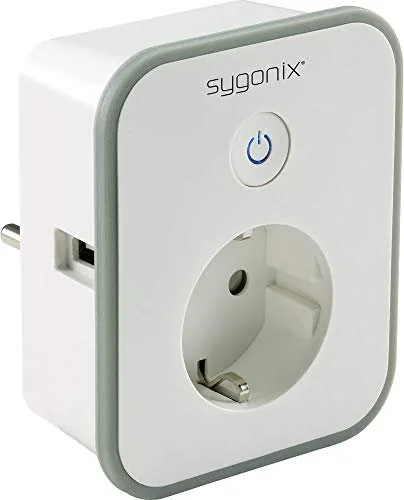
The Sygonix WiFi Socket with Power Measurement Function, 3680W, 2x USB-A, Smart Socket brings app-based control, charging convenience, and connected-home flexibility to a single outlet. Designed for use with the Smart Life - Smart Living app, it lets users manage compatible connected equipment through a Wi-Fi network or mobile data connection. The socket is also compatible with the Conrad Connect IoT platform, offering another route for integrating it into a broader smart-home setup.
Smart control for everyday devices
After pairing the socket with a mobile device on the same Wi-Fi network, users can switch the main socket, all outlets and ports, or the USB ports from the app. The interface also provides countdown and timer functions, supporting routines such as turning off selected devices after a chosen period. Group creation allows compatible devices to be controlled together, while device sharing makes it easier to give household members access without sharing one account.
Voice-control integration is available through Amazon Alexa and Google Assistant, subject to completing the relevant third-party setup. This can make routine actions more convenient, such as controlling a connected lamp or charger without opening the app. Push notifications and offline alerts can also help users stay aware of connection status, provided notifications are enabled in both the app and mobile-device settings.
Socket and USB charging in one unit
With a stated maximum load of 3680W, this smart socket is intended for a wide range of household electrical uses within its rated limits. Its two USB-A charging ports add practical value by allowing compatible phones, accessories, or other USB-powered devices to charge without occupying separate wall chargers. The product combines these everyday charging options with a power measurement function, helping users keep energy use in view.
Setup and connection notes
Setup is performed in the Smart Life - Smart Living app by selecting the Wi-Fi socket category and following the on-screen steps. A stable Wi-Fi signal is important for reliable operation. If pairing fails, checking the router, distance to the access point, and possible 2.4 GHz interference may help. Resetting the socket with the supplied reset pin can resolve some connection issues.
Note: Only connect devices that are suitable for unattended operation when using timers or schedules. Appliances such as heaters, empty kettles, and coffee makers can present fire risks if left running without supervision.
Note: Use strong Wi-Fi encryption and remove the socket from an account before transferring it to another owner.
Search for 67,732 Manuals online


Type-in Brand or Model
karen65
4 months ago
Is the setup and app connection reliable, and can the AC outlet and USB ports be controlled separately?
Manual.ly
4 months ago
Setup may take a little longer than expected, and a stable app connection is required for remote control. Once connected, the main outlet can be switched independently from the two USB ports, while the physical round button switches all connections together. The timer function is also available through the app.