Manual.ly Logo

Sygonix SC-WC-300 2K Manual

0.0 · 0 Ratings

PDF manual · 8 Pages

English

M: QW-35-FL
page

/ 8

Loading...
1dd430d1632eaa75ad57833f6a90d01091ae page 3
Caution:
• To avoid damaging the components, do not attempt to open or repair the product
without professional guidance.
• The operating range may be affected by environmental factors and nearby
sources of interference.
• Proper use helps to prolong the lifespan of the product.
b) Connected devices
Also observe the safety and operating instructions of any other devices which are
connected to the product.
Features
• High-resolution HD digital camera with CMOS sensor
• Maximum video resolution: 2592 x 1944 (5 MP)
• USB 2.0 high-speed
• Signal-noise-ratio: 39 dB
• Dynamic range: 74 dB
• Image focus: 30 cm to innity
• AWB (Automatic White Balance)
• Fixed focus
• Lens angle: 103° horizontal
• High-precision glass lens
• Built-in dual stereo microphone with automatic noise reduction
• Computer display mounting
• Tripod mounting
Overview
Operation
Thanks to the webcam’s comprehensive plug-and-play support (Windows, OS X/Max OS and
many other devices), you can plug the webcam into a computer USB port and use the camera
in any application that supports a USB video stream, such as Skype.
If the computer does not automatically recognise the webcam when it is plugged in, try using a
different USB port. If this does not resolve the issue, restart the computer and try again.
Note: To use the webcam’s internal microphone, select it as a USB audio input in your
application settings.
a) Windows
Windows 10 users can use the pre-installed Camera app, which provides a preview of the
camera image and allows you to capture still frames and video clips. Click the Start button
( ) and open the Camera app in the list of apps, or type “camera” in the search bar. When
using the Camera app, it is recommended to switch to the Full HD Camera option by clicking
Start > Camera > Change camera.
When the image from the webcam is displayed in the Camera app:
1 Select Photo or Video to take a photo or record a video.
2 To view captured photos or videos, go to Start > Photos and choose the desired
Collection.
3 To zoom in/out, select the correct device, set the video resolution to 1280 x 720p and go
to Video Capture Filter > Camera Control > Zoom in/out. Alternatively, set the video
resolution to 1280 x 720p and press the webcam case button to zoom in/out.
To use the camera with other applications, the camera will need to be enabled in the Windows
security settings:
1 Click the Start button ( ) and go to Settings > Privacy > Camera, and then enable Let
apps use my camera.
2 Enable the necessary apps to allow access to the webcam.
Operating Instructions
Webcam with stereo microphone
Item No. 2357965
Intended use
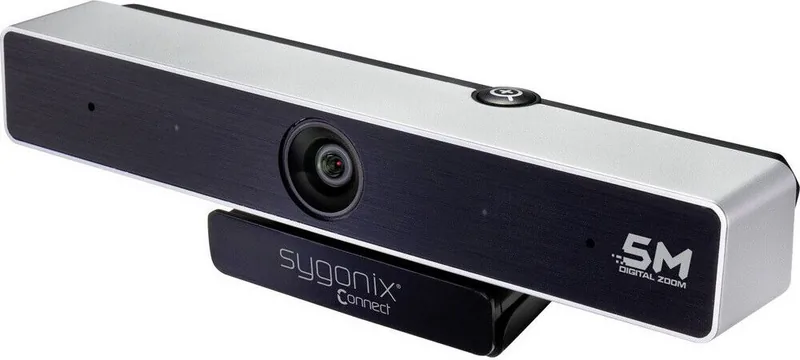
This wide-angle HD720p webcam features a 4x digital zoom, stereo microphone and plug-and-
play support for Windows, OS C/Mac OS and many other devices. Simply plug the webcam
into a computer USB port and use the camera in any application that supports a USB video
stream, such as Skype.
It is intended for indoor use only. Do not use it outdoors. Contact with moisture, e.g. in
bathrooms, must be avoided under all circumstances.
For safety and approval purposes, you must not rebuild and/or modify this product. If you
use the product for purposes other than those described, the product may be damaged. In
addition, improper use can result in short circuits, res, electric shocks or other hazards. Read
the instructions carefully and store them in a safe place. Make this product available to third
parties only together with its operating instructions.
This product complies with the statutory national and European requirements. All company
names and product names are trademarks of their respective owners. All rights reserved.
Delivery content
• Webcam
• Cable
• Webcam cover
• Operating instructions
Up-to-date operating instructions
Download the latest operating instructions at www.conrad.com/downloads or
scan the QR code shown. Follow the instructions on the website.
Explanation of symbols
The symbol with the lightning in the triangle is used if there is a risk to your health,
e.g. due to an electric shock.
The symbol with the exclamation mark in the triangle is used to indicate important
information in these operating instructions. Always read this information carefully.
The arrow symbol indicates special information and advice on operation.
Safety instructions
Read the operating instructions carefully and especially observe the safety
information. If you do not follow the safety instructions and information on
proper handling in this manual, we assume no liability for any resulting
personal injury or damage to property. Such cases will invalidate the warranty/
guarantee.
a) General information
• The device is not a toy. Keep it out of the reach of children and pets.
• Do not leave the packaging material lying around carelessly. This may become
dangerous playing material for children.
• Protect the appliance from extreme temperatures, direct sunlight, strong jolts,
high humidity, moisture, ammable gases, steam, and solvents.
• Do not place the product under any mechanical stress.
• If it is no longer possible to operate the product safely, take it out of operation and
protect it from any accidental use. Safe operation can no longer be guaranteed
if the product:
- is visibly damaged,
- is no longer working properly,
- has been stored for extended periods in poor ambient conditions or
- has been subjected to any serious transport-related stresses.
• Please handle the product carefully. Jolts, impacts, or a fall, even from a low
height, can cause damage to the product.
• Consult an expert when in doubt about the operation, safety, or connection of
the appliance.
• Maintenance, modications, and repairs must only be completed by a technician
or an authorised repair centre.
• If you have questions that remain unanswered by these operating instructions,
contact our technical support service or other technical personnel.

Chat with your Sygonix SC-WC-300 2K manual using AI

Get instant AI answers from your Sygonix SC-WC-300 2K manual

Ask anything about the Sygonix SC-WC-300 2K. Answers come from this manual, with the pages they are based on.

Ask a Question

0/1000

Do you recommend SC-WC-300 2K?

Yes No

Frequently Asked Questions

A

The webcam supports a maximum video resolution of 2592 x 1944 pixels at 30 frames per second, offering 5 megapixel clarity.

Is this answer helpful?

A

Yes, the device features plug-and-play support for macOS versions 10.6 and higher, allowing immediate use without extra drivers.

Is this answer helpful?

A

No, the product is designed exclusively for indoor use. Exposure to moisture, rain, or extreme outdoor temperatures can damage the unit.

Is this answer helpful?

A

It features an integrated dual stereo microphone with automatic noise reduction, effectively filtering background sounds for clearer voice pickup.

Is this answer helpful?

A

Yes, the delivery package includes a protective webcam cover to shield the lens when the camera is not in use.

Is this answer helpful?

A

The fixed focus lens is optimized for subjects located between 30 centimeters and infinity, so objects closer than 30 cm may appear blurry.

Is this answer helpful?

M: QW-35-FL

Advantages and Disadvantages

Advantages

  • High-resolution 5MP sensor captures sharp video up to 2592x1944 pixels
  • Built-in dual stereo microphone with effective noise reduction
  • Wide 103-degree horizontal field of view suitable for groups
  • Plug-and-play compatibility with Windows and Mac OS
  • Includes physical privacy cover for security
VS

Disadvantages

  • Fixed focus lens may struggle with objects closer than 30 cm
  • Intended for indoor use only, not weatherproof
  • Requires manual zoom adjustment via software or button
  • USB 2.0 speed may limit bandwidth for extremely high frame rates
  • No integrated ring light for low-light scenarios
M: QW-35-FL

Product Specification

Type

Webcam

Image Sensor

1x 1/2.7" CMOS 5.0 MP

Resolution

2592x1944 Pixels (30fps)

Viewing Angle

103° (horizontal), 83° (vertical), 120° (diagonal)

Wireless

N/A

Focus

Fixed Focus

Camera Cover

Flip Cover

Microphone

Integrated (stereo), 5m range

Speaker

N/A

Lighting

N/A

Cable Length

6.56ft

Power Supply

via USB

Mount

Clip Mount, with 1/4" Thread

Dimensions

5.97x2.17x1.72in

Weight

3.99oz

M: QW-35-FL

Product Description

Sygonix SC-WC-300 2K Webcam Review

The Sygonix SC-WC-300 2K Webcam stands out as a versatile tool for professionals and enthusiasts seeking high-quality video communication. Designed with a robust CMOS sensor, this device delivers crisp visuals with a maximum resolution of 2592 x 1944 pixels, ensuring that every detail is captured with precision. Whether you are hosting virtual meetings, streaming content, or recording tutorials, the wide-angle lens provides a broad field of view at 103 degrees horizontally, making it ideal for group calls or dynamic presentations.

One of the standout features of this webcam is its built-in dual stereo microphone equipped with automatic noise reduction technology. This ensures that your voice remains clear and distinct even in noisy environments, capturing audio from up to five meters away. The camera also supports automatic white balance and low-light correction, adapting seamlessly to varying lighting conditions to maintain image quality throughout the day.

Setup is incredibly straightforward thanks to comprehensive plug-and-play support for Windows and macOS systems. Users can simply connect the USB 2.0 Type-C cable to their computer and start using the device immediately in applications like Skype or Zoom without needing additional drivers. The included mounting bracket allows for easy attachment to computer displays, while the tripod mount offers flexibility for stationary setups.

For those concerned about privacy, the package includes a physical webcam cover, providing peace of mind when the camera is not in use. The device is designed for indoor use only, protecting the internal components from moisture and extreme temperatures. With a durable build and precise glass lens, the Sygonix SC-WC-300 promises longevity and consistent performance for all your video needs.

M: QW-35-FL

© Copyright 2026 Manual.ly