Manual.ly Logo

Sygonix RSL Manual

0.0 · 0 Ratings

PDF manual · 2 Pages

English

M: claude-opus-5-5
page

/ 2

Loading...
ca094394642937d94b9e7f85ecc48556554f page 2
Conguration
1. Set the desired switching group (I, II, III or IV) using the
switching group selector (6) on the remote control.
2. Connect the wireless power outlet to a standard power outlet.
Make sure that the wireless power outlet is turned off. The on/off
switch (2) should not light up.
3. Push and hold the on/off switch on the wireless power outlet until
it begins ashing.
4. Push the control key (5) for the desired channel on the left
column of the remote control.
5. The on/off switch lights up permanently. Conguration is
successful.
The keys on the right column of the remote control can
also be used for conguration. In this case, the light of the
on/off switch goes out.
6. Follow the steps described above to congure further channels.
Each wireless power outlet has 8 memory slots for vari-
ous channels or remote controls.
The remote control can control an unlimited number of
compatible wireless power outlets.
Resetting the channel conguration
a) All channels
1. Push and hold the on/off switch (2) on the wireless power outlet
until it begins ashing.
2. Release the on/off switch briey and push and hold it again until
its light goes out.
3. The product is now reset to factory settings.
b) Individually
1. Set the desired switching group (I, II, III or IV) using the
switching group selector (6) on the remote control.
2. Push and hold the on/off switch (2) on the wireless power outlet
until it begins ashing.
3. Push the control key (5) on the remote control for the channel
that you wish to reset. It does not matter whether you push the
key in the right or left column.
4. The light of the on/off switch goes out. The conguration for the
channel is now reset.
Function test
1. Set the desired switching group (I, II, III or IV) using the
switching group selector (6) on the remote control.
2. Connect the wireless power outlet to a standard power outlet.
3. Push the corresponding control key (5) on the left column of the
remote control. The on/off switch (2) on the power indicator
lights up, the wireless power outlet is activated.
4. To deactivate the wireless power outlet, push the corresponding
control key on the right column of the remote control. The on/off
switch on the wireless power outlet goes out.
Operation
The power consumption of a connected electrical
device may not exceed 2000 W/8.7 A (resistive load)
or 460 W/2 A (motor load). In case of overload, the
product’s internal thermal fuse is tripped. The ther-
mal fuse is not self-resetting. The wireless power
outlet can no longer be used.
To ensure perfect functioning, there should be a di-
stance of at least 1 m between two wireless power
outlets.
1. Connect the wireless power outlet to a standard power outlet.
Make sure that the product is turned off. The on/off switch (2)
should not light up.
2. Turn off the electrical device that you wish to operate via the
product using the device’s own power switch.
3. Plug the electrical device into the wireless power outlet.
4. Turn on the electrical device using its own power switch.
5. Now use the remote control to turn the electrical device on or off.
See the chapter “Key functions (remote control)”.
You can manually turn on/off an electrical device using
the on/off switch (2) on the wireless power outlet.
Transmission range
• Under ideal conditions, the range of radio signal transmission bet-
ween the remote control and the wireless power outlet is up to 30 m.
This gure applies only when there is direct visual contact
between the transmitter and receiver with no interference.
Under normal conditions, there are usually walls, ceilings,
etc. between the transmitter and receiver, which will de-
crease the range accordingly.
Due to various inuences which may effect transmission,
no specic range can be guaranteed.
Normally operation in a single-family house is possible
without complications.
• The range can be decreased by:
- Walls, reinforced concrete ceilings
- Laminated or metallized insulated glass panes
- Close proximity to metallic and conductive objects (i.e. heaters)
- Close proximity to human bodies
- Broadband interference, i.e. in residential areas (DECT phones,
mobile phones, wireless headphones, wireless speakers, wirel-
ess weather stations, baby monitors, etc.)
- Close proximity to electrical motors, transformers, power adap-
tors, computers
- Close proximity to poorly shielded or open computers or other
electrical devices
Care and cleaning
Do not use any aggressive cleaning agents, rubbing
alcohol or other chemical solutions as they can
cause damage to the housing and malfunctioning.
• Before cleaning, disconnect the product from the power supply and
from any connected device.
• Never submerge the product in water.
• There are no components located inside the product you need to
maintain. Never open/dismantle the product.
• To clean the product, a dry, soft and clean cloth is sufcient. Do
not apply too much pressure to the housing to prevent scratching.
• Use a longhaired, soft and clean brush and a vacuum cleaner to
easily remove dust.
Declaration of Conformity (DOC)
Conrad Electronic SE, Klaus-Conrad-Straße 1, D-92240 Hirschau he-
reby declares that this product conforms to the 2014/53/EU directive.
Click on the following link to read the full text of the EU
declaration of conformity: www.conrad.com/downloads
Select a language by clicking on a ag symbol and enter
the product order number in the search box. You can then
download the EU declaration of conformity in PDF format.
Disposal
a) Product
Electronic devices are recyclable waste and must not be
disposed of in the household waste. At the end of its ser-
vice life, dispose of the product according to the relevant
statutory regulations.
Remove any inserted batteries and dispose of them sepa-
rately from the product.
b) Batteries
You as the end user are required by law (Battery Ordi-
nance) to return all used batteries. Disposing of them in
the household waste is prohibited.
Contaminated batteries are labelled with this symbol to
indicate that disposal in the domestic waste is forbidden.
The designations for the heavy metals involved are: Cd =
Cadmium, Hg = Mercury, Pb = Lead (name on batteries,
e.g. below the trash icon on the left).
Used batteries can be returned to collection points in your municipali-
ty, our stores or wherever batteries are sold.
You thus full your statutory obligations and contribute to the protec-
tion of the environment.
Technical data
a) Wireless power outlet
Operating voltage .....................230 V/AC, 50 Hz
Power output ............................Resistive load: max. 2000 W (8.7 A)
..................................................Motor load: max. 460 W (2 A)
Frequency .................................433.92 MHz
Memory slots ............................8
Operating conditions ................. 0 to +35 °C,
10 – 90 % RH (non-condensing)
Storage conditions .................... 0 to +45 °C,
10 – 90 % RH (non-condensing)
Dimensions (W x H x D) ...........60 x 84 x 73 mm
Weight ......................................approx. 100 g
b) Remote control
Battery type ..............................CR2032
Number of channels .................12
Frequency .................................433.92 MHz
Transmission range ..................30 m (in open area)
Operating conditions ................. 0 to +35 °C, 10 – 90 % RH (non-
condensing)
Storage conditions .................... 0 to +45 °C, 10 – 90 % RH (non-
condensing)
Dimensions (W x H x D) ...........35 x 15 x 95 mm
Weight ......................................approx. 30 g
Additional wireless power outlets are available under item
no. 1762768.
An additional remote control is available under item no.
1761748.
This is a publication by Conrad Electronic SE, Klaus-Conrad-Str. 1, D-92240
Hirschau (www.conrad.com).
All rights including translation reserved. Reproduction by any method, e.g.
photocopy, microlming, or the capture in electronic data processing systems
require the prior written approval by the editor. Reprinting, also in part, is pro-
hibited. This publication represent the technical status at the time of printing.
Copyright 2018 by Conrad Electronic SE.
*1761751_2768_2776_V1_1018_02_mxs_m_en

Chat with your Sygonix RSL manual using AI

Get instant AI answers from your Sygonix RSL manual

Ask anything about the Sygonix RSL. Answers come from this manual, with the pages they are based on.

RSL Maintenance Schedule

As needed
Clean the housing with a dry soft cloth

Use a dry, soft and clean cloth to clean the product. Do not use aggressive cleaning agents or water. Disconnect from power before cleaning.

As needed
Remove dust using a brush and vacuum

Use a longhaired, soft and clean brush along with a vacuum cleaner to remove dust from the device.

When range decreases
Replace remote control battery

Replace the CR2032 battery when the remote control's range noticeably decreases or the indicator lamp no longer lights up when a button is pushed.

M: qwen/qwen3.8-flash

Ask a Question

0/1000

Do you recommend RSL?

Yes No

Frequently Asked Questions

A

The wireless power outlet supports a resistive load of up to 2000 Watts or a motor load of up to 460 Watts. Exceeding these limits will trip the internal thermal fuse permanently.

Is this answer helpful?

A

Plug in the socket, hold its switch until it flashes, then press the desired channel key on the remote. The light will stay on to confirm successful pairing.

Is this answer helpful?

A

No, this product is intended for indoor use only. Exposure to moisture, rain, or humidity can cause electric shock or damage the device.

Is this answer helpful?

A

If overloaded, the internal thermal fuse will trip and cut power. The fuse is not self-resetting, so the socket must be replaced or repaired by a professional.

Is this answer helpful?

A

Yes, the remote uses a single CR2032 coin cell battery. Replace it when the indicator light dims or the range decreases noticeably.

Is this answer helpful?

M: QW-35-FL

Advantages and Disadvantages

Advantages

  • Easy plug-and-play installation requires no professional electrician.
  • Remote control offers 12 channels for flexible device management.
  • Built-in thermal fuse protects against electrical overloads.
  • Clear LED indicators provide immediate status feedback.
  • Compact design fits standard outlets without blocking adjacent sockets.
VS

Disadvantages

  • Transmission range decreases significantly through thick concrete walls.
  • Not suitable for outdoor use or damp environments like bathrooms.
  • Thermal fuse does not reset automatically after tripping.
  • Battery life may decrease in cold storage conditions.
  • Cannot connect multiple wireless outlets in series safely.
M: QW-35-FL

Product Specification

Type

Set

Standard

RF bus (433MHz)

Function

Switchable socket (on/off), remote control

Topology

Star

Dimensions

3.31x2.87x2.36in (socket), 3.74x1.38x0.59in (remote)

Set consists of

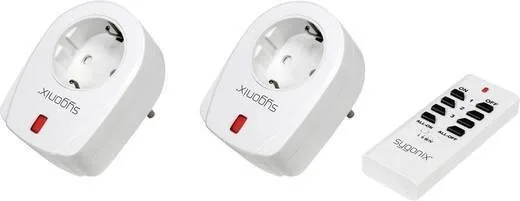
2x sockets, 1x remote

M: QW-35-FL

Product Description

Sygonix RSL Wireless Socket Set: Control Your Home with Ease

The Sygonix RSL Wireless Socket Set offers a seamless way to modernize your home electrical setup without the need for complex wiring. This set includes two plug-in sockets and a versatile remote control, designed specifically for indoor use where convenience meets safety. Whether you want to automate lamps, fans, or other small appliances, this system provides reliable wireless control from up to 30 meters away under ideal conditions.

Effortless Installation and Operation

Setting up your new smart home solution is incredibly straightforward. Each wireless socket plugs directly into a standard power outlet, and the included remote control allows you to manage connected devices instantly. The remote features twelve distinct channels across four switching groups, giving you granular control over multiple devices simultaneously or individually. You can turn lights on or off with a simple press of a button, eliminating the hassle of walking across the room to reach a wall switch.

Safety First Design

Safety is paramount in the design of the Sygonix RSL Wireless Socket Set. The units are built to withstand normal household environments while protecting against common hazards. They include internal thermal fuses that trip in case of overload, preventing damage to connected electronics. The system is strictly for indoor use, avoiding moisture and extreme temperatures to ensure long-term reliability. Children and pets are kept safe as the sockets are designed to be accessible yet secure when not in use.

Versatile Remote Control Features

The included remote control acts as the brain of your operation. With a clear layout of ON/OFF keys and a group selector, managing your home becomes intuitive. The indicator lamp provides visual feedback, confirming that commands have been sent successfully. You can configure each socket to respond to specific buttons, allowing for customized routines throughout your house. The battery compartment is easy to access, using a standard CR2032 cell for long-lasting performance.

Notes

  • Ensure at least one meter of distance between sockets for optimal signal transmission.
  • Do not use the product in hospitals or medical facilities due to potential radio interference.
  • Always disconnect the unit during thunderstorms for maximum safety.
M: claude-opus-5-5

© Copyright 2026 Manual.ly