
Manual.ly Logo

Sygonix Individually Switchable Power Strip Manual

0.0 · 0 Ratings

PDF manual · 4 Pages

English

M: gpt-5.6-terra
page

/ 4

Loading...
90be5d58185e77c96a081e4310cd9b071c4a page 2
• Never pour liquids above or near the product.
This constitutes a serious re hazard and may
result in a fatal electrical shock. If liquid does
enter the interior of the socket strip, immedia-
tely isolate the socket strip’s mains plug from
the mains (turn off fuse/circuit breaker/residual
current circuit breaker for the corresponding
circuit). Once you have isolated the socket strip
from the mains, unplug it from the mains socket
and consult a technician. Discontinue use of the
product.
• For installations in industrial facilities, follow the
accident prevention regulations for electrical
systems and equipment of the government sa-
fety organisation or the corresponding authority
for your country.
• Trained personnel must supervise the use of
electrical appliances in schools, training facilities
and DIY workshops.
• Consult a technician if you are not sure how to
use or connect the product, or if you have con-
cerns about safety.
• Maintenance, modications and repairs must be
carried out by a technician or a specialist repair
centre.
• If you have questions which remain unanswe-
red by these operating instructions, contact
our technical support service or other technical
personnel.
Operation
Ensure that the connection cables
are not kinked or squashed. This can
cause malfunctions, short circuits and
device defects.
Ensure that the socket strip is dead
before you connect any devices. The
socket strip is only isolated from the
mains when the power cable has been
unplugged from the mains socket!
The socket strip is not designed to be
mounted or suspended, for example,
by screwing it in place. It can only be
placed on at and horizontal surfaces.
• Ensure that the ON/OFF main switch and the
separate ON/OFF switches are switched off (in
position O (off)).
• Connect the plug of the socket strip to the mains
socket.
• Connect the devices to the sockets on the socket
strip.
• Now, switch the socket strip on by pressing the
ON/OFF main switch. The ON/OFF main switch
lights up red.
• Switch the sockets on individually with the sepa-
rate ON/OFF switches. The ON/OFF switches
light up red.
Maintenance and cleaning
• This product does not require maintenance. This
product does not contain any components that
require maintenance. Never attempt to open or
disassemble it. Repair or maintenance work must
be carried out by a technician or a specialist re-
pair centre.
• Unplug the plug of the socket strip from the mains
socket before cleaning it. Disconnect all connec-
ted loads from the socket strip.
• A dry, soft and clean cloth is sufcient for cleaning.
Dust can be easily removed using a soft, clean
long-haired brush and a vacuum cleaner.
• Never use aggressive detergents or chemical
solutions, as these could damage the housing or
impair the functioning of the product.
Disposal
Electronic devices are recyclable was-
te and must not be placed in household
waste.
At the end of its service life, dispose of
the product in accordance with appli-
cable regulatory guidelines.
You thus full your statutory obligations
and contribute to environmental protec-
tion.
Operating instructions
Socket strip
Item no. 2267534/4-way
(can be switched individually)
Item no. 2267535/6-way
(can be switched individually)
Intended use
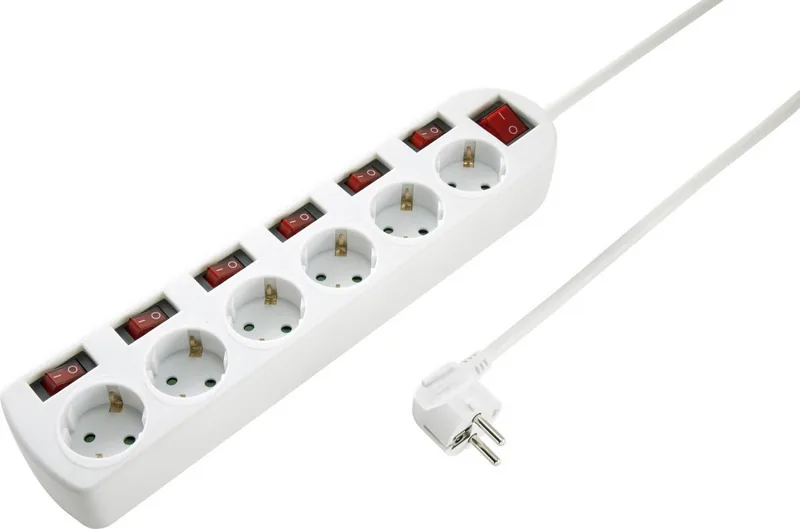
The illuminated ON/OFF main switch can be used
to disconnect all connected consumers from the
mains. Furthermore, this socket strip also has se-
parate ON/OFF switches for the individual sockets.
The product may only be used in dry, enclosed
spaces.
For safety and approval purposes, do not rebuild
and/or modify this product. Using the product for
purposes other than those described above may
damage the product. In addition, improper use can
cause hazards such as a short circuit, re or electric
shock.
Read the operating instructions carefully and
store them in a safe place. Only make this product
available to third parties together with its operating
instructions.
This product complies with statutory, national and
European regulations. All company and product
names included herein are trademarks of their re-
spective owners. All rights reserved.
Delivery content
• Socket strip
• Operating instructions
Up-to-date operating instructions
Download the latest operating instructions at www.
conrad.com/downloads or scan the QR code
shown. Follow the instructions on the website.
Explanation of symbols
The symbol with the lightning in a
triangle indicates that there is a risk
to your health, e.g. due to an electric
shock.
The symbol with an exclamation mark
in a triangle is used to highlight impor-
tant information in these operating ins-
tructions. Always read this information
carefully.
The arrow symbol indicates special
information and tips on how to use the
product.
Precautions
Read the operating instructions ca-
refully and the safety information in
particular. If you do not follow the
safety information and information
on proper handling in these opera-
ting instructions, we will assume no
liability for any resulting personal
injury or damage to property. Such
cases will invalidate the warranty/
guarantee.
• The device is not a toy. Keep it out of the reach
of children and pets.
• Do not leave packaging material lying around
carelessly. It may become a dangerous
plaything for children.
• Protect the product from extreme temperatures,
direct sunlight, strong jolts, high humidity, mois-
ture, ammable gases, vapours and solvents.
• Do not place the product under any mechanical
stress.
• If it is no longer possible to operate the product
safely, stop using it and prevent unauthorised
use. Safe operation can no longer be guaran-
teed if the product:
- is visibly damaged,
- is no longer working properly,
- has been stored for extended periods in poor
ambient conditions or
- has been subjected to any serious transport-
related stresses.
• Handle the product carefully. Jolts, impacts or
a fall even from a low height may damage the
product.
• Always observe the safety information and ope-
rating instructions of any other devices which
are connected to the product.
• The product is equipped with an enhanced pro-
tection against accidental contact. An integrated
mechanism will release the holes of the recep-
tacle only, if the two prongs of a power plug are
inserted into the two holes at once.
• Exercise particular caution in the presence of
children. Children cannot recognise the danger
arising from the incorrect use of electrical de-
vices. There is a risk of a life-threatening electric
shock!
• Only use a proper mains socket connected to
the public grid to power the socket strip.
• The mains socket must be located near to the
device and be easily accessible.
• Completely unwind the mains cable before use.
The power cable must not be pinched or dama-
ged by contact with sharp edges. Do not place
any objects on the mains cable or allow it to be-
come kinked. Place the mains cable away from
open spaces where it will not present a trip ha-
zard. The mains plug must be easily accessible.
Do not place the mains cable under carpets or
the like.
• Never plug in or unplug or operate the product
with damp or wet hands. There is a risk of a life-
threatening electric shock!
• Never connect the product to the power supply
immediately after it has been transferred from a
cold room into a warm one (e.g. during trans-
port). The condensation that develops in such
cases could damage the device or cause an
electric shock! Let the product reach room tem-
perature rst. Wait until the condensation has
evaporated; this may take several hours. Only
after this should the product be plugged into the
power supply and put into use.
• Always pull a mains plug on the designated grip-
ping surface. Never unplug a mains plug from a
mains socket by pulling the cable.
• Do not overload the socket strip. Pay attention
to the connection specications in the ‘Technical
data’ section.
• Do not connect in series! This can lead to the
socket strip being overloaded. Fire hazard! Plug
the earthed mains plug of the socket strip in
directly, e.g. into a wall socket. Do not connect
other socket strips to this socket strip.
• Do not cover a socket strip when it is in use.
At higher connected loads, the socket strip and
the connecting cable may become warm, which
can lead to overheating and potentially a re if
covered.
• The socket outlet is only dead with the mains
plug disconnected.
• Unplug the mains plug from the mains socket
under the following conditions:
- Before you clean the product
- If the product is not going to used for an ex-
tended period of time.
This is a publication by Conrad Electronic SE, Klaus-Conrad-Str. 1, D-92240 Hirschau (www.conrad.com).
All rights including translation reserved. Reproduction by any method, e.g. photocopy, microlming, or capture in electronic
data processing systems, requires the prior written approval of the publisher. Reprinting, also in part, is prohibited. This
publication reects the technical status at the time of printing.
Copyright 2020 by Conrad Electronic SE. *2267534_2267535_v2_1120_02_jh_m_4L_(1)
Technical data
Item no. 2267534 2267535
Connection data 250 V/AC, 50 Hz,
16 A, max. 3680 W
250 V/AC, 50 Hz,
16 A, max. 3680 W
Earthed contact sockets 4 6
Enhanced contact protection Yes Yes
Cable type H05VV-F 3G1.5 mm
2
H05VV-F 3G1.5 mm
2
Cable length 1.4 m 1.4 m
Operating conditions -10 to 50 °C, 10 - 90 % rH -10 to 50 °C, 10 - 90 % rH
Storage conditions -10 to 50 °C, 10 - 90 % rH -10 to 50 °C, 10 - 90 % rH
Dimensions (L x W x H) 246 x 77 x 42 mm 342 x 77 x 42 mm
Weight approx. 390 g approx. 490 g

Chat with your Sygonix Individually Switchable Power Strip manual using AI

Get instant AI answers from your Sygonix Individually Switchable Power Strip manual

Ask anything about the Sygonix Individually Switchable Power Strip. Answers come from this manual, with the pages they are based on.

Ask a Question

0/1000

Do you recommend Individually Switchable Power Strip?

Yes No

Frequently Asked Questions

A

Each outlet has its own ON/OFF switch, allowing you to power selected devices without switching off everything connected to the strip. This is useful when some equipment must remain active while accessories can be turned off.

Is this answer helpful?

A

Both versions are rated for 250 V AC, 50 Hz, 16 A, with a maximum total load of 3680 W. Add the power requirements of all connected devices and do not exceed the stated limit.

Is this answer helpful?

A

The product is available as a 4-way model, item number 2267534, and a 6-way model, item number 2267535. Both include individually switchable earthed outlets and a master switch.

Is this answer helpful?

A

No. It is intended exclusively for dry, enclosed indoor areas. Keep it away from moisture, direct liquids, high humidity, flammable vapors, and other unsuitable environmental conditions.

Is this answer helpful?

A

No. Do not connect power strips in series. Daisy-chaining can cause overload, overheating, and fire risk. Connect this unit directly to a suitable wall outlet.

Is this answer helpful?

A

Unplug it from the mains and disconnect all devices first. Clean it using a dry, soft cloth. Dust may be removed with a soft brush and vacuum. Do not use chemical cleaners or abrasive products.

Is this answer helpful?

M: gpt-5.6-terra

Advantages and Disadvantages

Advantages

  • Individual switches let you control each connected device separately.
  • Illuminated master and outlet switches make active power status easy to see.
  • Available in compact 4-way and higher-capacity 6-way versions.
  • Supports up to 3680 W, 250 V AC, and 16 A for compatible equipment.
  • Enhanced contact protection improves safety around unused outlets.
VS

Disadvantages

  • Designed only for dry, enclosed indoor spaces.
  • Must rest on a flat horizontal surface and is not intended for mounting.
  • A 1.4 m cable may be too short for distant wall outlets.
  • It must not be daisy-chained with other power strips.
  • The strip is fully isolated only when unplugged from the wall socket.
M: gpt-5.6-terra

Product Specification

Input

1 x Schuko (16 A)

Input voltage

250 V

Power

3,680 W (max.)

Additional connections

N/A

Material

Plastic

Cable length

4.59 ft

Features

Child safety shutter, 45-degree arrangement, 1 x safety switch (red illuminated), individually switchable

Manufacturer warranty

3 years

M: gpt-5.6-terra

Product Description

Sygonix Individually Switchable Power Strip - Read, Download & Print Free

The Sygonix Individually Switchable Power Strip is a practical choice for organizing and controlling multiple electrical devices from one central location. Designed for dry indoor environments, it combines a master power switch with separate illuminated switches for every outlet. This layout lets you keep essential equipment powered while turning off accessories that are not currently needed.

Flexible Power Control for Everyday Setups

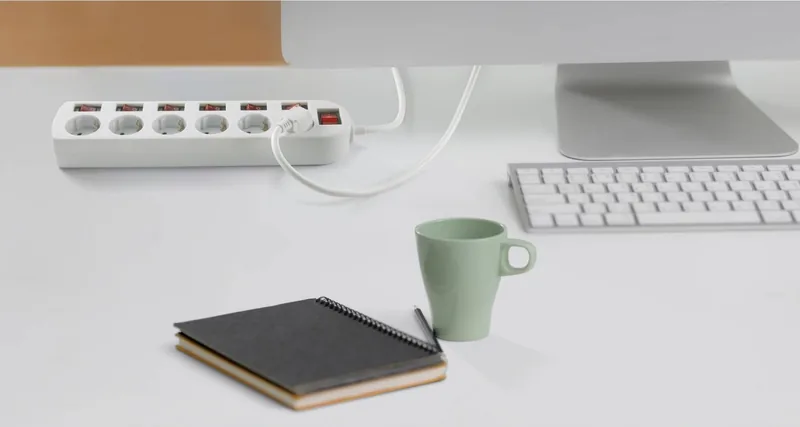
Whether used at a desk, in a home office, workshop, entertainment area, or hobby room, this power strip makes cable management more convenient. The red illuminated master switch controls the complete strip, while the individual red switches provide clear visual confirmation of which outlets are active. It is useful for reducing standby power from chargers, speakers, monitors, lamps, and other compatible devices.

Two versions are available to suit different requirements. The four-way model provides a compact option for smaller setups, while the six-way model offers extra capacity for spaces with more connected equipment. Both versions support loads up to 3680 W at 250 V AC and 16 A, making them suitable for a broad range of typical household and office electronics within the stated limit.

Built-In Safety Features

The Sygonix power strip includes enhanced contact protection to help prevent accidental contact with live socket openings. Its earthed outlets are intended for compatible plugs, and the 1.4 m H05VV-F 3G1.5 mm2 cable provides practical reach from a nearby wall socket to a work area.

Safe placement and use remain important. Position the strip only on a flat, horizontal surface, keep it uncovered during operation, and do not connect it in series with other power strips. Avoid moisture, liquids, damaged cables, excessive loads, and use with wet hands. The strip is only fully disconnected from mains power after its plug has been removed from the wall outlet.

Simple Everyday Care

No regular maintenance is required. Before cleaning, unplug the strip and disconnect all attached devices. A soft, dry cloth is sufficient for routine care, while a soft brush and vacuum can help remove dust. Avoid aggressive cleaning agents or chemical solutions that could damage the housing or affect performance.

Notes

  • Use indoors only in dry, enclosed rooms.
  • Check the total connected load before switching on equipment.
  • Keep the wall socket and mains plug easy to access.
  • Recycle the unit through appropriate electronic waste collection when it reaches the end of its service life.
M: gpt-5.6-terra

© Copyright 2026 Manual.ly