
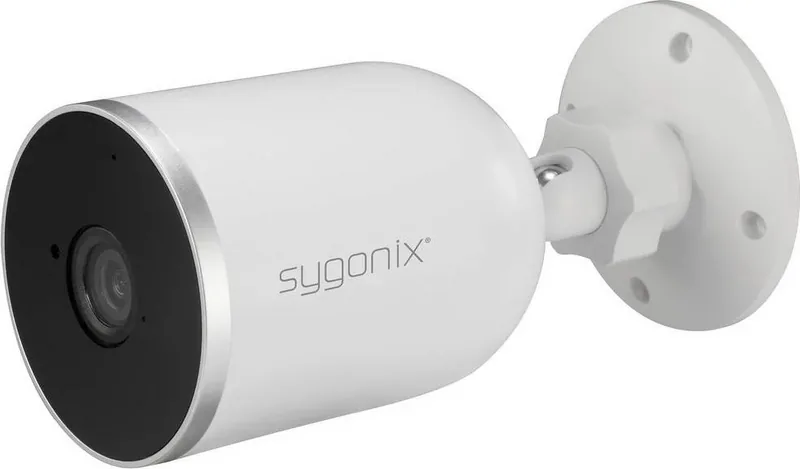
Sygonix 1080p Wi-Fi Outdoor Camera Manual
PDF manual · 12 Pages
English


Quick check
Incorrect answer, please try again.
Chat with your Sygonix 1080p Wi-Fi Outdoor Camera manual using AI
Get instant AI answers from your Sygonix 1080p Wi-Fi Outdoor Camera manual
Ask anything about the Sygonix 1080p Wi-Fi Outdoor Camera. Answers come from this manual, with the pages they are based on.
Ask a Question
Do you recommend 1080p Wi-Fi Outdoor Camera?
Yes NoDo you recommend 1080p Wi-Fi Outdoor Camera?
Yes NoFrequently Asked Questions
The camera supports IEEE 802.11 b/g/n on the 2.4 GHz band only. It is not compatible with 5 GHz networks. Ensure your phone or tablet is connected to the same 2.4 GHz network during pairing and enter the Wi‑Fi SSID exactly (case sensitive).
Is this answer helpful?
When a microSD card (class 10, max 128 GB) is inserted and formatted (FAT32 or exFAT where supported), the camera saves 15-second clips triggered by motion until the card is full. If no card is present or it’s full, you still receive push notifications and can view live video via the app.
Is this answer helpful?
To maintain IP65 protection, ensure the compartment cover and rubber gasket are properly seated and sealed after installation, route the power cable through a weatherproof inlet or use a weatherproof socket box for the adapter, and avoid damaging or pinching cables during setup.
Is this answer helpful?
First confirm the mobile device is on the same 2.4 GHz network and the router password is correct. To reset, press and hold the Reset button for 4–5 seconds until a long beep, wait for reboot, then repeat the pairing in the Smart Life app (Add device → Video Surveillance → Smart Camera).
Is this answer helpful?
You must comply with local privacy laws. Avoid directing the camera toward public areas or capturing identifiable images of others without consent. In some jurisdictions a visible warning notice is legally required when surveillance cameras are used on private property.
Is this answer helpful?
The camera uses an ambient light sensor to switch to IR night mode; recorded images are black-and-white at night. IR LEDs illuminate up to 15 m under low light, but placing the camera behind glass can cause IR glare and overexposure—avoid such installations or prevent reflections.
Is this answer helpful?
Use only the supplied 5 V/1 A adapter and the included USB-A cable (2.3 m). Do not use computer USB ports or damaged power components. Keep the mains outlet accessible, disconnect the adapter during storms, and avoid handling plugs with wet hands.
Is this answer helpful?
Advantages and Disadvantages
Advantages

- 1080p Full HD resolution with 3.6 mm lens delivers clear, wide-angle images (90° horizontal).
- IP65 weather resistance for outdoor use when compartment and cable entries are properly sealed.
- PIR motion detection with push notifications and local recording to microSD (up to 128 GB).
- Infrared night vision up to 15 m and automatic light-sensor-triggered night mode.
- 2-way audio and simple app integration via Smart Life for live view and remote control.
Disadvantages

- Only compatible with 2.4 GHz Wi‑Fi networks; no 5 GHz support.
- Records motion clips in 15-second increments only when microSD is present.
- Limited frame rate at 15 fps may affect smoothness for fast motion.
- Powered via 2.3 m USB-A cable and supplied 5 V/1 A adapter—requires nearby outlet.
- IR glare and overexposure possible if installed behind glass or reflective surfaces.
Product Specification
Type
Bullet
Image Sensor
1/2.7" CMOS
Resolution
1920x1080 Pixels (15fps)
Lens
0.14 in (F2.0)
Light Sensitivity
0.01 Lux (Color), 0 Lux (IR)
Viewing Angle
90° (horizontal), 80° (vertical)
Wireless
Wi-Fi 4 (WLAN 802.11b/g/n)
Data Storage
1x microSD-Slot (max. 128GB)
Illumination
IR-Illumination (49.21 ft)
Protection Class
IP65
Housing
suitable for outdoor use
Control & Operation
Mobile App
Product Description
Sygonix WLAN outdoor camera 1080p 3.6mm Manual
The Sygonix WLAN outdoor camera 1080p 3.6mm is a compact, weather-resistant security camera designed for home and small-business outdoor monitoring. With Full HD 1080p resolution, a 3.6 mm lens offering a wide 90° horizontal field of view, and IR night vision up to 15 m, this camera captures clear day and night footage. It connects to 2.4 GHz Wi‑Fi and integrates with the Smart Life - Smart Living mobile app for live view, push notifications, and on-the-go management.
Built for practical outdoor use, the camera features an IP65-rated housing to resist dust and low-pressure water jets when installed and sealed correctly. A built-in PIR motion sensor triggers 15-second video clips saved to a microSD card (class 10, up to 128 GB) and sends instant push alerts to paired mobile devices. Two‑way audio (microphone and speaker) lets you listen and talk through the app, while the integrated light sensor automatically switches to black-and-white night mode using IR LEDs when ambient light drops.
Setup and operation are straightforward: mount the camera with the supplied bracket and hardware, connect the 2.3 m USB power cable to the provided 5 V/1 A adapter, and pair via the Smart Life app (follow Add device → Video Surveillance → Smart Camera). The device beeps during pairing and supports reset through a dedicated button if needed. For reliable performance, ensure the camera is within range of your 2.4 GHz Wi‑Fi, and avoid placing it behind reflective glass to prevent IR glare.
Safety and maintenance are emphasized: use only the supplied power adaptor, avoid exposing cables to damage, and disconnect power during storms. Respect privacy and legal requirements—avoid directing the camera at public areas or capturing identifiable images without consent, and display warnings if required by local law. Clean the camera with a lint‑free damp cloth after disconnecting power; do not use solvents or alcohol.
Technical highlights include H.264 compression, 15 fps video, PIR detection with a 110° angle and up to 20 m range, and wireless compatibility with IEEE 802.11 b/g/n (2.4 GHz). Operating temperature ranges from -20 to +40 °C, and the camera measures approximately 70 x 147 mm and weighs about 259 g.
Notes:
- Remove the protective film from the lens before first use.
- Format microSD cards to FAT32 (or use exFAT where supported) and pair the camera before replacing the compartment cover.
- Keep the power outlet accessible and ensure all seals and gaskets are properly seated to maintain IP65 protection.
Search for 67,732 Manuals online


Type-in Brand or Model