
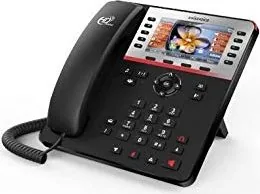
Swissvoice CP2505G Manual
PDF manual · 2 Pages
English



Quick check
Incorrect answer, please try again.
Chat with your Swissvoice CP2505G manual using AI
Get instant AI answers from your Swissvoice CP2505G manual
Ask anything about the Swissvoice CP2505G. Answers come from this manual, with the pages they are based on.
Ask a Question
Do you recommend CP2505G?
Yes NoFrequently Asked Questions
The Swissvoice CP2505G is an IP desk phone for professional calling. It supports handset, headset, and speakerphone conversations, as well as contacts, call history, call forwarding, transfers, conferences, voicemail access, and configurable keys.
Is this answer helpful?
Enter the telephone number and lift the handset, or dial using the speakerphone or headset key. You can also lift the handset first and then enter the number. Contacts and call-log entries can be selected and dialed directly.
Is this answer helpful?
Yes. It supports attended and blind transfers. An attended transfer lets you call and speak with the recipient before completing the transfer. A blind transfer sends the active call to the destination number without first speaking to the recipient.
Is this answer helpful?
View the phone IP address from the information menu, then enter http:// followed by that IP address in a computer web browser. The listed default administrator credentials are admin/admin. Change them after setup to improve security.
Is this answer helpful?
Yes. Programmable function keys can be configured through the phone web interface or from the phone menus. Navigation-key shortcuts and soft keys shown in idle mode can also be assigned to available functions.
Is this answer helpful?
Do Not Disturb helps reduce interruptions by setting a mode and status for the phone or a selected line. Its exact behavior depends on the connected telephone system and the configuration applied to the device.
Is this answer helpful?
Advantages and Disadvantages
Advantages

- Dedicated buttons support hold, transfer, conference, voicemail, headset, redial, mute, and speakerphone use.
- Programmable function keys, navigation shortcuts, and idle soft keys allow a customized workflow.
- Status icons clearly show missed calls, forwarding, network state, voicemail, mute, lock, and other phone conditions.
- Supports phonebook access, local call history, call forwarding, Do Not Disturb, and three-party conferences.
Disadvantages

- A SIP account and compatible server or PBX setup are required before basic IP calling can be used.
- Some features, including voicemail indicators and call options, depend on provider or PBX support.
- Web administration uses a documented default admin/admin login, which should be changed for security.
- Keypad lock uses a default PIN of 123 unless it is changed during configuration.
Product Specification
Type
VoIP phone (corded)
Display
4.3 in, 480x272 pixels, color
Phonebook
1,000 entries
Call log
300 entries
Interfaces
2x 1000Base-T (PoE), 1x handset (RJ-9), 1x headset (RJ-9)
Answering machine
No
Features
Caller ID, speakerphone, wideband, SIP (6 accounts), programmable keys (14), visual call signaling
Product Description
Swissvoice CP2505G Manual: A Practical Guide to Everyday IP Calling
The Swissvoice CP2505G is a business-oriented IP desk phone designed to make daily communication clear, flexible, and easy to manage. With dedicated controls for calls, voicemail, headset use, speakerphone operation, transfers, conferences, and contacts, it supports the essential tasks of an office or professional home workspace. This Swissvoice CP2505G Manual overview highlights the features that help users get started quickly and use the phone with confidence.
Clear controls for efficient call handling
The phone includes a navigation pad, soft keys, programmable function keys, and dedicated buttons for common calling actions. Users can answer calls with the handset, a compatible headset, or hands-free speakerphone mode. A redial function helps return recent calls, while mute and ringer-off controls provide quick privacy and quiet-operation options.
The display uses useful status icons to show conditions such as network connection, voicemail, missed calls, call forwarding, muted microphone status, headset mode, held calls, HD audio availability, encryption, and keypad lock. These visual indicators reduce guesswork during busy working hours.
Flexible calling features
The Swissvoice CP2505G supports call holding, attended transfer, blind transfer, and three-party conference calling. During an active conversation, a call can be placed on hold and resumed when needed. For transfers, users can either speak with the receiving party first or send the call directly to another number.
Call forwarding settings allow calls to be redirected according to the selected line and forwarding type. The Do Not Disturb feature can also be enabled for a phone or individual line, helping users limit interruptions when they need to focus.
Contacts, call history, and programmable keys
Contacts can be stored and reached through the phonebook, while local call logs provide access to incoming, outgoing, and missed-call records. Entries can be selected from these lists and dialed directly, making return calls faster.
Programmable function keys can be configured through the phone interface or its web interface. Navigation keys and idle-screen soft-key shortcuts can also be customized. This makes it possible to place frequently used functions, contacts, or line-related actions within easy reach.
Setup and daily management
The phone's IP address can be viewed from its information menu and used to access the web interface from a computer. The default administrator login is listed as admin/admin and should be changed during deployment. A SIP account is required for basic IP telephony configuration.
Notes
- The default keypad unlock PIN is 123.
- Voicemail availability and message counts depend on the connected server or phone system.
- Available calling features may vary according to the SIP provider or PBX configuration.
Search for 67,706 Manuals online


Type-in Brand or Model