

Supermicro X13SCL-IF Manual
PDF manual · 124 Pages
English



Quick check
Incorrect answer, please try again.
Chat with your Supermicro X13SCL-IF manual using AI
Get instant AI answers from your Supermicro X13SCL-IF manual
Ask anything about the Supermicro X13SCL-IF. Answers come from this manual, with the pages they are based on.
X13SCL-IF Maintenance Schedule
Verify the onboard battery supplies approximately 3 VDC. Replace if voltage is insufficient.
Replace with same type if battery is old or voltage drops below 3 VDC.
Free maintenance reminders
Timed to your purchase date. Always free, unsubscribe anytime.
Ask a Question
Do you recommend X13SCL-IF?
Yes NoFrequently Asked Questions
It supports Intel Xeon E-2400 processors and select 12th Gen Pentium processors in an LGA1700 socket. The platform is designed for server-style workloads and compact professional systems.
Is this answer helpful?
The board supports up to 64 GB of DDR5 ECC UDIMM memory across two DIMM slots. For best results, use matching modules with the same speed and capacity.
Is this answer helpful?
It includes SATA 3.0 ports, SlimSAS connectors, and one M.2 PCIe 4.0 x4 slot. This gives you options for SSDs, SATA drives, and flexible storage configurations.
Is this answer helpful?
Yes. It includes BMC support, which helps with monitoring and remote administration. The board also provides status LEDs and hardware health tracking for easier service work.
Is this answer helpful?
The BIOS can be set to stay off, power on, or return to the last state after power is restored. This makes it easier to match the system to the environment it serves.
Is this answer helpful?
It is better suited to servers, appliances, and professional systems than gaming builds. Its strengths are reliability, remote management, and compact deployment rather than consumer-focused extras.
Is this answer helpful?
Advantages and Disadvantages
Advantages

- Mini-ITX design packs server-class features into a very small footprint.
- Supports Xeon E-2400 and DDR5 ECC memory for reliable business workloads.
- Offers flexible storage with SATA, SlimSAS, and an M.2 PCIe 4.0 slot.
- Includes BMC, TPM, watchdog, and health monitoring for better uptime.
Disadvantages

- Only two DIMM slots limit total memory capacity and upgrade flexibility.
- Requires careful installation, ESD protection, and proper heatsink torque.
- Single main PCIe x16 slot may be restrictive for expansion-heavy builds.
- Many advanced options rely on jumpers and BIOS tuning, increasing setup effort.
Product Specification
Socket
Intel 1700
Lighting Header
N/A
Buttons/Switches
UID-Switch (external)
Audio
N/A
Graphics
ASPEED AST2600 - Onboard
Wireless
N/A
Multi-GPU
N/A
Power Connectors
1x 24-Pin ATX, 1x 8-Pin EPS12V
Lighting
N/A
BIOS
1x 32MB (256Mb)
Special Features
All solid capacitors, IPMI 2.0, ECC Support, Remote management with compatible CPU (Intel vPro)
USB Naming Convention
Link
Product Description
Supermicro C262 / C266: Compact Server-Grade Reliability
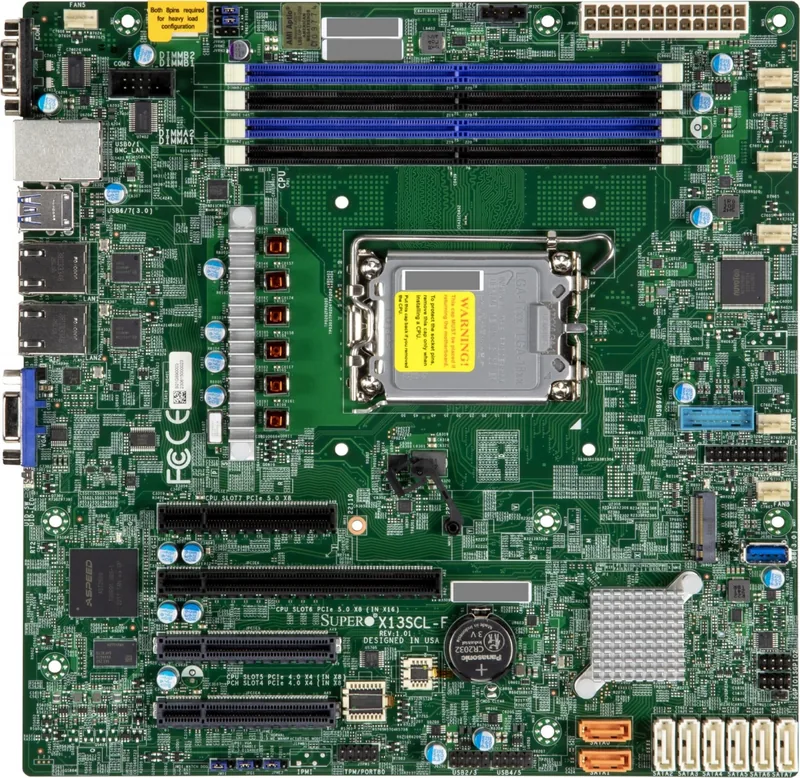
The Supermicro C262 / C266 platform is built for users who want serious server capabilities in a small, efficient form factor. Centered on the Intel C262 chipset and LGA1700 processor support, it blends dependable performance with the kind of control features that matter in real deployments. For compact servers, edge systems, and technical workstations, it offers a strong balance of speed, stability, and manageability.
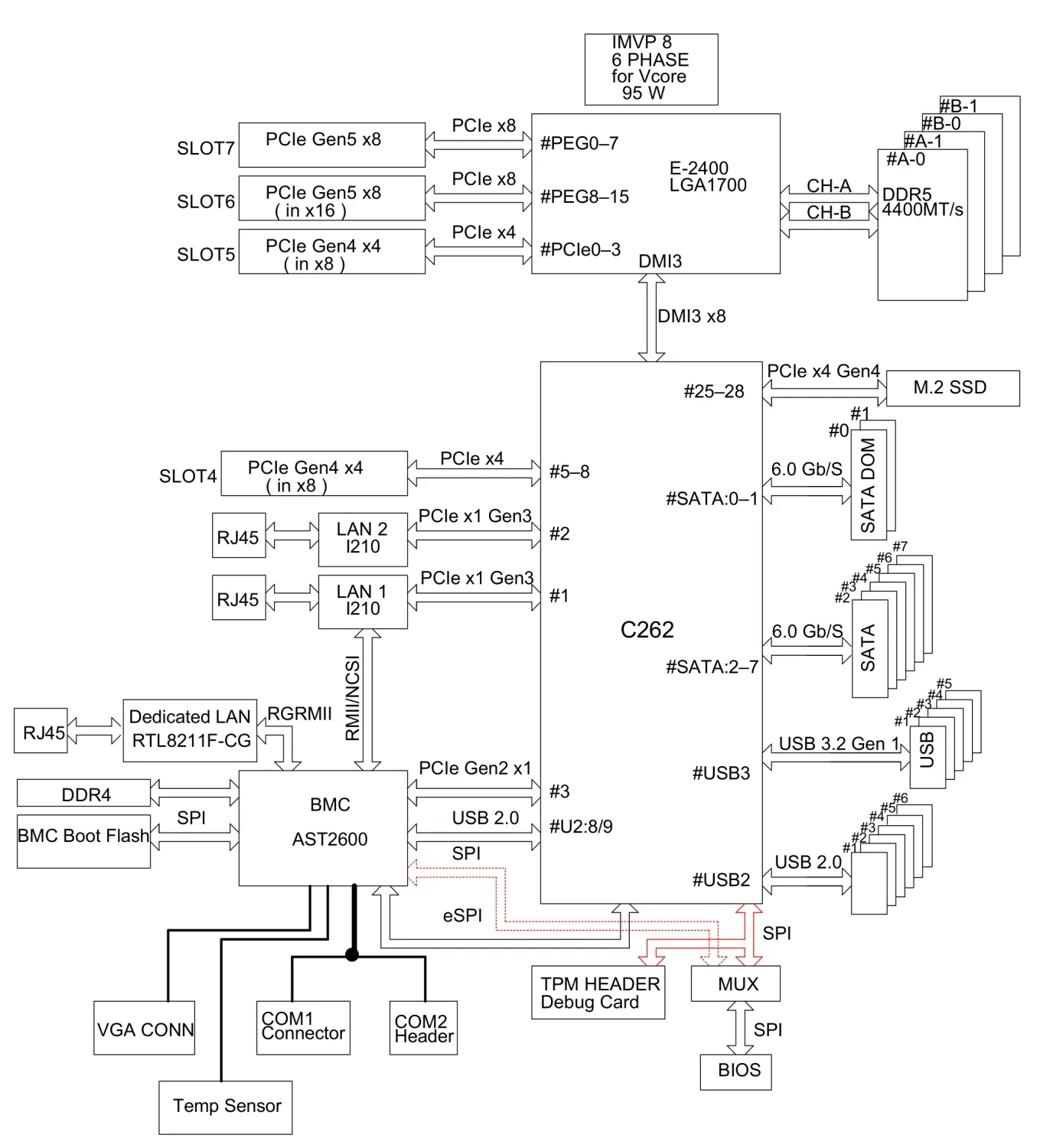
At the core of the board is support for Intel Xeon E-2400 and select 12th Gen Pentium processors, giving integrators a flexible path from entry-level builds to more capable business workloads. DDR5 ECC UDIMM support adds memory integrity and faster throughput, while the two-slot design keeps the layout practical and easy to service. With up to 64 GB of memory and speeds reaching 4800 MT/s in supported configurations, it is well suited to modern workloads that value consistency over excess.
Storage and expansion are another highlight. The board combines SATA 3.0, SlimSAS connectivity, and an M.2 PCIe 4.0 x4 slot, making it easy to mix boot drives, SSD cache, and traditional storage. A PCIe 5.0 x16 slot adds room for a high-performance add-in card, while onboard VGA, COM, USB, and dual LAN ports keep the system versatile for different deployment styles. That makes the platform especially attractive for network appliances, lab servers, and compact service nodes.
What truly sets this design apart is its server-minded feature set. Dedicated BMC support, TPM connectivity, watchdog controls, chassis intrusion detection, and system health monitoring provide the sort of visibility administrators expect in production hardware. Thermal management, voltage sensing, and fan monitoring help keep the system predictable under load, while BIOS options for power recovery and boot behavior make it easier to tailor the board to the environment it serves.
This is not a flashy consumer board; it is a practical tool for builders who want a compact motherboard with professional safeguards and long-term reliability. From installation discipline to BIOS tuning, every detail reflects a platform meant for stable operation and straightforward maintenance.
Notes
- Best for professional integration and controlled environments.
- Match memory, cooling, and processor support carefully.
- BIOS and jumper settings can significantly affect behavior.
Search for 67,706 Manuals online


Type-in Brand or Model