
Supermicro X12SCQ Manual
PDF manual · 128 Pages
English



Quick check
Incorrect answer, please try again.
Chat with your Supermicro X12SCQ manual using AI
Get instant AI answers from your Supermicro X12SCQ manual
Ask anything about the Supermicro X12SCQ. Answers come from this manual, with the pages they are based on.
Ask a Question
Do you recommend X12SCQ?
Yes NoFrequently Asked Questions
The board supports Intel 10th Gen Core i9/i7/i5/i3, Pentium, and Celeron processors in LGA1200 up to 10 cores. Note that certain 2M-cache SKUs for 10th/11th Gen are not supported and will not boot with current BIOS; always verify the CPU compatibility list on Supermicro’s website.
Is this answer helpful?
It supports up to 128GB of Non-ECC UDIMM DDR4 across four DIMM slots, with speeds up to 2933MHz. For optimal performance populate the blue DIMM slots first and use matched modules of the same size and speed; mixed speeds will default to the slowest module.
Is this answer helpful?
The board offers six SATA 3.0 ports, one M.2 PCIe 3.0 x4 slot (2242/2280/22110), and multiple PCIe slots (one x16, one x8, and two x4 lanes depending on configuration) for flexible storage and expansion configurations.
Is this answer helpful?
Power options include AC loss recovery (Last State, Power On, or Stay Off), standard 24-pin ATX plus required 8-pin CPU power, ACPI power management, and BIOS-controlled power button behavior. Always connect both 24-pin and 8-pin power connectors to ensure stable operation.
Is this answer helpful?
Onboard system health monitoring tracks voltages, multiple temperature sensors, and fan RPMs. The board supports TPM 2.0, SuperDoctor 5 for OS-level alerts (Windows/Linux), chassis intrusion detection, and detailed UEFI BIOS controls for CPU, memory, and thermal management.
Is this answer helpful?
Use ESD protection when handling components, ensure the CPU and heatsink are properly aligned and thermal paste/pads are correct, and never omit the required power connectors. Replace CMOS batteries with the specified type and dispose of them per local regulations.
Is this answer helpful?
Download the latest BIOS, drivers, and utilities from Supermicro’s support site. Follow Supermicro’s BIOS update instructions carefully and avoid flashing BIOS unless necessary; improper updates can render the system unbootable.
Is this answer helpful?
Advantages and Disadvantages
Advantages

- Robust Intel Q470E platform with LGA1200 support for 10th Gen CPUs and TPM 2.0 for hardware security
- Flexible I/O: multiple display outputs (HDMI/DP/DVI/VGA), dual Intel GbE, USB 3.2, six SATA 3.0, and M.2 PCIe x4
- Comprehensive system health and power features including SuperDoctor 5, ACPI options, fan monitoring, and BIOS power limits
- Expandable with multiple PCIe slots (x16/x8/x4) and support for up to 128GB DDR4 (2933MHz) in balanced configurations
- Service-friendly design: clear jumper functions, front-panel headers, detailed BIOS options, and thorough installation guidance
Disadvantages

- Does not support certain 10th/11th Gen 2M-cache CPU SKUs—verify CPU compatibility before purchase
- Only Non-ECC UDIMM memory supported—no ECC option for mission-critical error-correcting needs
- Micro ATX form factor limits number of full-size expansion cards and cooling/space options compared to larger boards
- Some advanced BIOS and power features require careful configuration to avoid instability for inexperienced users
- Onboard features like SuperDOM and TPM may need specific cables/modules sold separately
Product Specification
Form Factor
µATX
Socket
Intel 1200
Chipset
Intel Q470E
RAM
4x DDR4 DIMM, dual PC4-23466U/DDR4-2933, max. 128GB (UDIMM)
Expansion Slots
1x PCIe 3.0 x16, 1x PCIe 3.0 x8, 2x PCIe 3.0 x4, 1x M.2/M-Key (PCIe 3.0 x4, 22110/2280/2242), 1x M.2/E-Key (PCIe/Intel CNVi)
External Connectors
1x VGA (iGPU), 1x HDMI 2.0 (iGPU), 1x DVI-D (iGPU), 1x DisplayPort 1.4 (iGPU), 2x USB-C 3.1 (10Gb/s, Q470E), 2x USB-A 3.1 (10Gb/s, Q470E), 2x Gb LAN (Intel I219-LM/Intel I210-AT), 5x audio jacks, 1x Toslink, 1x PS/2 Combo
Internal Connectors
1x USB-C 3.1 Key-A Header (10Gb/s, Q470E), 2x USB 2.0 Header (480Mb/s, 4x USB 2.0), 6x SATA 6Gb/s (Q470E), 4x serial, 1x TPM-Header, 1x Speaker-Header, 1x Chassis Intrusion-Header
Cooling Headers
4x Fan 4-Pin
Lighting Headers
N/A
Buttons/Switches
N/A
Audio
7.1 (Realtek ALC888S)
Graphics
iGPU
Wireless
N/A
RAID Level
0/1/5/10 (Q470E)
Multi-GPU
N/A
Power Connectors
1x 24-Pin ATX, 1x 8-Pin EPS12V
Lighting
N/A
BIOS
1x 32MB (256Mb)
Special Features
All solid capacitors, TPM module (TPM 2.0), Remote management with compatible CPU (Intel vPro), Onboard TPM 2.0 support (Intel PTT)
USB Notation
Link
Product Description
Supermicro Q470E: Reliable Performance with the Supermicro Q470E Manual
The Supermicro Q470E-based motherboard delivers a robust platform tailored for professional integrators, IT technicians, and advanced users. Built around the Intel Q470E chipset and LGA1200 socket, this board supports 10th Gen Intel Core, Pentium, and Celeron processors (up to 10 cores) and offers a comprehensive mix of server-class features and desktop-class expandability. With support for up to 128GB DDR4 Non-ECC UDIMM memory at speeds up to 2933MHz, multiple PCIe lanes, and plentiful storage and I/O options, it’s designed for compact workstations, entry servers, and industrial systems that require stability and manageability.
Key Capabilities and Design Highlights
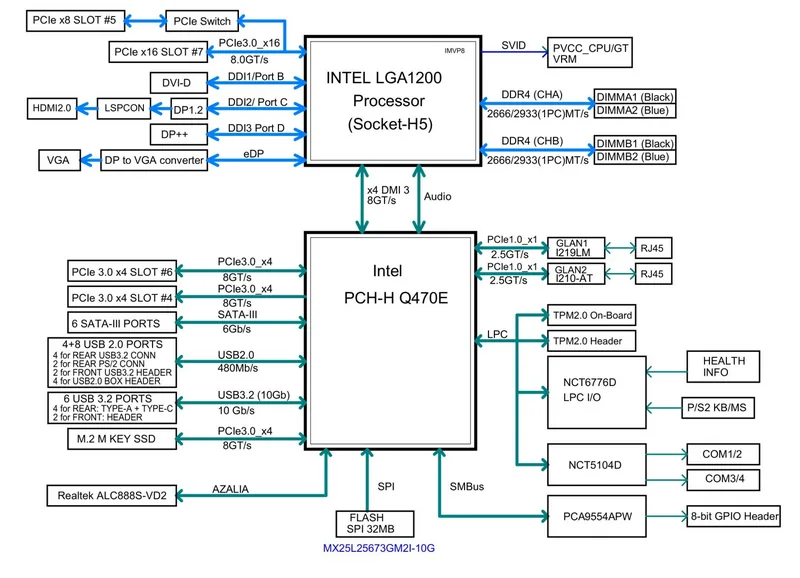
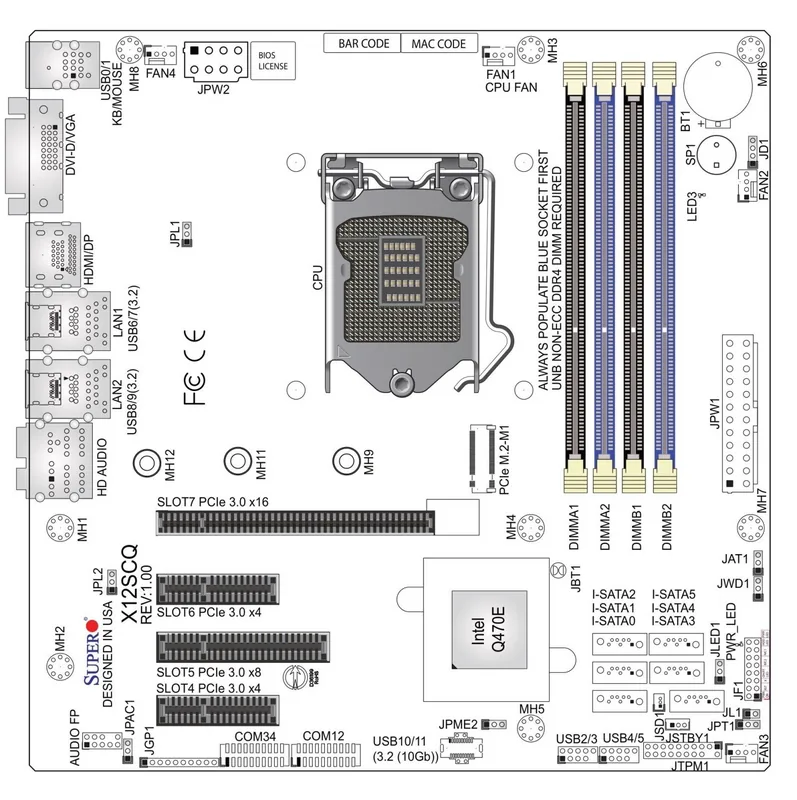
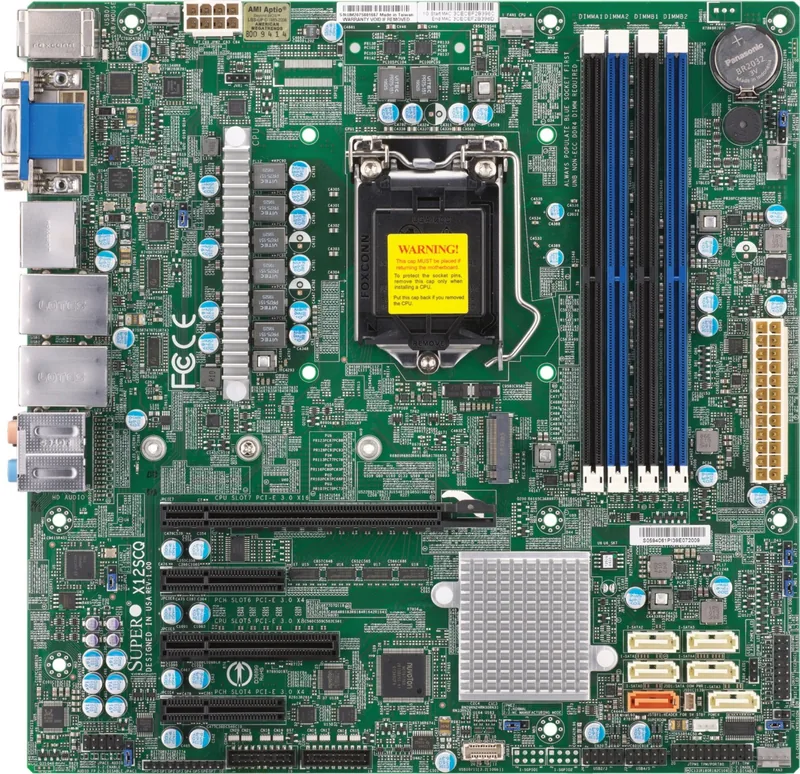
The board’s layout focuses on practical deployment and servicing. You’ll find four DIMM slots (populate the blue sockets first for best performance), one M.2 PCIe 3.0 x4 slot (supports 2242/2280/22110), several PCIe expansion slots (x16/x8/x4 combinations), and six SATA 3.0 ports for flexible storage configurations. Dual Intel Gigabit Ethernet controllers (I219LM and I210-AT) provide reliable networking and support link/activity LEDs for troubleshooting. Video outputs include HDMI 2.0, DisplayPort, DVI-D and VGA for multi-monitor setups powered by integrated Intel UHD Graphics.
On the management and reliability side, the board supports TPM 2.0, SuperDoctor® 5 system monitoring, ACPI power features (including configurable AC power recovery), and comprehensive hardware health monitoring for voltages, temperatures, and fans. The BIOS (AMI UEFI) offers extensive options for CPU, memory, chipset, and power tuning, including virtualization, C-state controls, power limits, and boot configuration.
Installation and maintenance are streamlined with clear front panel headers, multiple fan headers (4-pin PWM), COM headers, USB 2.0/3.2 headers, audio front-panel header, and general-purpose GPIO. The manual emphasizes safety and serviceability: ESD precautions, correct power connections (24-pin + 8-pin CPU), careful CPU/DIMM/heatsink handling, battery replacement, and jumper usage for functions like CMOS clear, watchdog, TPM, LAN enable/disable, and manufacturing mode.
Who Should Use It
This motherboard is ideal for system builders and IT pros needing a compact, configurable Micro-ATX platform with server-grade management features. It suits small servers, network appliances, edge devices, and workstation builds where remote management, hardware monitoring, and dependable networking are required.
Notes
- Always connect both the 24-pin ATX and 8-pin CPU power connectors. Failure to do so may damage components or void warranties.
- The board does not support certain 10th/11th Gen 2M-cache SKU processors; consult Supermicro’s CPU support list and BIOS updates before deployment.
- Use matched DDR4 Non-ECC UDIMM modules and populate blue DIMM slots first for balanced performance.
- Keep BIOS and driver packages current via Supermicro support pages to ensure compatibility and security.
- Follow ESD precautions and proper thermal installation when mounting CPU and heatsink.
Search for 67,706 Manuals online


Type-in Brand or Model