
Supermicro X11SSQ Manual
PDF manual · 151 Pages
English



Quick check
Incorrect answer, please try again.
Chat with your Supermicro X11SSQ manual using AI
Get instant AI answers from your Supermicro X11SSQ manual
Ask anything about the Supermicro X11SSQ. Answers come from this manual, with the pages they are based on.
X11SSQ Maintenance Schedule
Verify the battery supplies ~3VDC. Replace if it does not to prevent losing system setup configuration.
Replace with the same type (CR2032) when voltage is low or system loses configuration. Do not install upside down.
Free maintenance reminders
Timed to your purchase date. Always free, unsubscribe anytime.
Ask a Question
Do you recommend X11SSQ?
Yes NoFrequently Asked Questions
It is aimed at entry servers, storage systems, and embedded appliance builds. The H110 platform favors stability, compact design, and practical connectivity over high-end expansion features.
Is this answer helpful?
The board supports Intel 6th Generation Core i7, i5, i3, Pentium, and Celeron processors with an LGA1151 socket. Always confirm CPU compatibility before installation.
Is this answer helpful?
The X11SSQ-L supports up to 32GB of unbuffered DDR4 non-ECC memory across two DIMM slots. Using matched modules improves reliability and performance.
Is this answer helpful?
The board provides SATA 3.0 connectivity for standard drives and supports SuperDOM on I-SATA0. It is designed for practical storage setups in compact systems.
Is this answer helpful?
Yes. It includes DVI-D, HDMI, and DisplayPort output options, which makes it suitable for systems that need integrated graphics and flexible monitor support.
Is this answer helpful?
You need both a 24-pin ATX main power connector and a 4-pin 12V CPU power connector. The manual also recommends stable, high-quality ATX power supplies.
Is this answer helpful?
Advantages and Disadvantages
Advantages

- Supports Intel 6th Gen Core, Pentium, and Celeron CPUs in an LGA1151 socket.
- Offers DDR4 non-ECC memory support with onboard health and thermal monitoring.
- Includes practical I/O such as SATA 3.0, USB, HDMI, DisplayPort, and DVI-D.
- Adds useful management features like watchdog support, TPM header, and chassis intrusion detection.
Disadvantages

- The X11SSQ-L has fewer features than the Q170 version, including reduced expansion and connectivity.
- Maximum memory is limited to 32GB, which may not suit larger workloads.
- Installation is aimed at professional technicians, not casual DIY users.
- It is not intended for life-support, medical, nuclear, or other critical safety systems.
Product Specification
Form Factor
µATX
Socket
Intel 1151
Chipset
Intel H110
CPU Compatibility
Core i-7000, Core i-6000, Pentium Gold G4000, Pentium G4000, Celeron G3000
RAM
2x DDR4 DIMM, dual PC4-19200U/DDR4-2400, max. 32GB (UDIMM)
Expansion Slots
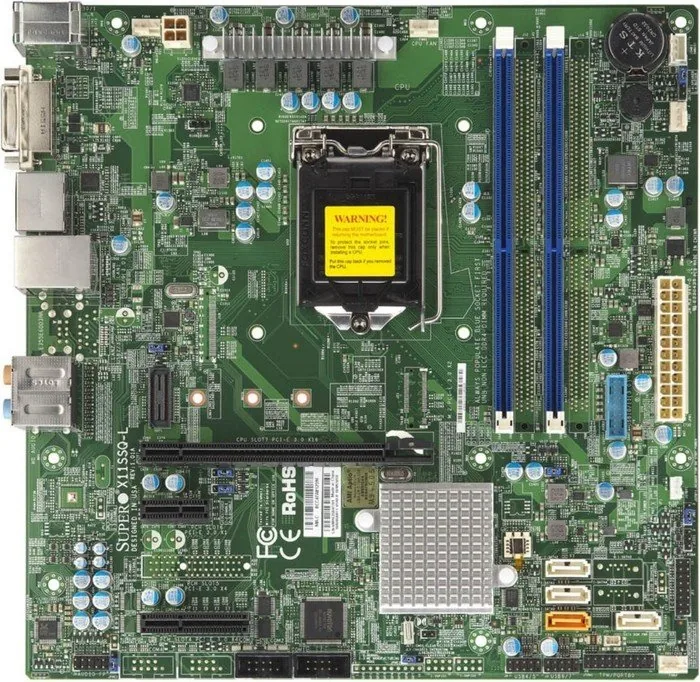
1x PCIe 3.0 x16, 1x PCIe 2.0 x4, 1x PCIe 2.0 x1
External Ports
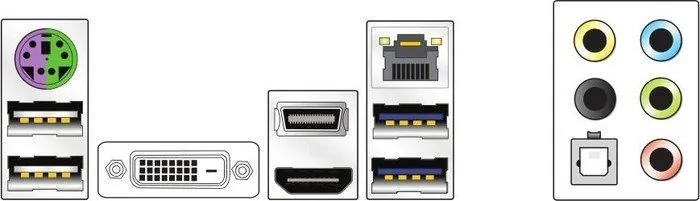
1x DVI-D (iGPU), 1x HDMI 1.4 (iGPU), 1x DisplayPort 1.2 (iGPU), 2x USB-A 3.0 (5Gb/s), 2x USB-A 2.0 (480Mb/s), 1x Gb LAN (Intel I219-LM), 5x Jack
Internal Ports
1x USB 3.0 Header (5Gb/s, 2x USB 3.0), 2x USB 2.0 Header (480Mb/s, 4x USB 2.0), 4x SATA 6Gb/s (H110), 2x serial, 1x TPM-Header
Cooling Headers
1x CPU fan 4-Pin, 3x fan 4-Pin
Lighting Header
N/A
Audio
7.1 (Realtek ALC888)
Graphics
iGPU
Wireless
N/A
RAID Level
N/A
Multi-GPU
N/A
Power Connectors
1x 24-Pin ATX, 1x 4-Pin ATX12V
Lighting
N/A
Special Features
All solid capacitors
USB Naming Convention
Link
Product Description
Supermicro H110 Manual: Practical Insights for the X11SSQ-L
The Supermicro H110 Manual for the X11SSQ-L motherboard reads like a compact roadmap for building a reliable small-server or embedded system. At its core, this board is designed around Intel’s 6th Generation Core, Pentium, and Celeron processors in an LGA1151 socket, making it a flexible choice for entry-level workloads where stability matters more than flashy extras. With DDR4 non-ECC memory support, SATA 3.0 storage, HDMI, DisplayPort, DVI-D, USB connectivity, and PCI Express expansion, it offers a balanced mix of modern I/O and practical compatibility.
What stands out most is how clearly the board targets real-world integration. The H110-based X11SSQ-L keeps things streamlined, while still delivering the essentials for compact servers, data storage boxes, and embedded appliances. Compared with the Q170 version, it trims some advanced features, but that also makes the platform simpler to deploy in cost-conscious builds. The design includes health monitoring, thermal control, watchdog support, and AC power recovery behavior, all of which are useful when uptime and serviceability matter.
From an installation perspective, the board is built for professional assembly. The manual emphasizes ESD precautions, correct CPU seating, careful heatsink mounting, and matching DIMM population order. That level of guidance is valuable because it reduces avoidable mistakes during setup. The X11SSQ-L supports up to 32GB of DDR4 memory through its two DIMM slots, making it well suited for lighter virtualization, compact business systems, or dedicated appliance roles rather than heavy workstation use. The onboard headers and connectors also help integrators connect front-panel controls, fan headers, audio, TPM, chassis intrusion detection, and standby power.
Security and management features add another layer of appeal. The platform supports technologies such as TPM, Intel TXT-related protections in the broader family, and system resource alerting through SuperDoctor 5. Add in fan monitoring, voltage checks, and temperature-driven control, and the board becomes more than just a processor socket and expansion slots—it becomes a dependable foundation for a controlled environment. For buyers searching for a practical motherboard reference, the Supermicro H110 Manual offers a clear picture of what this board can do and where it fits best.
Notes
- Best suited for entry server, storage, and embedded use cases.
- Requires proper power connections, including 24-pin ATX and 4-pin CPU power.
- Professional installation is recommended.
- Use matched memory modules for best results.
Search for 67,706 Manuals online


Type-in Brand or Model