
Supermicro X10SBA Manual
PDF manual · 99 Pages
English



Quick check
Incorrect answer, please try again.
Chat with your Supermicro X10SBA manual using AI
Get instant AI answers from your Supermicro X10SBA manual
Ask anything about the Supermicro X10SBA. Answers come from this manual, with the pages they are based on.
Ask a Question
Do you recommend X10SBA?
Yes NoFrequently Asked Questions
It uses the Intel Celeron J1900 Bay Trail-M SoC, a low-power quad-core processor designed for compact systems, embedded devices, and small business platforms that need efficient everyday performance.
Is this answer helpful?
The board supports up to 8 GB of unbuffered, non-ECC DDR3L SO-DIMM memory at 1.35V, with speeds up to 1333 MHz. Standard DDR3 modules are not the intended choice.
Is this answer helpful?
The two models differ in connectivity and expansion. The base model includes options such as SATA 3.0 ports, mini-PCI-E, mSATA, USB 4/5, USB 6, and eDP support, while the -L version has a reduced feature set.
Is this answer helpful?
Yes. Its low power use, multiple display outputs, dual LAN, compact size, and BIOS power-control options make it a good match for kiosks, signage players, thin clients, and similar always-on installations.
Is this answer helpful?
No. They share the same resource path, so mSATA and I-SATA1 cannot be active at the same time. You need to choose one based on your storage design and controller needs.
Is this answer helpful?
The BIOS can be updated through Supermicro’s flashing tools, and recovery instructions are provided for failed BIOS cases. It is important to use the correct image and avoid interrupting the process once it starts.
Is this answer helpful?
Advantages and Disadvantages
Advantages

- Low-power Intel J1900 quad-core design suits always-on and embedded workloads.
- Multiple display outputs, including HDMI, DisplayPort, VGA, and model-based eDP.
- Dual Intel Gigabit LAN improves network reliability for small servers and appliances.
- Strong monitoring features for fans, temperature, power loss, and system health.
Disadvantages

- Memory support is limited to 8 GB of 1.35V DDR3L SO-DIMM modules.
- Some features are model-specific, so X10SBA and X10SBA-L are not fully identical.
- mSATA and I-SATA1 share resources and cannot be used together at the same time.
- The X10SBA-L lacks SATA 3.0 ports and several expansion options found on the base model.
Product Specification
Form factor
Mini-ITX
CPU
Intel Celeron J1900, 4C/4T, 2.00-2.42GHz, 2MB Cache, 10W TDP, Codename "Bay Trail-M" (Silvermont, Intel 22nm)
Chipset
System-on-Chip (SoC)
RAM
2x DDR3 SO-DIMM, dual PC3L-10667S/DDR3L-1333, max. 8GB (UDIMM)
External ports
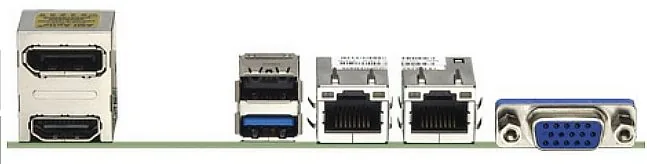
1x VGA (iGPU), 1x HDMI 1.4 (iGPU), 1x DisplayPort 1.1 (iGPU), 1x USB-A 3.0 (5Gb/s), 1x USB-A 2.0 (480Mb/s), 2x Gb LAN (Intel I210-AT)
Cooling headers
1x CPU fan 4-pin, 1x Fan 4-pin
Lighting headers
N/A
Audio
7.1 (Realtek ALC888S-VD2)
Graphics
Intel HD Graphics (iGPU), 4EU/32SP, 0.69-0.85GHz, Architecture "Gen 7" (Bay Trail GT1)
Wireless
N/A
Multi-GPU
N/A
Power connectors
1x 24-Pin ATX, 1x 4-Pin ATX12V, 1x 4-Pin Molex
Lighting
N/A
Special features
All solid capacitors, passively cooled
USB specification
Link
Product Description
Supermicro Bay Trail-M: Compact Power for Embedded and Small Business Builds
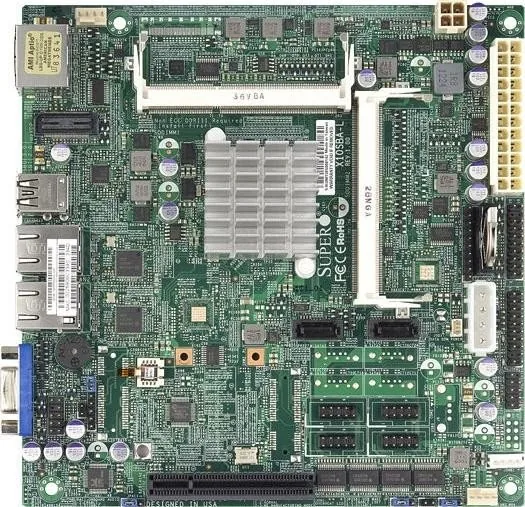
Supermicro’s X10SBA family, often discussed as the Supermicro Bay Trail-M Manual board, is a compact micro-ITX motherboard built around Intel’s Celeron J1900 SoC. It combines four cores, low power consumption, and integrated graphics in a small footprint, making it a practical foundation for entry-level servers, kiosks, digital signage, thin clients, and control-box systems.
Why it stands out
This board is designed for builders who want efficiency without giving up essential connectivity. It supports up to 8 GB of DDR3L 1.35V SO-DIMM memory, dual-channel operation, and a wide range of storage and expansion choices. Depending on the model, you can work with SATA 2.0 and SATA 3.0 options, mini-PCI-E, mSATA, or eDP support, giving integrators flexibility for different deployment needs.
Built for practical deployments
The board includes HDMI, DisplayPort, and VGA outputs, plus dual Intel Gigabit Ethernet ports for reliable networking. That mix makes it a strong fit for systems that need multiple display paths or stable wired connections. Supermicro also adds the kind of operational features that matter in real installations, such as ACPI power management, wake-on-USB support, fan control, and AC power-loss recovery settings.
Simple hardware integration
For installers, the layout is straightforward and well-labeled. Front panel headers, fan headers, serial ports, audio connections, TPM support, and power connectors are all documented clearly. The BIOS options further expand control over boot behavior, graphics allocation, USB compatibility, serial port configuration, and system health monitoring.
Reliability and maintenance
A major strength of this platform is its focus on monitoring and safety. Temperature sensors, fan status checks, overheat indicators, and software-based resource alerts help reduce downtime. The board also includes recovery options for CMOS and BIOS-related issues, which is valuable for long-life embedded systems where maintenance windows are limited.
Notes
- Use DDR3L 1.35V non-ECC SO-DIMM modules only.
- Install memory in the recommended order for best compatibility.
- Some connectors and features differ between the X10SBA and X10SBA-L versions.
- For storage planning, remember that mSATA and I-SATA1 cannot be used at the same time.
Overall, the X10SBA line is a compact, efficient choice for builders who need dependable performance, flexible I/O, and a board that fits neatly into professional small-form-factor projects.
Search for 67,706 Manuals online


Type-in Brand or Model