
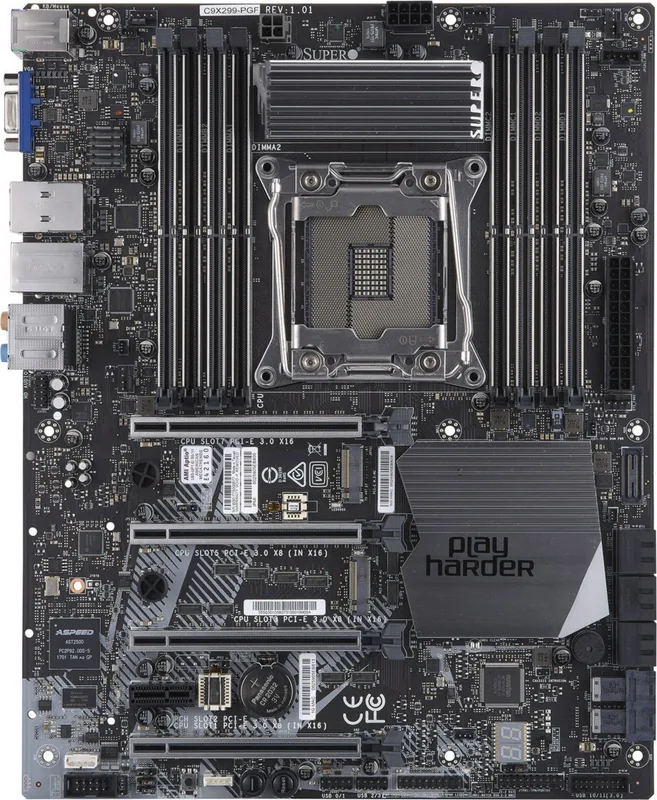
Supermicro Supero C9X299-PGF Manual
PDF manual · 143 Pages
English



Quick check
Incorrect answer, please try again.
Chat with your Supermicro Supero C9X299-PGF manual using AI
Get instant AI answers from your Supermicro Supero C9X299-PGF manual
Ask anything about the Supermicro Supero C9X299-PGF. Answers come from this manual, with the pages they are based on.
Ask a Question
Do you recommend Supero C9X299-PGF?
Yes NoFrequently Asked Questions
It supports a single Intel Core X-series processor in an LGA2066 R4 socket. The board is built for X299-platform systems that need strong performance and expansion options.
Is this answer helpful?
The board supports up to 128GB of unbuffered, non-ECC DDR4 memory. For best stability, use matching DIMMs of the same type, size, and speed.
Is this answer helpful?
Yes. It includes six SATA 3.0 ports, two M.2 connectors, and two U.2 connectors. That gives builders several ways to combine speed, capacity, and flexibility.
Is this answer helpful?
Yes. The X299 platform and BIOS options include CPU and memory tuning features, along with overclocking controls. Proper cooling and a strong power supply are important.
Is this answer helpful?
Confirm CPU support, use the correct heatsink, verify DDR4 compatibility, and make sure the chassis mounting holes and power connectors match the board.
Is this answer helpful?
The main difference noted is onboard high-definition audio. The C9X299-PGF includes back-panel HD audio ports, while the C9X299-RPGF does not.
Is this answer helpful?
Check the power supply quality, replace the CMOS battery if needed, and use the BIOS recovery instructions if the firmware becomes corrupted. The manual also provides beep codes and troubleshooting steps.
Is this answer helpful?
Advantages and Disadvantages
Advantages

- Supports Intel Core X-series CPUs on LGA2066 with X299 chipset performance.
- Up to 128GB DDR4 memory and dual-channel support for demanding workloads.
- Strong storage options with M.2, U.2, and six SATA 6Gb/s ports.
- Multiple PCIe 3.0 slots for graphics, expansion cards, and high-speed add-ons.
- Built-in monitoring, fan control, and BIOS recovery features improve reliability.
Disadvantages

- High-end features may be more than casual users need for basic desktop tasks.
- Requires careful power delivery, including both 24-pin and 8-pin connectors.
- Memory and CPU compatibility must be matched for best results.
- Overclocking and advanced setup can be complex for first-time builders.
Product Specification
Form Factor
ATX
Socket
Intel 2066
Chipset
Intel X299 (Platform "Basin Falls")
RAM
8x DDR4 DIMM, quad PC4-23466U/DDR4-2933, max. 256GB (UDIMM)
Expansion Slots
4x PCIe 3.0 x16 (2x x16, 2x x8), 1x PCIe 3.0 x1, 1x M.2/M-Key (PCIe 3.0 x4, 2280), 1x M.2/M-Key (PCIe 3.0 x4, 22110/2280), 2x Mini SAS HD SFF-8643 (PCIe 3.0 x4)
External Connectors
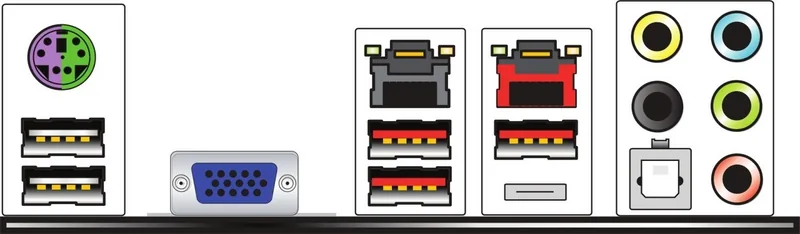
1x VGA (AST2500), 1x USB-C 3.1 (10Gb/s, ASM3142), 3x USB-A 3.1 (10Gb/s, ASM3142), 2x USB-A 3.0 (5Gb/s), 1x Gb LAN (Intel I210-AT), 1x 5GBase-T (Marvell AQtion AQC108), 5x Audio Jacks, 1x Toslink, 1x PS/2 Combo
Internal Connectors
1x USB-C 3.1 Key-A Header (10Gb/s, ASM3142), 1x USB 3.0 Header (5Gb/s, 2x USB 3.0), 2x USB 2.0 Header (480Mb/s, 4x USB 2.0), 6x SATA 6Gb/s (X299), 1x TPM-Header
Cooling Headers
5x Fan 4-Pin
Lighting Headers
N/A
Buttons/Switches
Power Button (internal), Reset Button (internal), Clear CMOS Button (internal)
Audio
7.1 (Realtek ALC1220)
Graphics
ASPEED AST2500 - Onboard
Wireless
N/A
RAID Level
0/1/5/10 (X299)
Multi-GPU
N/A
Power Connectors
1x 24-Pin ATX, 1x 8-Pin EPS12V, 1x 4-Pin ATX12V
Lighting
N/A
BIOS
1x 16MB (128Mb)
Special Features
Audio+solid capacitors, Diagnostic LED (Segment Display)
Manufacturer Warranty
three years (processing via dealer)
USB Notation
Link
Product Description
Supermicro Supero C9X299-PGF Bulk: Built for High-End X299 Builds
The Supermicro Supero C9X299-PGF bulk board is aimed at builders who want workstation-class control in an ATX layout. Designed around the Intel X299 chipset and an LGA2066 socket, it supports Intel Core X-series processors and brings strong expansion potential for demanding gaming rigs, creative workstations, and overclocking-focused systems. The Supermicro Supero C9X299-PGF bulk Manual is especially useful for anyone planning a careful first-time build or a serious upgrade.
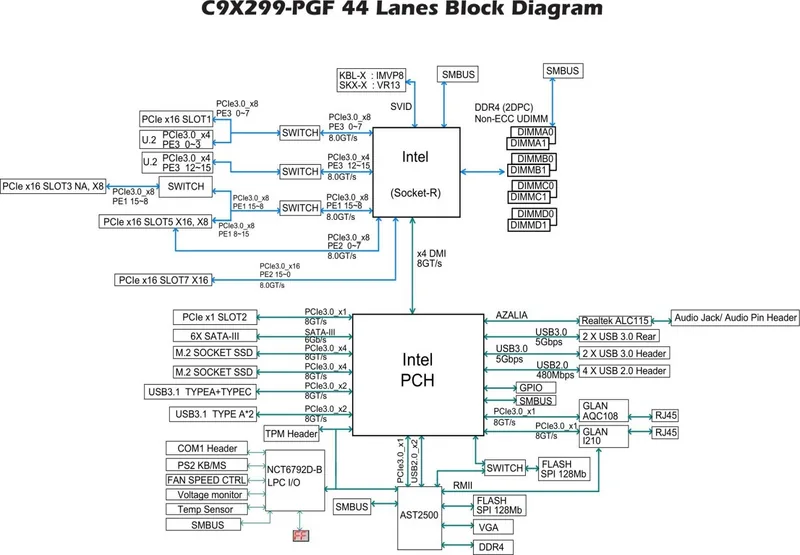
What makes this platform appealing is its balance of performance and flexibility. With support for up to 128GB of DDR4 UDIMM memory, dual-channel operation, and speeds reaching 3000+ MHz with overclocking, it gives system builders room to scale. The board also includes multiple PCIe 3.0 slots, two M.2 connectors, and two U.2 SSD connectors, making it a practical foundation for fast storage and graphics-heavy configurations.
Connectivity is another strong point. The board offers USB 3.1 Type-A and Type-C ports, USB 3.0 headers, dual Ethernet ports, legacy PS/2 support, VGA output, and front-panel headers for chassis integration. On the C9X299-PGF version, onboard high-definition audio adds another layer of convenience for users who want a more complete desktop setup without relying on add-on cards.
Supermicro also emphasizes reliability and monitoring. The board includes fan headers with speed control, thermal management support, voltage and temperature monitoring, chassis intrusion detection, and clear status indicators. For builders who value long-term stability, these safeguards can make a real difference when the system is under sustained load.
The BIOS and support tools round out the experience. The AMI BIOS offers EZ Mode and Advanced Mode, with options for boot management, CPU and memory tuning, overclocking, and recovery features. Troubleshooting guidance, beep codes, and recovery instructions make maintenance more approachable, especially for integrators and technicians.
In short, the C9X299-PGF bulk is not just a motherboard for raw specs; it is a board for users who want control, storage flexibility, and dependable system health tools in one package. It fits well in builds where uptime, tunability, and expansion matter as much as speed.
Notes
- Check CPU and memory compatibility before installation.
- Use a quality 24-pin and 8-pin power supply.
- Install a proper heatsink and maintain strong airflow.
- Keep BIOS and drivers updated for best stability.
Search for 67,706 Manuals online


Type-in Brand or Model