
Supermicro Supero C7Z170-OCE Manual
PDF manual · 133 Pages
English



Quick check
Incorrect answer, please try again.
Chat with your Supermicro Supero C7Z170-OCE manual using AI
Get instant AI answers from your Supermicro Supero C7Z170-OCE manual
Ask anything about the Supermicro Supero C7Z170-OCE. Answers come from this manual, with the pages they are based on.
Ask a Question
Do you recommend Supero C7Z170-OCE?
Yes NoVideo Manual
Supermicro SuperO Booster Software Guide
Frequently Asked Questions
It supports 6th Generation Intel Core i7/i5/i3 processors in the LGA1151 (H4) socket. For the latest compatibility details check Supermicro's product support resources.
Is this answer helpful?
The board supports up to 64GB of unbuffered non-ECC DDR4 memory across four DIMM slots. It accepts UDIMMs and supports dual-channel operation; populate slots in the recommended order for best performance.
Is this answer helpful?
Storage includes six Intel-controlled SATA 3.0 ports (I-SATA0–I-SATA5) with RAID 0/1/5/10 support, plus an M.2 PCIe 3.0 x4 slot for NVMe SSDs to enable high-speed storage configurations.
Is this answer helpful?
Use the AMI/UEFI BIOS recovery procedures documented by Supermicro: place a properly named BIOS image (e.g., SUPER.ROM) on a USB drive and use the BIOS Restore/Recovery switch or button. Follow the manual's step-by-step instructions to avoid bricking the board.
Is this answer helpful?
The board has dual Gigabit Ethernet ports (two RJ-45 LAN controllers) with activity/link LEDs and a Realtek ALC1150 codec providing 7.1-channel HD audio plus S/PDIF out and front audio header.
Is this answer helpful?
Use a high-quality ATX power supply with the 24-pin main connector and the 8-pin +12V CPU connector. It should meet ATX 2.02+ and preferably SSI guidelines; ensure adequate amperage for CPU, GPUs, and dual LAN requirements.
Is this answer helpful?
Yes — onboard POST/status display, power and M.2 LEDs, LAN activity/link LEDs, speaker/beep codes, CMOS clear, BIOS restore switch, and optional OC front panel provide diagnostics and recovery options.
Is this answer helpful?
Advantages and Disadvantages
Advantages

- Comprehensive I/O: USB 3.0/3.1 Type-C, HDMI, DisplayPort, DVI-D, and multiple front headers for modern connectivity.
- High-performance expansion: Multiple PCIe 3.0 x16/x8/x1 slots and M.2 x4 support for GPUs and NVMe storage.
- Robust monitoring and control: Onboard voltage/temperature sensors, firmware fan control, and SuperDoctor management tools.
- Overclocking features: Physical OC buttons, optional OC front panel, BIOS dual-boot and recovery options for safe tuning.
- Enterprise-grade networking and audio: Dual gigabit LAN controllers and Realtek ALC1150 7.1-channel audio support.
Disadvantages

- Older CPU generation: Supports 6th Gen Intel CPUs (LGA1151) — not compatible with newer CPU families.
- Complex jumper/switch layout: Numerous jumpers and onboard switches may overwhelm casual builders.
- Power requirements: Requires quality 24-pin + 8-pin (CPU) PSU and adequate amperage for stable operation.
- Manual-dependent recovery: BIOS recovery requires following specific procedures and USB media (risk if mishandled).
- Driver/source links: Users must retrieve updated drivers/BIOS from Supermicro sites; manual alone may not suffice.
Product Specification
Form Factor
ATX
Socket
Intel 1151
Chipset
Intel Z170
CPU Compatibility
Core i-7000, Core i-6000, Pentium Gold G4000, Pentium G4000, Celeron G3000
RAM
4x DDR4 DIMM, dual PC4-26400U/DDR4-3300 (OC), max. 64GB (UDIMM)
Expansion Slots
3x PCIe 3.0 x16 (2x x16, 1x x8), 2x PCIe 3.0 x4 (x1), 1x M.2/M-Key (PCIe 3.0 x4, 22110/2280/2260)
External Connectors
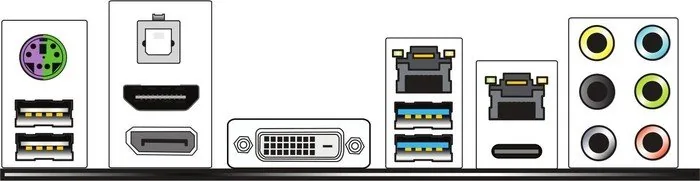
1x DVI-D (iGPU), 1x HDMI 1.4 (PS175), 1x DisplayPort 1.2 (iGPU), 1x USB-C 3.1 (10Gb/s, ASM1142), 2x USB-A 3.0 (5Gb/s), 2x USB-A 2.0 (480Mb/s), 2x Gb LAN (Intel I219-V/Intel I210-AT), 6x Jack, 1x Toslink, 1x PS/2 Combo
Internal Connectors
1x USB-A 3.1 Header (2x USB-A 3.1 (10Gb/s), ASM1142), 1x USB 3.0 Header (5Gb/s, 2x USB 3.0), 2x USB 2.0 Header (480Mb/s, 4x USB 2.0), 6x SATA 6Gb/s (Z170), 1x serial, 1x TPM-Header
Cooling Header
1x CPU Fan 4-Pin, 4x Fan 4-Pin
Lighting Header
N/A
Audio
7.1 (Realtek ALC1150)
Graphics
iGPU
Wireless
N/A
RAID Level
0/1/5/10 (Z170)
Multi-GPU
N/A
Power Connectors
1x 24-Pin ATX, 1x 8-Pin EPS12V
Lighting
N/A
Special Features
All solid capacitors, Diagnostic LED (Segment display), PLX PEX 8747 Switch
USB Naming Convention
Link
Product Description
Supermicro Supero C7Z170-OCE Manual — Overview and Key Features
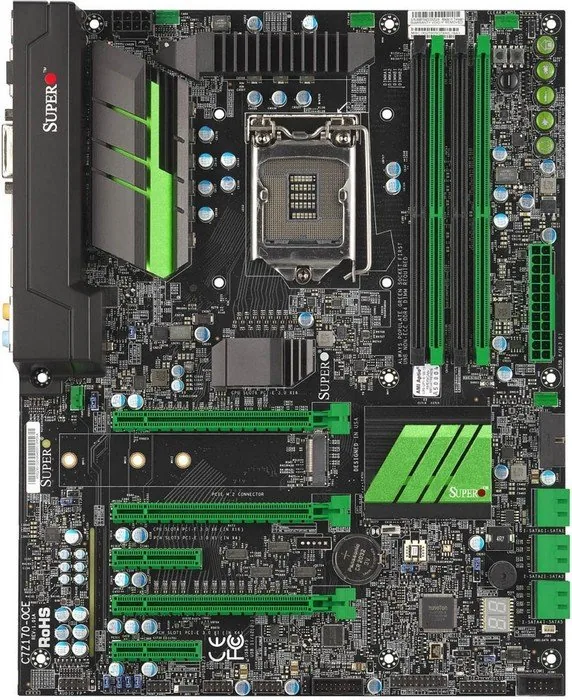
The Supermicro Supero C7Z170-OCE is a performance-focused ATX motherboard built around the Intel Z170 chipset and the LGA1151 socket for 6th-generation Intel Core processors. Engineered for enthusiasts and system integrators, this board supports up to 64GB of unbuffered non-ECC DDR4 memory across four DIMM slots, multiple PCIe 3.0 expansion slots, an M.2 socket for high-speed NVMe storage, and extensive I/O options including USB 3.0/3.1 (Type-C), HDMI, DisplayPort and DVI-D. With dual gigabit Ethernet controllers, Realtek ALC1150-based 7.1 audio, and robust power and thermal monitoring, the C7Z170-OCE targets overclocking and high-performance desktop builds.
Design and hardware highlights
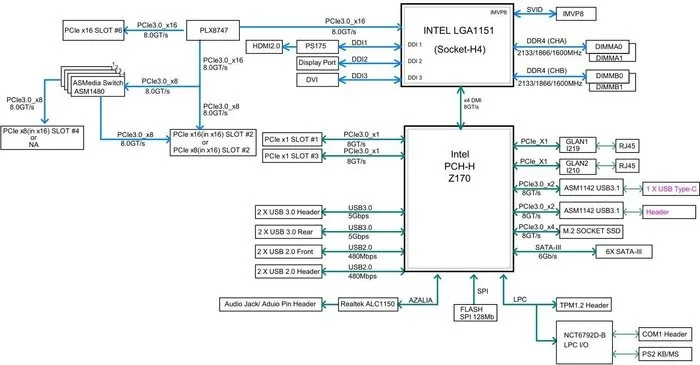
The board features a 6+1 phase CPU power design, a comprehensive fan-header array (five 4-pin headers), onboard health monitoring for voltages and temperatures, and firmware-driven fan control. Storage options include six SATA 3.0 ports (RAID 0/1/5/10) and an M.2 PCIe 3.0 x4 slot. Expansion is flexible with multiple CPU- and PCH-driven PCIe x16/x8/x1 slots, and a PLX/bridge arrangement to support varied GPU or accelerator configurations. The BIOS is AMI-based with UEFI GUI, supports recovery procedures and dual BIOS/boot-block features for resiliency during updates.
Usability and maintenance
Installation guidance stresses proper handling of static-sensitive components, correct seating of LGA1151 CPUs and DDR4 DIMMs, and the need for a quality 24-pin plus 8-pin (CPU) power supply that meets ATX/SSI specs. The manual documents jumpers and onboard switches for LAN/audio enable/disable, CMOS clear, BIOS recovery, watch dog, manufacturing mode, and BIOS restore. Diagnostic aids include onboard POST/status displays, onboard power and M.2 LEDs, LAN activity/link indicators, and speaker/beep code references.
Overclocking and management
The C7Z170-OCE includes physical OC controls (onboard and optional front-panel OC module) for rapid frequency adjustments and BIOS selection, plus SuperDoctor monitoring software support for Windows and Linux. Thermal safety features such as CPU thermal trip, PECI support, and chassis intrusion headers are provided for system management and reliability.
Notes:
- Supports Intel 6th Gen Core i3/i5/i7 processors (LGA1151) and Intel Z170 chipset features (PCIe 3.0, Intel RST, VT-d, AHCI).
- Default BIOS behavior and recovery paths are documented; follow BIOS recovery instructions carefully when updating firmware.
- Ensure proper airflow and a high-quality PSU to avoid thermal or power-related instability.
Search for 67,706 Manuals online


Type-in Brand or Model