
Supermicro SuperChassis 836BE1C-R1K03JBOD Manual
PDF manual · 90 Pages
English



Quick check
Incorrect answer, please try again.
Chat with your Supermicro SuperChassis 836BE1C-R1K03JBOD manual using AI
Get instant AI answers from your Supermicro SuperChassis 836BE1C-R1K03JBOD manual
Ask anything about the Supermicro SuperChassis 836BE1C-R1K03JBOD. Answers come from this manual, with the pages they are based on.
SuperChassis 836BE1C-R1K03JBOD Maintenance Schedule
Remove the failed fan's power cable, press the release tab to lift the fan from the tray, and replace it with a new one ensuring airflow direction matches.
Unplug the AC cord, push the release tab, pull out the module, insert the new module until it clicks, and plug the AC cord back in.
Power down the server, remove the cover and cables, remove power supplies, slide out the old distributor, and install the new one.
Ask a Question
Do you recommend SuperChassis 836BE1C-R1K03JBOD?
Yes NoFrequently Asked Questions
It is a storage expansion chassis designed to add large-capacity SAS/SATA storage to an existing server or storage platform. It works as a JBOD enclosure rather than a standalone server.
Is this answer helpful?
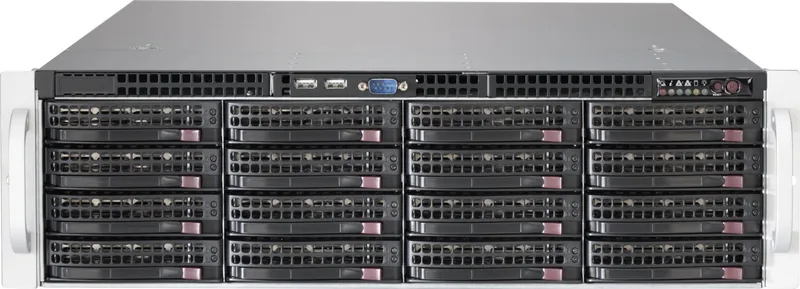
The enclosure supports up to sixteen hot-swappable 3.5-inch SAS or SATA drives. This makes it suitable for high-capacity storage expansion and backup-oriented deployments.
Is this answer helpful?
Yes. The chassis includes an IPMI-enabled control board that helps with power control, fan monitoring, and temperature visibility. That is useful for remote administration and maintenance.
Is this answer helpful?
Yes, the design uses redundant power supplies so the system can keep operating if one unit fails. This improves availability in professional rack environments.
Is this answer helpful?
Yes. The drive bays are hot-swappable, so drives can be removed and installed without shutting down the enclosure. Proper storage controller and software support is still required.
Is this answer helpful?
A clean, ventilated, restricted-access rack area is recommended. The enclosure is intended for professional installations where airflow, grounding, and service access are well controlled.
Is this answer helpful?
Advantages and Disadvantages
Advantages

- 16 hot-swap 3.5-inch SAS/SATA bays provide dense storage expansion in a compact 3U chassis.
- Redundant power and multi-fan cooling improve resilience and help support nonstop operation.
- IPMI-based control makes remote monitoring and basic chassis management easier.
- Rack rails and tool-friendly drive carriers simplify installation and routine servicing.
Disadvantages

- Requires correct SAS cabling and HBA planning, so setup is more complex than a simple external drive shelf.
- Best handled by experienced technicians; it is not ideal for casual or first-time installers.
- Full benefit depends on compatible backplanes, controllers, and storage software support.
- Open bays, cables, and fan/power modules demand careful maintenance and airflow management.
Product Specification
Hard Drive
N/A
Internal
16x 3.5" SAS/SATA 12Gb/s (16x front), JBOD, Hot-Swap
External
4x 12Gb/s SAS (Mini-SAS SFF-8644)
Additional Connections
1x RJ-45 (IPMI)
CPU
N/A
RAM
N/A
Fans
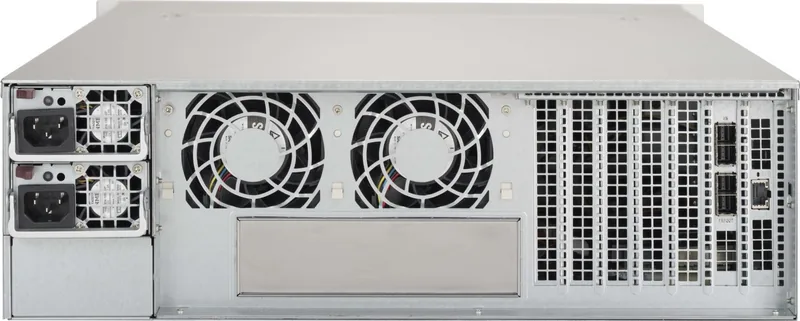
5x 3.15in (Hot-Swap)
Power Consumption
no specification (operation), no specification (idle)
Dimensions
17.21x5.20x25.47in (WxHxD), 3U
Weight
55.02lb
Special Features
redundant power supply
USB Notation
Link
Product Description
Supermicro SuperChassis 836BE1C-R1K03JBOD: Built for Scalable Storage
The Supermicro SuperChassis 836BE1C-R1K03JBOD black, 3U, 1200W redundant Manual centers on a storage enclosure designed for serious expansion. This 3U JBOD solution is made to help teams add capacity quickly without rebuilding the entire server stack. With its rack-ready layout, hot-swap drive bays, and redundant power design, it fits naturally into environments where uptime and flexible growth matter.
At the heart of the chassis is support for sixteen 3.5-inch SAS/SATA drives, giving administrators plenty of room for large-scale storage pools. The enclosure is meant to connect to a host system through external SAS cabling, making it a practical choice for backup targets, archival workloads, virtualization storage, and data-heavy applications. For teams planning ahead, the ability to expand storage independently of the main server can reduce upfront costs while keeping future upgrades simple.
Cooling and reliability are clearly prioritized. The chassis uses multiple hot-swap fans and a redundant power architecture to help keep operation steady under continuous load. That matters in dense rack environments where airflow, serviceability, and thermal stability can make a major difference in long-term performance. The black finish and compact 3U profile also help it blend into professional data center installations.
Another strong point is remote manageability. With IPMI support through the control board, users can monitor chassis health, adjust fan behavior, and power the unit on or off without always being physically present. For storage teams managing multiple enclosures, this kind of visibility can save time and simplify routine maintenance.
Installation is designed with rack deployment in mind, including slide rails and service-friendly drive carriers. The enclosure also supports cascading configurations, which makes it easier to build out layered storage systems as capacity demands increase. Whether used as a primary expansion unit or part of a larger JBOD chain, it offers a balanced mix of density, durability, and operational control.
Notes
- Best suited for professional storage deployments and experienced technicians.
- Check compatibility for backplanes, HBAs, and cable types before installation.
- Keep airflow clear and follow grounding and rack safety practices.
- Redundant components help improve availability, but proper setup is essential.
Search for 67,706 Manuals online


Type-in Brand or Model