
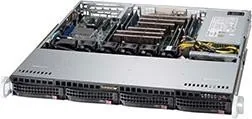
Supermicro SuperChassis 813MFTQ-441CB Manual
PDF manual · 54 Pages
English



Quick check
Incorrect answer, please try again.
Chat with your Supermicro SuperChassis 813MFTQ-441CB manual using AI
Get instant AI answers from your Supermicro SuperChassis 813MFTQ-441CB manual
Ask anything about the Supermicro SuperChassis 813MFTQ-441CB. Answers come from this manual, with the pages they are based on.
SuperChassis 813MFTQ-441CB Maintenance Schedule
Ensure no objects obstruct airflow in or out of the server. Pull excess cabling from airflow paths and use shorter cables if necessary.
If a fan fails, power down the system, remove the failed fan cable, pull the fan up to remove it, and replace with a new fan ensuring correct air direction.
Power down the system, unplug the cord, slide the failed module out, and replace it with an identical model before securing and powering up.
Free maintenance reminders
Timed to your purchase date. Always free, unsubscribe anytime.
Ask a Question
Do you recommend SuperChassis 813MFTQ-441CB?
Yes NoFrequently Asked Questions
It is a good fit for compact enterprise servers, storage appliances, and high-density rack deployments. The 1U layout helps maximize rack space while keeping essential expansion and drive support available.
Is this answer helpful?
The chassis supports four hot-swappable 3.5-inch SAS/SATA drive bays. This makes it practical for storage-focused builds where quick drive replacement and easy maintenance are important.
Is this answer helpful?
It supports ATX motherboards up to 12 x 10 inches. That gives system builders flexibility when selecting server boards for storage, networking, or general-purpose workloads.
Is this answer helpful?
Yes, it includes space for one full-height, half-length PCI expansion card. This is useful for add-on controllers, networking cards, or other server accessories.
Is this answer helpful?
This version is associated with a 440W power supply configuration. The SC813M family also includes other wattage options, but the 441CB model is built around efficient 440W power delivery.
Is this answer helpful?
Yes, the chassis is designed with multiple fans and airflow-guiding elements such as an air shroud. These features help direct air across key components and support stable operation in rack environments.
Is this answer helpful?
Advantages and Disadvantages
Advantages

- Compact 1U design helps save rack space while still supporting enterprise hardware.
- Four hot-swappable 3.5-inch SAS/SATA bays simplify storage replacement and scaling.
- Supports ATX motherboards up to 12 x 10 inches plus one full-height PCI card.
- Air shroud and multi-fan layout are built to improve cooling in dense deployments.
Disadvantages

- Limited 1U space can make cable routing and component access more difficult.
- Only one expansion card slot restricts upgrade flexibility.
- Best results depend on enterprise-grade drives, which can raise system cost.
- Internal servicing is intended for experienced technicians, not casual users.
Product Specification
External
4x 3.5" SAS/SATA 6Gb/s Hot-Swap
Internal
N/A
I/O
N/A
PCI Slots
1
Fan (front)
N/A
Fan (rear)
N/A
Fan (middle)
4x 1.57"
Fan (other)
N/A
Motherboard
up to ATX
Color
gray/black, interior gray
Dimensions (WxHxD)
17.20x1.69x19.80 in
Volume
2.50 gal
Weight
31.09 lb
Product Description
Supermicro SuperChassis 813MFTQ-441CB: Compact 1U Performance for Dense Server Environments
The Supermicro SuperChassis 813MFTQ-441CB black, 1U, 440W Manual describes a rack-friendly chassis built for modern server rooms where every inch matters. This 1U platform is designed to support high-density deployments while keeping maintenance practical, making it a strong fit for storage appliances, small enterprise servers, and performance-oriented infrastructure. Its compact depth and clean internal layout help system builders create efficient solutions without giving up essential expansion and cooling features.
At the heart of the design are four hot-swappable 3.5-inch SAS/SATA drive bays, which make storage upgrades and drive replacement much easier during operation. The chassis also supports ATX motherboards up to 12 x 10 inches and provides space for one full-height, half-length PCI expansion card, giving integrators enough flexibility for networking, storage, or controller add-ons. For teams working in racks, this balance of compact size and hardware compatibility is especially valuable.
Cooling and airflow are clearly central to the product philosophy. The chassis uses multiple heavy-duty fans and an air shroud design that guides airflow to critical components. That focus helps maintain stable temperatures in tight rack environments where heat can build up quickly. The manual also highlights careful maintenance practices, which reflects the chassis’s role in professional deployments where uptime and safe service procedures matter just as much as performance.
Power options are another standout element. The 440W configuration offers an efficient match for the chassis class, while the broader SC813M family shows how Supermicro supports multiple wattage levels and even redundant designs in related models. For buyers comparing configurations, the 441CB variant sits in a sweet spot: compact, capable, and suited to workloads that need reliable power without oversized hardware.
Notes
- Best suited for rack-based systems that need a small footprint and dependable thermal design.
- Enterprise-grade drives are recommended for the best reliability and compatibility.
- Trained technicians should handle installation, maintenance, and internal component changes.
- Proper cable routing and airflow clearance are important to get the most from this chassis.
Overall, this chassis is a practical choice for IT teams that want a durable 1U foundation with strong storage support, straightforward serviceability, and a design philosophy centered on efficient enterprise deployment.
Search for 67,706 Manuals online


Type-in Brand or Model