

Supermicro SuperChassis 523L-505B Manual
PDF manual · 43 Pages
English



Quick check
Incorrect answer, please try again.
Chat with your Supermicro SuperChassis 523L-505B manual using AI
Get instant AI answers from your Supermicro SuperChassis 523L-505B manual
Ask anything about the Supermicro SuperChassis 523L-505B. Answers come from this manual, with the pages they are based on.
SuperChassis 523L-505B Maintenance Schedule
Verify no cables or objects obstruct airflow and ensure all fans operate normally to prevent overheating.
Replace non-operating fans with the same model while the system is running if necessary.
Replace failed power supply units by disconnecting power and removing mounting screws.
Free maintenance reminders
Timed to your purchase date. Always free, unsubscribe anytime.
Ask a Question
Do you recommend SuperChassis 523L-505B?
Yes NoFrequently Asked Questions
The SC523L-505B ships with a 500W high-efficiency power supply that supports 100–240V AC auto-switching and provides multi-rail DC outputs; the unit includes a front/back LED to indicate power status and allows tool-light replacement per the manual.
Is this answer helpful?
The chassis includes two fixed 3.5" drive bays and supports up to seven low-profile expansion slots, providing a balance of internal storage and PCI expansion for compact server builds.
Is this answer helpful?
Cooling relies on two 80 x 38 mm system fans and a removable air shroud that channels airflow across the motherboard and drives; proper cable routing, shroud placement, and functional fans are essential to prevent overheat conditions indicated by the front-panel LEDs.
Is this answer helpful?
Yes. The manual provides step-by-step procedures: disconnect power, remove the chassis cover, and replace the fan or power module. The power supply is designed for simple removal and reinstallation with a bracket and screws; follow safety warnings and ensure all power sources are disconnected first.
Is this answer helpful?
The chassis includes rail kits with inner and outer rails and adjustable brackets to fit racks 29"–35.25" deep. It can also be mounted in telco-style open racks using L-brackets. The manual details bracket placement, screw types, and stability precautions.
Is this answer helpful?
Yes. Follow standardized AC/DC safety statements: disconnect all power sources before servicing, handle batteries correctly, ensure proper grounding, avoid exposed DC terminals, and comply with local electrical codes and disposal regulations as described in the manual.
Is this answer helpful?
Check the front-panel LEDs to identify the issue, verify fan operation and orientation, inspect and reroute any cables obstructing airflow, confirm the air shroud is installed correctly, and ensure the ambient room temperature is within the chassis's operating range; replace failed fans per maintenance instructions if necessary.
Is this answer helpful?
Advantages and Disadvantages
Advantages

- Short 14.5" depth ideal for space-limited racks and edge deployments.
- Efficient 500W auto-switching power supply with tool-light replacement.
- Focused air shroud and dual high-performance fans for targeted cooling.
- Serviceable design: removable cover, drive trays, and easy motherboard access.
- Seven low-profile expansion slots for flexible I/O and peripheral upgrades.
Disadvantages

- Only two fixed 3.5" drive bays limit on-board storage expansion.
- 2U form factor still requires rack space and proper airflow clearance.
- Fans are small (80 x 38 mm) and may be louder under heavy load.
- Some motherboard layouts require optional standoffs and shroud tab removal.
- Single power supply design lacks internal redundancy for critical sites.
Product Specification
External
1x 5.25" Slimline (optional)
Internal
2x 3.5"
I/O
N/A
PCI Slots
7 (low profile)
Fan (front)
N/A
Fan (rear)
2x 3.15in
Fan (middle)
N/A
Fan (other)
N/A
Motherboard
up to ATX
Color
gray/black, interior gray
Dimensions (WxHxD)
16.77x3.50x14.49in
Volume
0.49 cu ft
Weight
28.00 lb
Product Description
Supermicro SuperChassis 523L-505B black, 2U, 500W Manual
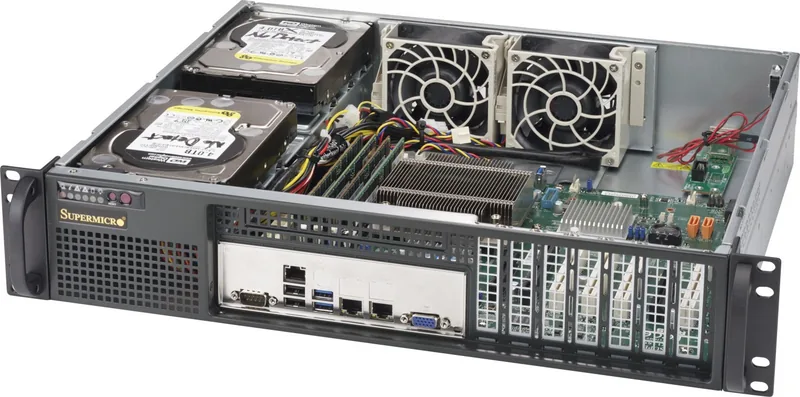
The Supermicro SuperChassis 523L-505B is a compact, rack-ready 2U server chassis designed for space-constrained deployments while still delivering enterprise-grade features. Finished in black and equipped with a 500W high-efficiency power supply, this short-depth (14.5") enclosure balances thermal performance, serviceability, and versatile rack integration for small data centers, edge sites, and telco racks.
Inside the chassis are two fixed 3.5" drive bays, support for seven low-profile expansion slots, and a focused air-shroud design that funnels cooling from two high-performance 80 x 38 mm fans directly across critical components. The front panel offers convenient power and reset buttons plus multiple status LEDs to monitor power, HDD activity, NIC activity, fan health, and overheat conditions. The unit ships with preinstalled fans and a user-replaceable 500W power module that supports auto-voltage switching (100–240V), and the replacement process is tool-light for quick field service.
Installation and maintenance are streamlined: removable chassis cover, tool-accessible drive trays, a removable air shroud to ease motherboard installation, and clear steps for replacing fans or the power supply. The chassis includes permanent and optional standoffs for motherboards, and the manual details safe power removal, battery handling, DC terminal cautions, and other electrical safety practices. Rail kits and bracket instructions let you mount the SC523L-505B into standard racks (29"–35.25" depth) or telco-style open racks using L-brackets.
Thermal management emphasizes proper cable routing, correct air shroud placement, and ensuring fans are operating; LEDs alert administrators to fan failures or overheat states so corrective actions (re-seating shrouds, rearranging cables, verifying fan operation) can be taken. The chassis also includes guidance on rack placement, ambient operating temperature, mechanical loading, and grounding to maintain stability and safety during installation and servicing.
Overall, the Supermicro SC523L-505B is aimed at integrators and technicians who need a short-depth, serviceable 2U platform with efficient power, focused cooling, and clear maintenance procedures—making it well suited for compact server rooms, edge deployments, and telco environments.
Notes:
- Supports two fixed 3.5" drives and seven low-profile expansion slots.
- Air shroud must be used for optimal cooling; remove only necessary perforated tabs.
- Power supply is hot-replaceable with clear removal/installation steps and status LEDs.
- Follow all safety and electrical code guidance when installing or servicing.
Search for 67,706 Manuals online


Type-in Brand or Model