
Supermicro MCP-220-82616-0N Manual
PDF manual · 2 Pages
English



Quick check
Incorrect answer, please try again.
Chat with your Supermicro MCP-220-82616-0N manual using AI
Get instant AI answers from your Supermicro MCP-220-82616-0N manual
Ask anything about the Supermicro MCP-220-82616-0N. Answers come from this manual, with the pages they are based on.
Ask a Question
Do you recommend MCP-220-82616-0N?
Yes NoFrequently Asked Questions
The insert supports 2.5” SAS and SATA drives: up to 12 Gbps for SAS3 and up to 6 Gbps for SATA3, allowing use of modern high-performance 2.5” enterprise drives.
Is this answer helpful?
Compatibility includes Supermicro chassis families such as 216B, 826B, 417B, 846X, and 847B. Verify your specific chassis model for mounting location compatibility before purchasing.
Is this answer helpful?
Set the J52 and J53 jumpers to match your motherboard’s SGPIO header mapping. There are four jumper configurations; if the jumper settings don’t match the SGPIO header, the fail LEDs will not function correctly.
Is this answer helpful?
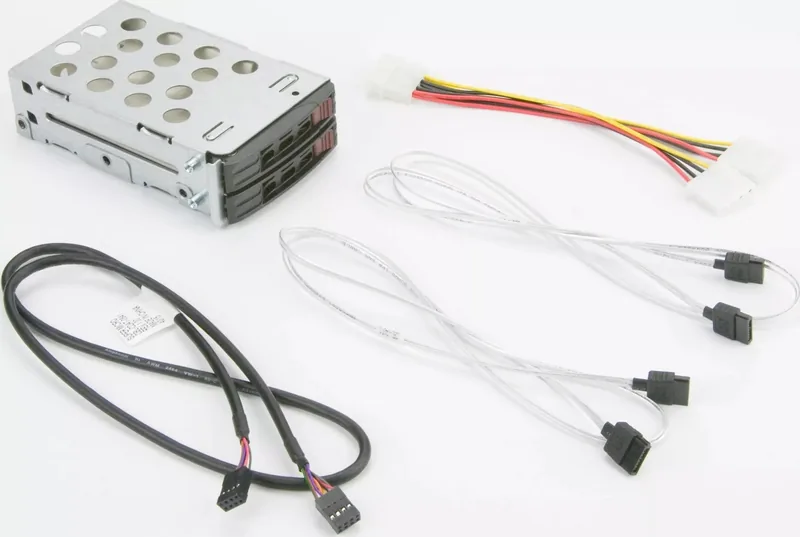
The kit typically includes a 12Gbps backplane for 2.5” drives, two tool-less 2.5” drive trays, SATA S-S cables, a 4-pin power Y-cable, an 8-pin SGPIO cable, and mounting hardware such as a metal cage, screws, and stickers.
Is this answer helpful?
Installation is straightforward: connect SATA, SGPIO, and power cables; mount the insert in the chassis; install drives into the tool-less trays; and insert trays into the backplane. Ensure jumper settings align with the SGPIO header for LED functionality.
Is this answer helpful?
For maximum performance in certain layouts you may want the optional 12G mini SAS HD to 4 SATA cable (CBL-SAST-0699). Some setups may require specific cable lengths or adapter types based on chassis and motherboard layout.
Is this answer helpful?
Yes. It’s backward compatible with previous MCP-220 models, enabling deployment alongside older units in environments that mix legacy and newer backplanes or chassis.
Is this answer helpful?
Advantages and Disadvantages
Advantages

- Supports dual 2.5” hot-swappable drives with 12 Gbps SAS3 and 6 Gbps SATA3 compatibility.
- Tool-less drive trays reduce maintenance time and simplify drive swaps.
- Includes necessary cabling and a 12Gbps backplane for straightforward installation.
- SGPIO support with configurable jumper settings enables drive fail/locate LED reporting.
- Backward compatible with older MCP-220 models and several Supermicro chassis families.
Disadvantages

- Requires correct jumper configuration to enable fail LEDs; misconfiguration disables indicators.
- Physical compatibility limited to supported Supermicro chassis models; not universal.
- Optional 12G mini SAS cable may be needed separately for optimal throughput.
- Only two 2.5” bays—may be insufficient for very high-density storage requirements.
- Some users may need to consult motherboard documentation to match SGPIO mappings.
Product Specification
Type
Tray/Carrier
Internal connectors
2x 2.5" SATA 6Gb/s
External connectors
N/A
Hot-Swap
Yes
Chassis cooling
N/A
Tray cooling
N/A
Power supply
1x 4-Pin Molex
Lock
No
Product Description
Supermicro MCP-220-82616-0N Insert/Carrier Manual — Product Overview
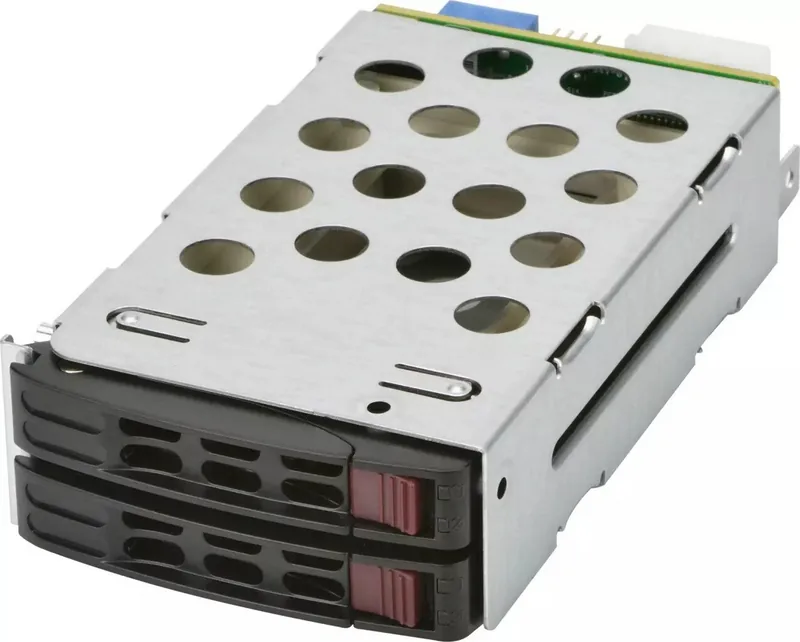
The Supermicro MCP-220-82616-0N Insert/Carrier is a compact dual 2.5” drive kit designed to expand storage capacity in compatible Supermicro chassis. Engineered for modern data centers and dense server environments, this insert supports both 12 Gbps SAS3 and 6 Gbps SATA3 drives, delivering hot-swappable convenience and flexible connectivity. Its tool-less 2.5” drive trays simplify drive installation and replacement, minimizing downtime during maintenance.
Key capabilities and design
This insert provides two hot-swappable bays that integrate with Supermicro backplanes and support SGPIO-driven fail/locate LED indicators. The module offers four SAS/SATA port jumper configurations to align with various SGPIO header mappings, ensuring accurate status reporting for each bay. Backward compatibility with earlier models like MCP-220-82609-0N means it can be adopted in mixed-deployment environments.
The kit includes a 12Gbps backplane tailored for 2.5” SAS/SATA drives and essential cabling—power Y-cable, SATA S-S cables, and SGPIO cable—plus two tool-less drive trays. Mounting hardware and a metal cage are provided for secure installation in compatible chassis such as the 216B, 826B, 417B, 846X, and 847B families.
Installation and configuration
Installation is straightforward: connect SATA, SGPIO, and power cables; mount the drive kit into the designated chassis location; install drives into the tool-less trays; and slide trays into the backplane. Proper jumper placement on J52/J53 is crucial for matching the SGPIO header mapping; incorrect jumper settings will prevent fail LEDs from functioning. For high-speed internal wiring, there is an optional mini SAS HD to 4 SATA 12G cable available.
Practical use cases
This insert/carrier is ideal for servers requiring high I/O density in constrained drive bay space—such as virtualization hosts, database nodes, edge servers, and storage-journal or cache tiers. Its hot-swap ability and LED status indicators support quick serviceability, making it suitable for environments where uptime and fast recovery are priorities.
Notes
- Ensure jumper settings correspond to the motherboard’s SGPIO header to enable fail/locate LEDs.
- Verify chassis compatibility before purchase.
- Use the optional 12G mini SAS cable for maximum throughput where needed.
Search for 67,706 Manuals online


Type-in Brand or Model