

Supermicro C741 Series Manual
PDF manual · 139 Pages
English



Quick check
Incorrect answer, please try again.
Chat with your Supermicro C741 Series manual using AI
Get instant AI answers from your Supermicro C741 Series manual
Ask anything about the Supermicro C741 Series. Answers come from this manual, with the pages they are based on.
C741 Series Maintenance Schedule
Ensure all heatsink fans and CPU/system fans work properly. Check hardware monitoring settings to verify temperatures are within normal range.
Verify the battery supplies approximately 3 VDC. Replace with the same type if it does not supply the correct voltage.
Free maintenance reminders
Timed to your purchase date. Always free, unsubscribe anytime.
Ask a Question
Do you recommend C741 Series?
Yes NoFrequently Asked Questions
No, the products are not intended for life support systems or medical equipment where failure could result in significant injury or loss of life.
Is this answer helpful?
The system supports up to 4TB capacity with 16 DIMMs of 256GB 3DS RDIMM/RDIMM DDR5 ECC memory.
Is this answer helpful?
The motherboard features four PCIe 5.0 x16 slots and two PCIe 5.0 x8 slots for maximum connectivity.
Is this answer helpful?
The primary difference is networking ports; X13DEI has 1G LAN while X13DEI-T has 10G LAN support.
Is this answer helpful?
No, this motherboard is intended to be installed and serviced by professional technicians only.
Is this answer helpful?
Advantages and Disadvantages
Advantages

- Supports dual Intel Xeon processors up to 350W TDP
- Up to 4TB DDR5 ECC memory capacity across 16 DIMMs
- Multiple PCIe 5.0 expansion slots for high bandwidth
- Integrated Baseboard Management Controller for remote administration
- Trusted Platform Module for enhanced system security
Disadvantages

- Installation requires professional technicians only
- Not intended for life support or critical safety systems
- Specific CPU carrier types required for SP XCC and SP MCC
- High static sensitivity requiring ESD precautions
- Updates made without notice or notification to users
Product Specification
Socket
Intel 4677
Chipset
Intel C741
Header Lighting
N/A
Buttons/Switches
UID Button (External)
Graphics
ASPEED AST2600 - Onboard
Wireless
N/A
RAID Level
0/1/5/10 (C741)
Multi-GPU
N/A
Lighting
N/A
BIOS
1x 32MB (256Mb)
Features
All solid capacitors, ECC Support, IPMI 2.0, Onboard TPM 2.0 Support (Intel PTT), Remote Management with compatible CPU (Intel vPro)
USB Naming
Link
Product Description
Welcome to the Future of Enterprise Computing
Welcome to the future of enterprise computing with the Supermicro C741 platform. This high-performance motherboard series is engineered for system integrators and IT professionals seeking scalability. The architecture leverages the Intel C741 chipset to support dual 4th Generation Intel Xeon Scalable Processors. This setup enables up to 60 CPU cores per socket and supports thermal design power up to 350 watts. Memory capacity reaches an impressive 4TB using 16 DIMMs of DDR5 ECC technology.
Expansion and Networking
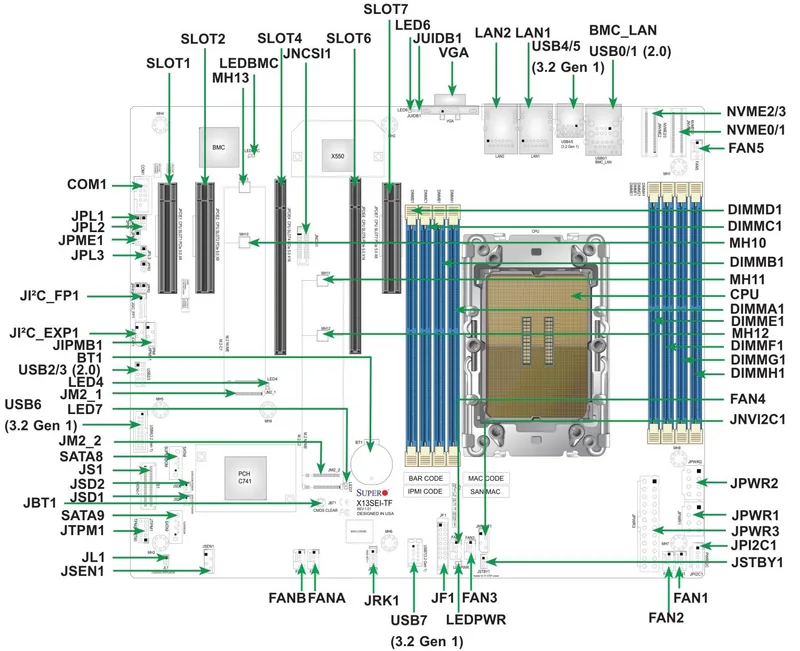
Expansion flexibility defines this product line. Users benefit from four PCIe 5.0 x16 slots and two PCIe 5.0 x8 slots. Additional storage options include M.2 slots and multiple SATA connections. Networking varies between the two models regarding LAN speed. The X13DEI features 1 Gigabit ports while the X13DEI-T offers 10 Gigabit capability via Broadcom controllers. Management is streamlined through the ASPEED AST2600 Baseboard Management Controller.
Security and Maintenance
Security remains paramount for data integrity. Features include Trusted Platform Module support and hardware Root of Trust. This ensures the system is protected against critical data corruption. Supermicro integrates advanced monitoring for voltage and temperature. Professionals should consult standard Supermicro C741 Manual resources for detailed installation guidelines regarding static sensitivity and hardware assembly.
Designed for general purpose servers, this hardware excels in virtualization and High Performance Computing applications. It is optimized for future specifications with flexible I/O support. Installation requires professional technicians due to the complexity of dual CPU carriers. Proper ESD precautions are essential during mounting. The design includes comprehensive LED indicators for status tracking.
Power management includes ACPI features and redundant power supply detection. System health is continuously monitored via firmware. Cooling strategies involve dual cooling zones and low-noise fan speed control. This platform transforms data center operations by providing robust computing power and reliability. Whether for AI acceleration or deep learning, the infrastructure supports demanding workloads effectively. Always verify compatibility with available drivers and utilities online.
Safety and Support
Safety warnings state this product is not intended for life support systems. Buyers assume all risk for ultra-hazardous applications. California regulations apply to perchlorate materials in lithium coin cells. Disputes are governed by Santa Clara County laws. Backplane connectivity allows for complex configurations using SlimSAS connectors with RAID support. The BMC reset function offers cold reboot capabilities for maintenance tasks. This combination of performance and security makes it a top choice. It represents a significant step forward in processing capabilities for modern workloads.
Search for 67,706 Manuals online


Type-in Brand or Model