
Supermicro C236 Series Manual
PDF manual · 121 Pages
English



Quick check
Incorrect answer, please try again.
Chat with your Supermicro C236 Series manual using AI
Get instant AI answers from your Supermicro C236 Series manual
Ask anything about the Supermicro C236 Series. Answers come from this manual, with the pages they are based on.
C236 Series Maintenance Schedule
Ensure all heatsink fans and CPU/system fans work properly. Check IPMI hardware monitoring to verify temperatures are within normal range.
Verify the motherboard battery supplies approximately 3VDC. Replace with a new one if it does not supply the correct voltage.
Free maintenance reminders
Timed to your purchase date. Always free, unsubscribe anytime.
Ask a Question
Do you recommend C236 Series?
Yes NoFrequently Asked Questions
It supports Intel Xeon E3-1200 v5/v6, 6th and 7th Gen Core i3, Pentium, and Celeron processors in an LGA1151 socket, with an 80W max TDP limit.
Is this answer helpful?
The board supports up to 64GB of ECC DDR4 UDIMM memory across four DIMM slots. Matched modules are recommended for better interleaving and performance.
Is this answer helpful?
The TF model includes two 10GbE ports, while the -4TF version adds two more. Both include a dedicated IPMI LAN for management access.
Is this answer helpful?
Yes. The onboard ASpeed BMC supports IPMI 2.0 and KVM features, making it easier to monitor, troubleshoot, and control the system remotely.
Is this answer helpful?
It includes six SATA 3.0 connectors, RAID 0/1/5/10 support, and one M.2 socket for NVMe storage, giving you several configuration options.
Is this answer helpful?
Make sure the CPU is seated correctly, memory is installed in the recommended order, both power connectors are attached, and cooling is adequate.
Is this answer helpful?
Advantages and Disadvantages
Advantages

- Supports Xeon E3 and mainstream Intel CPUs for flexible system planning.
- Up to 64GB ECC DDR4 memory helps improve reliability and data integrity.
- Dual or quad 10GbE options suit fast networking and server workloads.
- IPMI 2.0, KVM, and BMC tools make remote administration easier.
- M.2 NVMe and SATA RAID support add useful storage versatility.
Disadvantages

- Best suited for professionals; installation may be less friendly for beginners.
- Requires both ATX and CPU power connectors, so power planning matters.
- Cooling and airflow need attention, especially with higher-TDP processors.
- Feature differences between TF and -4TF models can complicate part selection.
Product Specification
Socket
Intel 1151
Chipset
Intel C236
RAM
4x DDR4 DIMM, dual PC4-19200E/DDR4-2400, max. 64GB (UDIMM)
Header Lighting
N/A
Wireless
N/A
Multi-GPU
N/A
Lighting
N/A
USB Notation
Link
Product Description
Supermicro C236 Manual: A Practical Server Board for Reliable Builds
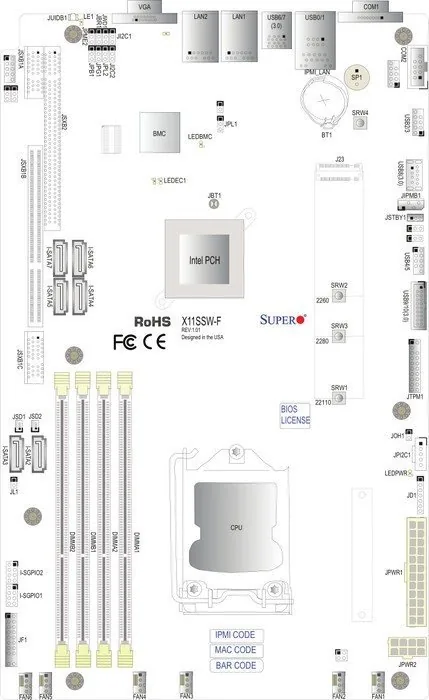
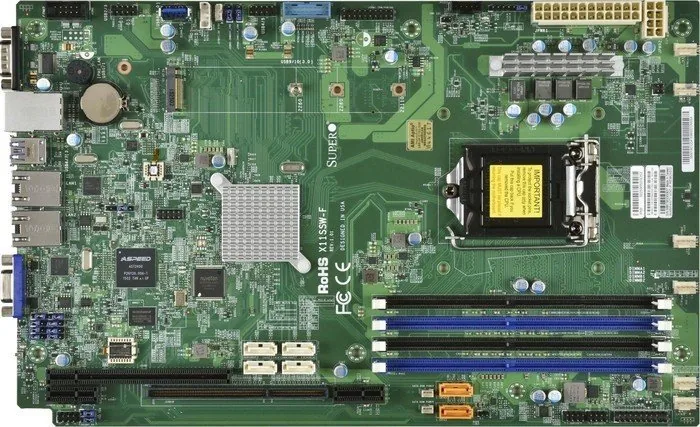
The Supermicro C236 platform, represented by the X11SSW-TF/-4TF motherboard, is designed for builders who want server-grade stability in a compact WIO layout. It supports Intel Xeon E3-1200 v5/v6 processors along with 6th and 7th Gen Core i3, Pentium, and Celeron CPUs in an LGA1151 socket. That broad CPU range makes it a smart fit for entry servers, compact storage systems, and network appliances where consistency matters more than flashy extras.
Balanced performance and storage flexibility
A major strength of this board is its memory support. Four DDR4 ECC UDIMM slots allow up to 64GB of memory, and the platform benefits from matched modules for better interleaving and smoother performance. Alongside that, the board provides six SATA 3.0 ports, RAID 0/1/5/10 support, and an M.2 NVMe socket, giving system designers a flexible mix of speed, redundancy, and capacity. For anyone reading the Supermicro C236 Manual, the message is clear: this board is built to support practical, dependable infrastructure.
Strong networking and remote management
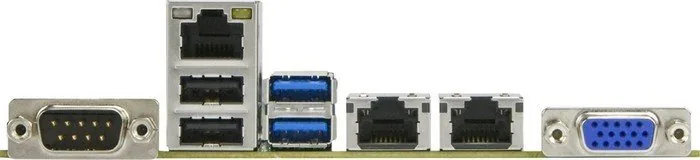
Networking is another standout area. The TF model includes dual 10GbE ports, while the -4TF variant expands that to four 10GbE ports for more demanding workloads. A dedicated IPMI LAN and ASpeed AST2400 BMC add remote monitoring, KVM access, and hardware-level management. Voltage, temperature, fan, and power monitoring help administrators keep systems healthy even when the machine is mounted in a remote rack or accessed only occasionally.
Designed for controlled deployment
This motherboard is clearly aimed at professional installation. The layout includes headers and jumpers for front-panel control, watchdog behavior, BIOS recovery, VGA control, and LAN enable options. It also supports AC power-loss recovery, ACPI power management, and system health alerts through firmware tools. These details make the board attractive for integrators who need a predictable platform with room for customization and long-term serviceability.
Ideal use cases
In practice, the X11SSW-TF/-4TF shines in small server builds, remote management environments, and storage-focused systems that need dependable networking and ECC memory. It offers the kind of engineering choices that reduce surprises and simplify maintenance, especially when uptime is important.
Notes
- Use matched DDR4 ECC UDIMMs for the best results.
- Connect both required power plugs before first boot.
- Verify cooling and airflow before selecting a CPU.
- The -4TF model is better suited to higher-density network setups.
Search for 67,706 Manuals online


Type-in Brand or Model