
Supermicro AOC-SLG3-4E2P Manual
PDF manual · 18 Pages
English



Quick check
Incorrect answer, please try again.
Chat with your Supermicro AOC-SLG3-4E2P manual using AI
Get instant AI answers from your Supermicro AOC-SLG3-4E2P manual
Ask anything about the Supermicro AOC-SLG3-4E2P. Answers come from this manual, with the pages they are based on.
Ask a Question
Do you recommend AOC-SLG3-4E2P?
Yes NoFrequently Asked Questions
It is used to expand a system with four internal NVMe storage connections. It is designed for fast data transfer, storage scaling, and integration in servers, workstations, and other performance-oriented systems.
Is this answer helpful?
The card supports up to four physical NVMe devices through its four internal OCuLink connectors. That makes it useful for building compact, high-speed storage arrays or cache-oriented storage configurations.
Is this answer helpful?
It uses a PCIe 3.0 x8 host interface. Inside the card, a PCIe switch helps distribute bandwidth across the four NVMe connections while maintaining strong performance and flexibility.
Is this answer helpful?
Yes. The card includes both low-profile and full-height mounting brackets. This helps it fit different chassis types and makes installation easier across a wider range of systems.
Is this answer helpful?
Yes, the design supports hot-plug without needing a Vpp header. This is helpful in compatible environments where drive maintenance or replacement needs to be handled more efficiently.
Is this answer helpful?
The main thing is to use the correct cable type. MiniSAS HD and OCuLink cables can look similar, but they are wired differently. Also, use anti-static precautions and power down the system before installation.
Is this answer helpful?
Advantages and Disadvantages
Advantages

- Four NVMe ports make it easy to expand fast storage in one card.
- PCIe switch design supports strong bandwidth and better traffic handling.
- Low-profile and full-height brackets improve installation flexibility.
- Hot-plug support adds convenience in compatible system designs.
Disadvantages

- Requires careful cable matching because similar-looking cables may be wired differently.
- Best results depend on compatible motherboard slots and chassis layout.
- Not ideal for users who only need a single NVMe connection.
- Installation is more technical than a basic plug-and-play storage adapter.
Product Specification
Connectivity
PCIe 3.0 x8
Interfaces
4x OCuLink/SFF-8611
Internal
4x OCuLink/SFF-8611 (PCIe 3.0 x4)
External
N/A
RAID Level
N/A
Chipset
Broadcom PLX PEX9733
Special Features
low profile PCB
Product Description
Supermicro AOC-SLG3-4E2P, PCIe 3.0 x8 Manual
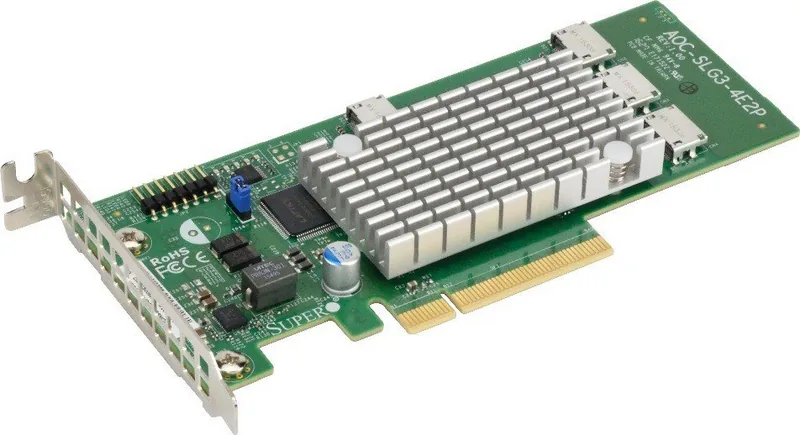
The Supermicro AOC-SLG3-4E2P is a compact PCIe 3.0 x8 expansion card built for fast NVMe storage connectivity. Designed around a proven PCIe switch architecture, it brings four internal OCuLink NVMe ports into a single low-profile adapter, making it a practical choice for servers, workstations, embedded systems, and performance-focused desktop builds.
At its core, this card is about scaling storage without sacrificing efficiency. It supports up to four physical NVMe devices and delivers an aggregate bandwidth of 6.4 GB/s, giving administrators and builders a clean way to extend high-speed storage across multiple drives. That makes it especially appealing for near-line cache deployments, data-heavy applications, and environments where predictable throughput matters more than flashy extras.
One of the most useful qualities of the AOC-SLG3-4E2P is its flexibility. It ships with both low-profile and full-height brackets, so it can fit a wider range of chassis types. The card is also designed for hot-plug support without a Vpp header, which helps simplify integration in compatible setups. For system builders, that can mean fewer complications during deployment and easier maintenance later on.
From a practical perspective, the card is aimed at users who want reliable NVMe expansion with strong signal integrity and error isolation. Its PCIe switch-based design supports peer-to-peer transfers and port extension, helping the card serve as more than just a simple adapter. It is a smart fit for enterprise storage layouts, but it also has value in compact systems that need serious bandwidth in a small footprint.
Installation is straightforward for experienced users: power down the system, handle the card with anti-static precautions, install it in the correct PCIe slot, and connect the proper cables. The included documentation also emphasizes matching cable types carefully, since MiniSAS HD and OCuLink assemblies may look similar but are not interchangeable.
Key takeaways
- Four internal NVMe OCuLink ports for high-speed storage expansion.
- PCIe 3.0 x8 design with strong aggregate bandwidth for demanding workloads.
- Low-profile and full-height brackets improve chassis compatibility.
- Hot-plug support and PCIe switch architecture help simplify advanced storage setups.
Notes
- Best suited for users who need reliable multi-drive NVMe connectivity.
- Always verify cable wiring before installation to avoid compatibility issues.
- Handle the card carefully to protect sensitive components during assembly.
Search for 67,706 Manuals online


Type-in Brand or Model