

Strong SRT 8506 Manual
PDF manual · 24 Pages
English



Quick check
Incorrect answer, please try again.
Chat with your Strong SRT 8506 manual using AI
Get instant AI answers from your Strong SRT 8506 manual
Ask anything about the Strong SRT 8506. Answers come from this manual, with the pages they are based on.
Ask a Question
Do you recommend SRT 8506?
Yes NoFrequently Asked Questions
You can reset the receiver to factory defaults by going to the Menu Installation section and selecting factory settings. You will need to enter the default PIN code which is zero zero zero zero. This will clear all saved channels and user preferences so you must set up the device again from scratch.
Is this answer helpful?
The power consumption is approximately 5.4 Watts in typical usage and up to 12 Watts at maximum load. In standby mode it consumes less than 0.4 Watts. The voltage requirement is 100 to 240 Volts AC so it works with most international power supplies.
Is this answer helpful?
Yes the device supports automatic software updates via terrestrial signal or manual updates via a USB drive. Ensure the USB device is formatted to FAT32 and meets the power requirements. Always wait for the update to finish before using the device to prevent damage.
Is this answer helpful?
The remote requires two AAA type batteries. They are not rechargeable and should not be mixed with other battery types. For longer life consider using low self discharge NiMH batteries with the correct polarity as indicated in the battery compartment.
Is this answer helpful?
Yes the receiver supports DVB subtitles provided the service operator broadcasts them. You can select the subtitle language in the Setup settings menu. If available subtitles can also be accessed through the teletext function on supported channels.
Is this answer helpful?
The remote control has a range of up to seven meters with a viewing angle of thirty degrees. Do not block the infrared sensor on the front of the receiver as this will stop it from working properly with the remote.
Is this answer helpful?
For USB updates the device must not draw more than 500 mA of power. If you use an external hard drive it might require its own power supply. The drive should be formatted in FAT32 for the best compatibility with the receiver.
Is this answer helpful?
Advantages and Disadvantages
Advantages

- HDMI Output for high definition video connection
- S/PDIF Audio output for home theater systems
- USB port allows software upgrades easily
- Electronic Program Guide for scheduling
- Built-in parental lock for child safety
Disadvantages

- USB power limit is 500mA max
- No Bluetooth connectivity supported
- Active antennas need 5V DC power
- Standby power drain requires attention
- Signal availability depends on local regions
Product Specification
Tuner Slots
1 (fixed)
Single Tuner
1x DVB-T2
Twin Tuner
no
Dual Tuner
no
Triple Tuner
no
PVR
no
Video Connections
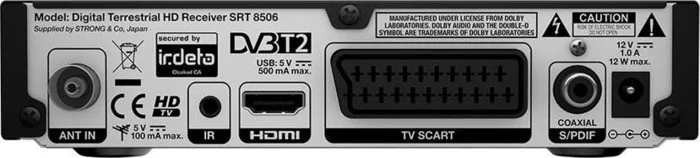
1x HDMI Out, 1x SCART Out
Audio Connections
1x Digital Audio Out (coaxial)
Other Connections
1x USB 2.0
Display
4-digit 7-segment LED
Features
EPG, Teletext
Software Update
USB
Program Memory Slots
400
Favorite Lists
3
Timer
32
Special Features
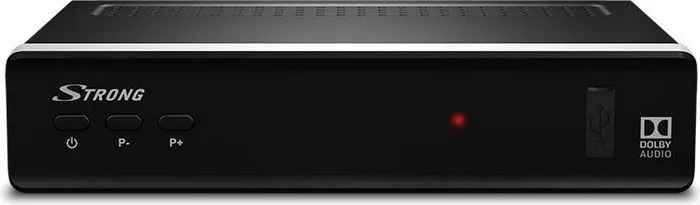
Device Buttons
Power Consumption
12W max, 5.4W typical, 0.4W standby
Color
black
Dimensions
6.69x1.57x5.20in (WxHxD)
Weight
0.77 lbs
Product Description
Welcome to Your New Entertainment Center
Experience high definition television with the Strong SRT 8506 receiver today. This device brings modern functionality directly to your home entertainment setup. It supports digital terrestrial signals ensuring crystal clear pictures on your screen. The Strong SRT 8506 Manual guides you through every step of the setup process effortlessly without confusion. You will find detailed instructions on connecting cables and configuring settings properly for your needs.
Essential Features Overview
This receiver includes HDMI and SCART outputs for versatile connection options. It also supports S/PDIF audio connections for home theater systems effectively. The USB port allows for software updates and even media playback capabilities. An electronic program guide makes scheduling recordings simple and intuitive. You can manage your favorite channels easily using the provided menus on screen. The system supports multiple audio languages and subtitle options for wider accessibility. Children can be protected with the built-in parental lock features too. Power consumption is reasonable for a device of this class.
Getting Started with Installation
Installation is straightforward with the right setup planning involved safely. Place the device near your television for easy remote access initially. Ensure the antenna is properly aligned for the best signal strength available. Follow the initial wizard to select your region and language preferences. The default access code is usually set to zero for security protection easily. Always unplug before moving equipment to avoid electrical hazards during setup.
Power and Maintenance Tips
Keep the ventilated area clear to prevent overheating during use continuously. Clean the exterior with a soft cloth only to avoid damage to paint. Do not use liquid cleaners directly on the unit body surfaces inside. Regular updates keep the system running smoothly for years without issues. Contact support if you encounter persistent issues regarding performance or connection reliability. Battery usage for the remote should be checked periodically for best function.
Final Thoughts
This product represents a solid choice for digital TV enthusiasts globally. Enjoy your content with ease using the Strong SRT 8506 Manual insights effectively. You should always read the safety measures regarding voltage and positioning carefully. Proper care ensures longevity and optimal performance from your new receiver at home. It supports various regions and ensures secure access through PIN codes.
Notes for Users
Always check the power adapter rating before connecting the unit properly. If issues persist reset the device to factory defaults by entering zero zero zero zero.
Search for 67,706 Manuals online


Type-in Brand or Model
Pearline O'Keefe
7 months ago
Is registration mandatory for this receiver and does it compromise the promised user anonymity?
Manual.ly
7 months ago
Thank you for asking. Registration is required to activate the receiver features and services. While we value data protection, we do ask for your email address and birth date to verify the account and comply with service regulations. This ensures secure access to your personalized settings and electronic program guide. We adhere to strict privacy standards regarding the storage and handling of this information.