
Strong SRT 8222 Manual
PDF manual · 26 Pages
English



Quick check
Incorrect answer, please try again.
Chat with your Strong SRT 8222 manual using AI
Get instant AI answers from your Strong SRT 8222 manual
Ask anything about the Strong SRT 8222. Answers come from this manual, with the pages they are based on.
SRT 8222 Maintenance Schedule
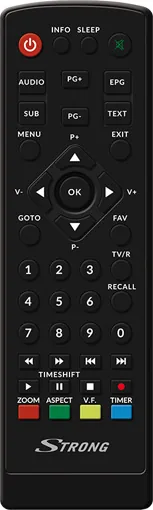
If the batteries are exhausted, replace them with two new AAA type batteries. Ensure correct polarity when inserting.
Download new software from the website to a USB drive and install via System > Software Update to keep the device current.
Ask a Question
Do you recommend SRT 8222?
Yes NoFrequently Asked Questions
The default PIN code is 1234. You can change this in the System menu under Set Password to enhance security.
Is this answer helpful?
Yes, the Twin-Tuner technology allows you to record one channel while watching another, even on different frequencies.
Is this answer helpful?
No, this receiver only supports Free-To-Air and unscrambled channels. It does not have conditional access modules for paid services.
Is this answer helpful?
It supports MP3 for music, JPG for photos, and various video formats. The drive should be formatted as FAT32 or NTFS.
Is this answer helpful?
Download the update file to a USB stick, plug it into the receiver, go to System Menu, and select Software Update.
Is this answer helpful?
No, Timeshift requires a connected USB storage device with sufficient free space and read/write speed to function correctly.
Is this answer helpful?
Advantages and Disadvantages
Advantages

- Twin-tuner technology allows recording one channel while watching another simultaneously
- Supports advanced HEVC/H.265 and AVC/H.264 video decoding for high-quality images
- Versatile connectivity including HDMI, SCART, S/PDIF, and USB 2.0 ports
- Built-in Electronic Program Guide (EPG) for easy scheduling and browsing
- Comprehensive parental control features with password protection
Disadvantages

- Requires external USB storage for recording and timeshift functions to work properly
- Scrambled channels cannot be viewed without additional decryption hardware
- Remote control range may be limited by obstacles or direct sunlight interference
- USB device speed limitations can cause freezing during HD playback or timeshift
- Default PIN code is generic and must be changed for enhanced security
Product Specification
Tuner Slots
1 (fixed)
Single Tuner
1x DVB-T2
Twin Tuner
no
Dual Tuner
no
Triple Tuner
no
Decoder
HEVC, HDTV
Smartcard Reader
no
Common Interface
no
PVR
no
Video Connections
1x HDMI Out, 1x SCART Out
Audio Connections
1x Digital Audio Out (coaxial)
Other Connections
1x USB 2.0, 1x RJ-45
Display
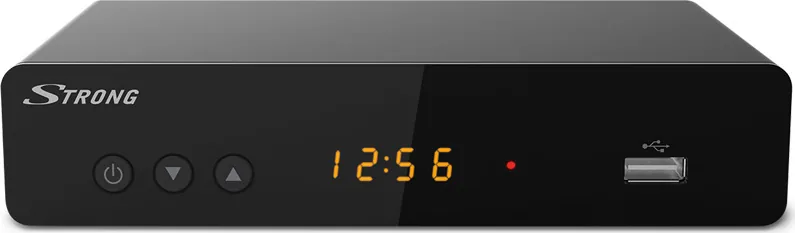
4-digit 7-segment LED
Features
EPG, Media Player, Teletext, Web Services
Channel Memory Slots
400
Timer
30
Special Features
Device Buttons, FTA
Color
Black
Dimensions
6.7x1.6x4.1 in (WxDxH)
Weight
9.5 oz
Product Description
Experience High-Definition Broadcasting with the Strong SRT 8222
The Strong SRT 8222 stands as a premier choice for digital terrestrial television enthusiasts seeking crystal-clear picture quality and versatile functionality. This twin-tuner receiver is designed to transform your viewing experience by delivering high-definition content directly from your antenna. Whether you are watching live sports, enjoying movies, or exploring radio stations, this device ensures that every moment is captured in stunning detail.
At the heart of the SRT 8222 lies advanced video decoding technology supporting both AVC/H.264 and HEVC/H.265 standards. This dual capability allows users to enjoy modern broadcast formats alongside traditional channels without compromise. The device features a sleek interface that simplifies navigation through electronic program guides, making it easy to schedule recordings or browse upcoming events. With its robust tuning capabilities covering VHF and UHF bands, reception remains stable across various environments.
Connectivity options are extensive, catering to diverse home entertainment setups. Users can connect via HDMI for superior audio-visual transmission or utilize SCART ports for compatibility with older televisions. The inclusion of an S/PDIF output enables connection to external audio amplifiers for immersive Dolby Digital soundscapes. Furthermore, the built-in USB port supports multimedia playback, allowing users to view photos, listen to music, and watch video files stored on external drives. The twin-tuner feature is particularly notable, enabling simultaneous recording of one channel while watching another, even if they are on different frequencies.
Security and customization are also priorities. The system includes parental controls with password protection to restrict access to specific content based on age ratings. Users can manage their channel lists by locking, skipping, or renaming entries to suit personal preferences. The electronic program guide provides detailed information about current and future programs, enhancing the overall utility of the receiver. For those who value convenience, features like timeshift allow pausing live broadcasts to resume later, ensuring no action is missed.
Installation is straightforward, guided by intuitive on-screen menus that walk users through language selection, country settings, and channel scanning. Safety instructions emphasize proper ventilation and electrical precautions to ensure long-term reliability. The device operates efficiently with low power consumption, making it an eco-friendly addition to any living room. By combining cutting-edge technology with user-friendly design, the Strong SRT 8222 delivers a comprehensive solution for modern digital TV needs.
Search for 67,706 Manuals online


Type-in Brand or Model