
Strong SRT 7030 Manual
PDF manual · 27 Pages
English



Quick check
Incorrect answer, please try again.
Chat with your Strong SRT 7030 manual using AI
Get instant AI answers from your Strong SRT 7030 manual
Ask anything about the Strong SRT 7030. Answers come from this manual, with the pages they are based on.
Ask a Question
Do you recommend SRT 7030?
Yes No
Stefan Richter
7 months ago
The manual booklet was missing and channel sorting is completely wrong. How do I manually organize favorites and adjust the channel order?

Manual.ly
7 months ago
We apologize for the confusion regarding the setup process. Please use your remote to access the settings menu for channel organization. You can delete unwanted channels and rearrange the list manually. The physical manual was omitted to reduce waste, but a PDF version is available on our website. For help with favorites, long-press the button assigned to save them.
dolor_et
4 months ago
Is it easy to create a favorites list and put channels such as ARD and ZDF in the desired order?
Manual.ly
4 months ago
Several users found channel sorting and favorite-list setup difficult, especially after a factory reset. The preset channel list may not match the usual numbering. Please consult the full manual for the channel-editing and favorites steps; if this is essential, verify the procedure before purchase.
Frequently Asked Questions
The receiver supports DVB-S and DVB-S2 satellite broadcasts using QPSK and 8PSK modulation. It is designed for free-to-air TV and radio channels. Encrypted channels may appear in scans but cannot be watched.
Is this answer helpful?
Yes. Connect a compatible USB storage device to use instant recording, timer recording, and Timeshift. A fast USB 2.0 drive formatted in FAT or FAT32 is recommended, especially for HD content.
Is this answer helpful?
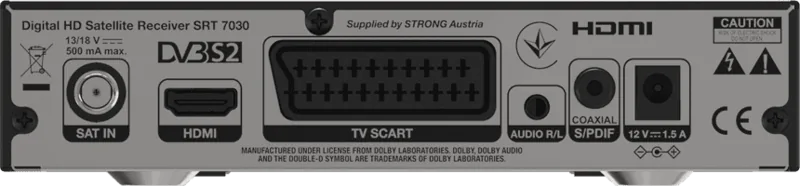
The receiver provides HDMI for HD TVs and SCART for older televisions. It also includes analogue left/right audio outputs and coaxial S/PDIF for connection to amplifiers, HiFi systems, or home cinema equipment.
Is this answer helpful?
Yes. It supports DiSEqC 1.2 and GotoX or USALS motor control. GotoX calculates satellite positions from local longitude and latitude, while DiSEqC 1.2 allows manual position control and storage.
Is this answer helpful?
Channels can be moved, sorted, skipped, locked, renamed, or deleted. You can also place channels in up to eight favorite lists. The channel list includes an alphabetical search function for faster selection.
Is this answer helpful?
The factory default PIN is 0000. It is used for protected menus and locked channels. Change it in the system settings after setup, and keep the new code stored safely.
Is this answer helpful?
Advantages and Disadvantages
Advantages

- Supports DVB-S and DVB-S2 free-to-air satellite broadcasts with video output up to 1080p.
- Offers HDMI, SCART, analogue stereo audio, coaxial S/PDIF, SAT IN, and USB 2.0 connectivity.
- USB recording and Timeshift functions let users pause live TV and save programmes to compatible storage.
- Supports fixed, DiSEqC, motorized, USALS/GotoX, and SatCR satellite installations.
- Channel tools include favorites, sorting, moving, skipping, locking, renaming, EPG, and recording timers.
Disadvantages

- Encrypted satellite channels can be scanned but cannot be viewed with this receiver.
- USB compatibility is not guaranteed for every device, codec, bitrate, or file resolution.
- Recording and Timeshift need fast FAT/FAT32 USB storage; some external hard drives need separate power.
- Only one programme can be recorded at a time, with viewing limited to channels on the same transponder.
- H.265 video playback is not supported according to the listed multimedia specifications.
Product Specification
Tuner slots
1 (fixed)
Single tuner
1x DVB-S2
Twin tuner
No
Dual tuner
No
Triple tuner
No
Decoder
MPEG-4, HDTV
Smart card reader
No
Common Interface
No
Video connections
1x HDMI 1.3 out, 1x SCART out
Audio connections
1x digital audio out (coaxial), 1x 3.5 mm audio in
Additional connections
1x USB 2.0
Features
EPG, media player, teletext
Software update
USB
Program memory slots
2,000
Favorites lists
8
Timer
8
Control signal
DiSEqC 1.0/1.1/1.2, GotoX, Unicable
Special features
12 V connection, FTA
Power consumption
18 W maximum, 5 W typical, 0.7 W standby
Color
Black
Dimensions
6.61 x 1.57 x 4.13 in (W x H x D)
Weight
9.17 oz
Product Description
Strong SRT 7030 Manual: HD Satellite TV Made Simple
The Strong SRT 7030 is a compact digital HD satellite receiver designed for viewers who want flexible access to free-to-air satellite television and radio channels. With support for DVB-S and DVB-S2 broadcasts, it delivers HD viewing up to 1080p and provides practical tools for channel management, recording, and multimedia playback. The Strong SRT 7030 Manual helps users get the most from its connections, satellite settings, and everyday controls.
Flexible Connections for Modern and Older TVs
The receiver includes HDMI for high-definition television sets and a SCART output for older displays. A SAT IN connection links the unit to a satellite dish, while analogue audio outputs and coaxial S/PDIF allow connection to stereo systems, amplifiers, or home cinema equipment. This combination makes the SRT 7030 suitable for many home entertainment setups.
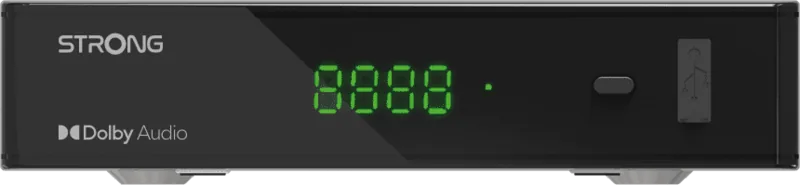
Its USB 2.0 port expands the receiver beyond live television. Connect a compatible FAT32 USB drive to record programmes, use Timeshift to pause live TV, and play compatible video, music, and image files. Recordings can be renamed, locked, or deleted directly through the on-screen menus. For reliable HD recording and Timeshift performance, a fast USB storage device is recommended.
Satellite Setup and Channel Control
The Strong SRT 7030 supports fixed and motorized satellite dishes. Installation options include DiSEqC 1.0 and 1.1 switching, DiSEqC 1.2 motor control, GotoX or USALS positioning, and SatCR systems. Users can scan a single satellite, scan multiple selected satellites, or search individual transponders. Signal strength and quality indicators assist with dish alignment.
Once channels are installed, they can be organized to suit personal viewing habits. The receiver supports up to eight favorite lists, as well as channel moving, sorting, skipping, locking, renaming, and deletion. The electronic programme guide displays available schedules and programme details, and can be used to create timers for channel switching or recordings.
Everyday Viewing Features
The remote control gives quick access to channel lists, audio languages, subtitles, teletext, programme information, favorites, and the previous channel. Video settings include multiple resolutions and aspect-ratio modes for 16:9 and 4:3 displays. Audio output can be set to PCM stereo or RAW for compatible digital audio equipment.
Notes
- The receiver is intended for free-to-air services; encrypted channels cannot be viewed.
- USB drives should be formatted as FAT or FAT32, and important data should be backed up before use.
- The default PIN is 0000 and should be changed to protect locked channels and settings.
- Keep ventilation openings clear and disconnect power before connecting cables or during thunderstorms.
Search for 67,706 Manuals online


Type-in Brand or Model
Hans Weber
5 months ago
Is the manual provided with this device helpful for reordering channels and creating a favorites list, or is it confusing as previous users suggest?
Manual.ly
5 months ago
Thank you for reaching out. While the included booklet is brief, the online user manual is comprehensive. To reorder channels, please access the installation menu and select manual sorting. For favorites, you can save groups by pressing the red button during playback. We recommend downloading the full PDF from our support site for detailed screenshots. If you continue to face issues, our technical team can guide you step by step.