
Strong SRT 7007 Manual
PDF manual · 32 Pages
English



Quick check
Incorrect answer, please try again.
Chat with your Strong SRT 7007 manual using AI
Get instant AI answers from your Strong SRT 7007 manual
Ask anything about the Strong SRT 7007. Answers come from this manual, with the pages they are based on.
SRT 7007 Maintenance Schedule
Replace AAA batteries if the remote does not work. Batteries are not rechargeable.
Use a soft, slightly damp cloth with mild soap solution. Do not use alcohol or ammonia-based cleaners.
Free maintenance reminders
Timed to your purchase date. Always free, unsubscribe anytime.
Ask a Question
Do you recommend SRT 7007?
Yes No
Tomáš Neumann
9 months ago
Do I need any extra setup or paid add-ons for PVR, and will the Strong HD satellite receiver work right away after connecting to the TV?

Manual.ly
9 months ago
In most cases you can plug in the Strong receiver, connect it to your TV and run the channel scan without installing anything additional, and it should work right away. For PVR, some variants require enabling or adding the PVR function via a software download/feature activation, depending on the exact package and firmware. Also, if you see an extra charge for a “preinstalled” offer (for example the mentioned 19.90 EUR add-on), that is tied to that specific promotion, not the basic connection. If you experience repeated rebooting or switching off/on during long playback, please update the receiver firmware and check the power connection; if it continues, contact support with your model and software version.
Frequently Asked Questions
It is designed as a digital satellite receiver for watching TV and radio channels, with added USB multimedia features and optional recording support.
Is this answer helpful?
Yes. It supports HD viewing through HDMI, with video resolutions up to 1080p depending on the TV and signal source.
Is this answer helpful?
Yes. The receiver supports USB-based music, photo, and video playback, provided the file format and device compatibility are suitable.
Is this answer helpful?
Recording and Timeshift can be enabled through USB software support, so availability may depend on the installed firmware version.
Is this answer helpful?
It supports single and multi-satellite installations, DiSEqC switches, motorized dishes, and SatCR configurations, making it adaptable to many systems.
Is this answer helpful?
The default password is 0000. If it has been changed and forgotten, support from the dealer or STRONG service may be needed.
Is this answer helpful?
Advantages and Disadvantages
Advantages

- HD satellite receiver with HDMI and SCART support for flexible TV connections.
- USB multimedia playback adds music, photo, and video options beyond live TV.
- EPG, favorites, subtitles, and teletext improve everyday viewing convenience.
- Supports advanced antenna setups like DiSEqC, motorized dishes, and SatCR.
Disadvantages

- USB recording and Timeshift may depend on extra software availability.
- Some multimedia files may not play correctly depending on codec or bitrate.
- Factory reset removes all stored channels, timers, and personal settings.
- Advanced installation options may feel complex for beginners without guidance.
Product Specification
Tuner slots
1 (fixed)
Single tuner
1x DVB-S2
Twin tuner
no
Dual tuner
no
Triple tuner
no
Decoder
MPEG-4, HDTV
Smartcard reader
no
Common Interface
no
Video connections
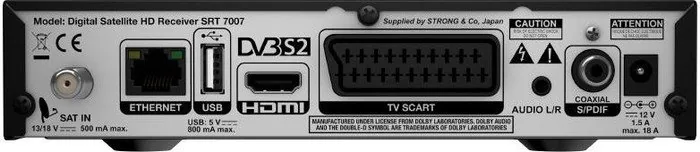
1x HDMI Out, 1x SCART Out
Audio connections
1x Digital Audio Out (coaxial)
Other connections
1x USB, 1x RJ-45
Display
4-digit 7-segment LED
Functions
EPG, Media player, Teletext, Web services
Software update
USB
Program memory slots
4,000
Favorite lists
8
Timer
8
Control signal
DiSEqC 1.0/1.1/1.2
Special features
Device buttons, FTA
Power consumption
18W maximum, 5W typical, 1W standby
Color
black
Dimensions
7.36x1.77x5.75in (WxHxD)
Weight
0.84 lb
Product Description
Strong SRT 7007 Manual: A Practical Look at a Flexible HD Satellite Receiver
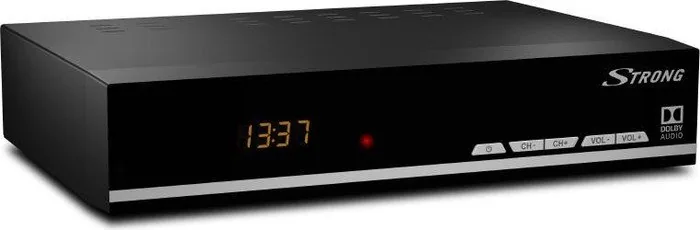
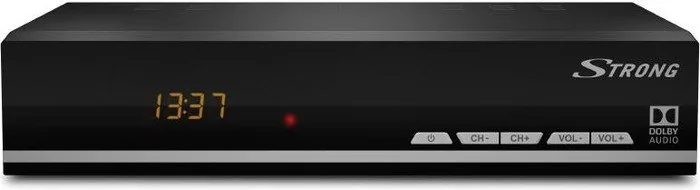
The Strong SRT 7007 Manual highlights a receiver built for users who want straightforward satellite TV with useful extras. It supports digital HD reception, offers HDMI and SCART connections, and is designed to work with a wide range of home setups. Whether you are upgrading an older television system or adding satellite access to a modern screen, this model aims to keep installation and daily use simple.
One of the most appealing aspects of the Strong SRT 7007 is its balance between basic viewing and added media features. The receiver includes USB multimedia support, so it can handle music, photos, and video playback from external storage. With the right USB software, it can also enable recording and Timeshift functions, turning live TV into a more flexible experience. That makes it a practical choice for viewers who want more control over what they watch and when they watch it.
The interface is built around easy navigation, with clear menu sections for picture settings, channel search, time options, system settings, and USB features. You can sort channels, create favorite lists, lock programs, and use the EPG to check schedules or book recordings. Audio and subtitle selection add another layer of convenience, especially for multilingual broadcasts or shared family viewing.
Setup is also a strong point. The receiver supports different antenna configurations, including single satellites, multi-LNB systems, DiSEqC switches, and even motorized dishes or SatCR setups. This gives it broader compatibility than many entry-level boxes. For users who like to fine-tune their installation, the signal and dish setup tools are especially useful.
From a product perspective, the Strong SRT 7007 Manual reflects a receiver that is practical, adaptable, and focused on everyday use. It is not trying to be overly complex; instead, it delivers reliable satellite reception, multimedia playback, and a clear set of tools for channel management and system control.
Notes
- USB recording and Timeshift may require additional software support.
- Best results come from a fast, compatible USB storage device.
- The default password is 0000 unless changed by the user.
- A factory reset removes stored channels and personal settings.
Search for 67,706 Manuals online


Type-in Brand or Model
Lena Sommer
10 months ago
Do I need to pay extra or install anything via download to get PVR working on this Strong HD Sat receiver, or does it work out of the box?
Manual.ly
10 months ago
The basic receiver functions normally work immediately after you connect it to the TV and the satellite dish. You typically do not need to buy an additional offer for a preinstalled setup. PVR features can require an activation or a software update depending on the exact model and region; if PVR is not enabled in the menu, use the receiver's settings to enable it or install the official Strong update. If you experience repeated power cycling (the device turns off and back on during longer viewing), check the cable and signal quality and then contact support for warranty service.