
Strong SRT 3000 Manual
PDF manual · 24 Pages
English



Quick check
Incorrect answer, please try again.
Chat with your Strong SRT 3000 manual using AI
Get instant AI answers from your Strong SRT 3000 manual
Ask anything about the Strong SRT 3000. Answers come from this manual, with the pages they are based on.
SRT 3000 Maintenance Schedule
Unplug the power cord from the wall socket when the receiver is not used for a long period to ensure safety.
Always disconnect the receiver from the mains voltage supply before cleaning it with a soft damp cloth.
Ask a Question
Do you recommend SRT 3000?
Yes NoFrequently Asked Questions
It is made for DVB-C digital cable television. The receiver connects to a cable operator’s wall outlet and scans available channels through automatic or manual setup options.
Is this answer helpful?
Yes, but recording may depend on optional USB recording software. When supported, the receiver can handle instant recording, scheduled timers, and timeshift using compatible USB storage.
Is this answer helpful?
Yes. In addition to HDMI, the device includes a SCART connection, so it can work with older televisions as well as modern HD sets.
Is this answer helpful?
The USB port supports multimedia playback and can be used for recordings and timeshift with suitable software and storage. It also allows formatting and safe removal options through the menu.
Is this answer helpful?
You can create favorite lists, lock channels, skip channels, move channels, rename entries, and sort them by name, lock status, or scan order. This makes channel management flexible.
Is this answer helpful?
Use a fast USB device with enough free space. Slower drives may cause freezes or poor playback, especially with HD content. Recording quality also depends on the connected storage speed.
Is this answer helpful?
Advantages and Disadvantages
Advantages

- Easy-to-use interface with clear menu navigation and a straightforward remote layout.
- Supports HDMI, SCART, and S/PDIF for wide compatibility with modern and older setups.
- USB media playback adds extra value for video, music, and photo viewing.
- Optional recording, timeshift, and timer features improve convenience for daily TV use.
Disadvantages

- Recording features may require optional software and a fast USB storage device.
- Some advanced functions depend on broadcast availability and operator support.
- Channel setup can require operator-specific technical details for best results.
- USB compatibility and playback performance are not guaranteed with every drive or file type.
Product Specification
Tuner Slots
1 (fixed)
Single Tuner
1x DVB-C
Twin Tuner
no
Dual Tuner
no
Triple Tuner
no
Decoder
MPEG-4, HDTV
Smartcard Reader
no
Common Interface
no
Video Connections
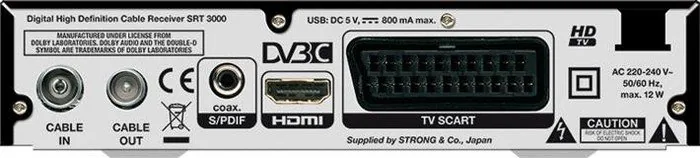
1x HDMI Out, 1x SCART Out
Audio Connections
1x Digital Audio Out (coaxial)
Other Connections
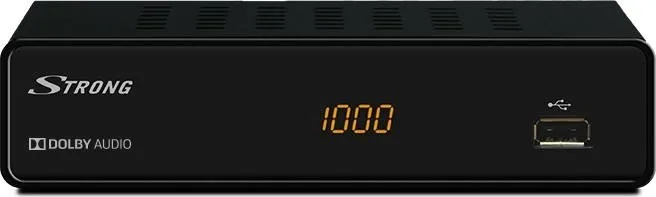
1x USB
Display
4-digit 7-segment LED
Functions
EPG, Teletext
Software Update
USB
Program Memory Slots
1,000
Favorite Lists
yes
Timer
8
Special Features
FTA
Power Consumption
12W maximum, 5.1W typical, 0.7W Standby
Color
black
Dimensions
6.69x1.57x4.45in (WxHxD)
Weight
0.75lb
Product Description
Strong SRT 3000 Manual: A Practical Look at the Strong SRT 3000
The Strong SRT 3000 is a compact digital cable receiver built for viewers who want simple setup, clear picture quality, and useful everyday features without unnecessary complexity. The Strong SRT 3000 Manual shows that this model is designed around straightforward operation, making it a solid option for households that need an easy way to receive DVB-C cable channels and manage them comfortably.
One of the biggest strengths of the SRT 3000 is its flexible connection options. It supports HDMI for modern TVs, SCART for older displays, and S/PDIF coaxial audio for connection to a home theater or digital amplifier. That means it can fit into both new and legacy entertainment setups with little hassle. The receiver also includes a USB port, which opens the door to multimedia playback and, with optional software, recording and timeshift functions.
Daily use is made easier through a clear remote control layout and practical on-screen menus. You can change channels directly, browse the channel list, access the EPG, switch audio languages, and activate subtitles or teletext when available. The receiver also offers helpful management tools such as favorite lists, channel locking, skipping, moving, renaming, and sorting, giving users more control over how their channel lineup is organized.
For people who like convenience, the SRT 3000 includes features such as instant recording, timeshift, and timer-based scheduling. These functions are especially useful when paired with a fast USB storage device. The media section adds extra value by allowing playback of videos, music, and pictures from USB storage, turning the receiver into a more versatile home device.
Setup is also relatively beginner-friendly. The first-start wizard helps with language, region, aspect ratio, scan mode, and connection type, while automatic and manual channel scans make installation adaptable to different cable operators. The receiver even supports LCN, which can preserve the channel order defined by the provider.
Notes
- Best suited for cable TV users who want a simple DVB-C receiver.
- USB features may depend on optional recording software and storage speed.
- HDMI is ideal for highest picture quality, while SCART supports older TVs.
- A default PIN is used for parental and menu protection functions.
Overall, the Strong SRT 3000 balances basic TV reception with a useful set of practical extras. It is not trying to be flashy; instead, it focuses on reliable performance, easy navigation, and flexible connectivity for everyday viewing.
Search for 67,706 Manuals online


Type-in Brand or Model