
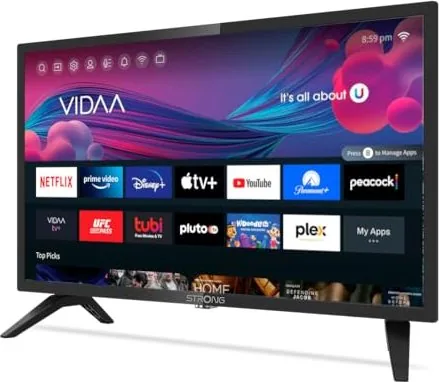
Strong SRT 24HE4203 Manual
PDF manual · 34 Pages
English



Quick check
Incorrect answer, please try again.
Chat with your Strong SRT 24HE4203 manual using AI
Get instant AI answers from your Strong SRT 24HE4203 manual
Ask anything about the Strong SRT 24HE4203. Answers come from this manual, with the pages they are based on.
SRT 24HE4203 Maintenance Schedule
Replace the AAA batteries with new ones when the voltage is no longer sufficient for operation. Remove them if not using the remote for a long time.
Prevent excessive dust buildup on the device, especially in the ventilation slots, to ensure proper cooling and safety.
Ask a Question
Do you recommend SRT 24HE4203?
Yes NoFrequently Asked Questions
You can use an Ethernet cable via the LAN port or configure Wi-Fi settings in the network menu for wireless access to streaming services and apps immediately after installation completion.
Is this answer helpful?
The factory default PIN is usually set to 1234 which you can change within the system menu security settings to better protect child-safe content access levels effectively.
Is this answer helpful?
Yes, the device supports DVB-S and S2 tuners allowing reception of satellite broadcasts provided you have a connected dish and appropriate LNB setup installed externally nearby.
Is this answer helpful?
The system includes a sleep timer option in the timer settings menu allowing automatic shutdown after specified durations like 30 minutes or 60 minutes to save energy overnight.
Is this answer helpful?
There are three HDMI inputs located on the rear panel designated as HDMI1, HDMI2 and HDMI3 for connecting external media devices easily.
Is this answer helpful?
System updates are typically performed automatically via network settings or manually checked under system information menus on the official website www.strong.tv for support resources.
Is this answer helpful?
Try resetting the device by unplugging power for a minute or checking antenna signals to rule out reception issues before contacting support for further diagnostics on display faults.
Is this answer helpful?
Advantages and Disadvantages
Advantages

- VIDAA Smart TV OS provides easy access to popular streaming apps like Netflix and YouTube without extra dongles
- Three HDMI ports allow connecting multiple devices simultaneously including gaming consoles and Blu-ray players
- Compact 24-inch design fits well in bedrooms or kitchens where space is limited compared to larger living room screens
- Dual USB ports enable direct playback of photos and music files stored on portable storage drives for instant enjoyment
- Energy efficient power consumption helps reduce monthly electricity bills during extended viewing sessions throughout the week
Disadvantages

- Built-in speakers output lower volume compared to soundbar systems requiring external audio solutions for cinema-like experience
- USB 2.0 ports may struggle with transferring large HD video files due to slower data transfer speeds affecting loading times
- Remote control battery type AAA means extra purchases are needed since spare batteries are not always readily available everywhere
- Limited viewing angles compared to OLED technology might cause color shifting when watching from extreme side positions
- Older analog AV inputs lack high definition resolution capability restricting compatibility with very modern high resolution equipment exclusively
Product Specification
Diagonal
24"/24.02"
Resolution
1366x768
Panel
LCD
Backlight
LED, Edge-lit
HDR
No
Refresh Rate
50/60Hz Native
Brightness
150 cd/m2
Contrast Ratio
3,000:1 Static
Viewing Angle
178 deg/178 deg (h/v)
3D
No
Tuner
1x DVB-C/T/T2/S/S2 HEVC (H.265)
Video Inputs
3x HDMI 1.4
Audio Inputs
Digital Audio Out (Optical), Headphone (3.5mm Jack)
Additional Connections
2x USB-A 2.0, 1x CI
Wireless
Wi-Fi 4 (WLAN 802.11b/g/n)
Total Audio Power
16W (2x 8W)
Gaming Features
9.5ms Response Time
Special Features
HbbTV
Energy Efficiency Class SDR
F (A through G)
Energy Consumption SDR
21kWh/1000h
Color
Black
VESA
100x100
Stand Base
Side
Dimensions with Stand Base
21.69x14.45x6.34in (WxHxD)
Dimensions without Stand Base
21.69x12.80x3.19in (WxHxD)
Weight with Stand Base
5.51lbs
Weight without Stand Base
5.29lbs
Note
Information on DVB-T2 reception in Austria. Information on DVB-T2 reception in Germany.
Product Description
Experience Modern Entertainment with Strong SRT 24HE4203
Discover the vibrant world of entertainment with the Strong SRT 24HE4203. This compact television brings together modern connectivity and essential viewing pleasure for small spaces. Whether placed in a bedroom, kitchen, or study room, the device ensures crystal clear visuals supported by robust smart features. Users often reference the Strong SRT 24HE4203 Manual when setting up their initial preferences to maximize performance. The interface relies on the intuitive VIDAA operating system allowing quick access to streaming platforms without complex configurations. Picture quality remains consistent across various input sources thanks to efficient processing hardware.
Connection options are plentiful featuring three HDMI inputs alongside dual USB ports for media playback directly from flash drives. Network integration supports both wired and wireless connections enabling seamless internet browsing and app downloads. Installation procedures emphasize safety guidelines regarding power consumption and ventilation spacing around the chassis to prevent overheating. Maintenance tips suggest regular cleaning of vents to maintain optimal airflow and longevity for internal components. Families appreciate the ease of navigation through menu systems accessible via remote control buttons labeled for function activation.
Parents benefit from parental control settings allowing restriction of content based on ratings. Technical specifications indicate power efficiency suitable for budget-conscious households seeking minimal electricity usage. The design incorporates a slim profile fitting comfortably on standard furniture units while standing upright securely. Entertainment enthusiasts find value in the variety of picture modes adjusting contrast and brightness automatically for different lighting conditions. Sound customization includes multiple presets like Theater mode or Music mode optimizing output for specific genres.
Accessibility features provide subtitles and audio descriptions for users with hearing impairments ensuring inclusive viewing experiences. Regional support covers multiple languages catering to diverse demographics across various European countries efficiently. Security protocols protect against unauthorized access while ensuring stable network connections remain protected. Regular updates keep firmware current offering bug fixes and performance improvements downloaded automatically via internet connection. Service support contacts are available through dedicated regional help lines providing assistance for technical inquiries.
Additional functionality allows users to link external devices like game consoles through analog inputs and digital outputs. Energy saving modes activate automatically when signal stops to reduce power draw during idle times. User defined buttons on the remote allow fast access to favorite applications simplifying the workflow for frequent viewers. Storage space recommendations suggest keeping original boxes for potential returns or shipping purposes should repairs become necessary.
Safety Recommendations: Always disconnect power before cleaning to avoid electric shock risks. Keep batteries away from children when replacing them in the remote unit. Store packaging materials safely in case warranty claims arise during the coverage period. Ensure sufficient space behind the set for ventilation to prevent heat buildup affecting electronic parts internally.
Search for 67,706 Manuals online


Type-in Brand or Model