
Strong LEAP-S1 Manual
PDF manual · 19 Pages
English



Quick check
Incorrect answer, please try again.
Chat with your Strong LEAP-S1 manual using AI
Get instant AI answers from your Strong LEAP-S1 manual
Ask anything about the Strong LEAP-S1. Answers come from this manual, with the pages they are based on.
Ask a Question
Do you recommend LEAP-S1?
Yes No
Lukas Krüger
10 months ago
Can I expand storage and play media from a USB stick or SD card? Also, does the box work as a NAS/network server so I can access files over the network?

Manual.ly
10 months ago
Yes, you can use USB sticks and, depending on the model, SD/storage media to add more space and to play supported media. However, some USB sticks may only work if they are formatted in a compatible way for the box, and not every stick will be readable. The device is mainly designed as an Android streaming box, not as a NAS/server. It typically does not expose its internal or attached storage as network storage for file browsing over the network. If you want to watch files, using the relevant apps (for example, media player apps) is usually required rather than direct network access.
Frequently Asked Questions
Go to Settings > Remote & Accessories > Add Accessory on the LEAP-S1, follow the on-screen pairing instructions, and ensure Bluetooth is enabled. Pairing is required for the remote’s Google Assistant functions to work.
Is this answer helpful?
The LEAP-S1 supports 4Kp60 decoding including H.265 (10-bit), VP9 Profile 2, and H.264, with common resolutions like 2160p, 1080p and 720p and an aspect ratio option of 16:9 or auto/full screen.
Is this answer helpful?
Yes: the device supports microSD and USB storage (USB 3.0 and 2.0). Note that unpowered external HDDs may exceed the box’s USB power output (max 5V/500mA) and could require an external power adapter.
Is this answer helpful?
For no sound, check TV and device volume, mute states, and audio settings (Settings > Device Preference > Sound) and try different audio formats. For no picture, ensure HDMI is connected and TV input is set to the correct HDMI/AV source.
Is this answer helpful?
To update, go to Settings > About > System update. To factory reset, go to Settings > Device Preferences > About > Factory Reset. Resetting erases installed apps and user data, so back up anything important first.
Is this answer helpful?
Yes, the LEAP-S1 supports Dolby Digital and Dolby Digital Plus audio decoding. Playback quality may also depend on the connected TV or audio system and source material.
Is this answer helpful?
The LEAP-S1 supports dual-band Wi‑Fi (2.4 GHz and 5 GHz) and wired Ethernet. Connect via Settings > Network to join Wi‑Fi or plug an Ethernet cable for a stable wired connection.
Is this answer helpful?
Advantages and Disadvantages
Advantages

- 4Kp60 video support (H.265, VP9, H.264) for crisp high-resolution playback.
- Chromecast built-in and Google Assistant integration for seamless casting and voice control.
- Dual-band Wi‑Fi plus Gigabit Ethernet and Bluetooth 4.2 for flexible connectivity.
- USB 3.0 port and microSD expansion for additional storage and peripherals.
- Compact design with included voice-enabled remote and essential accessories.
Disadvantages

- Only 2 GB RAM and 8 GB eMMC may limit heavy multitasking or large app storage.
- Some USB devices and webcams may be incompatible; STRONG cannot guarantee support.
- Power-limited USB ports may require external power for certain HDDs.
- Availability of streaming apps and services may vary by country and region.
- Remote voice features require Bluetooth pairing; initial setup adds a step for users.
Product Specification
Chipset
CPU: Amlogic S905X2, 4x 1.80GHz, GPU: ARM Mali G31
Video
AVC, H.263, H.264, H.265, HEVC, MPEG-2
Audio Decoder
Dolby Digital, Dolby Digital Plus
Video Connections
1x HDMI Out, Audio/Video Output
Audio Connections
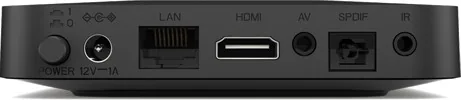
1x Digital Audio Out (coaxial)
Other Connections
1x USB 2.0, 1x USB 3.0, RJ-45, Cardreader (microSD)
Wireless
Wi-Fi 5 (WLAN 802.11a/b/g/n/ac)
Hard Drive
no
Features
HDR, Android, Remote Control
Dimensions
4.33x0.87x4.33in (WxHxD)
Weight
0.37 lb
Product Description
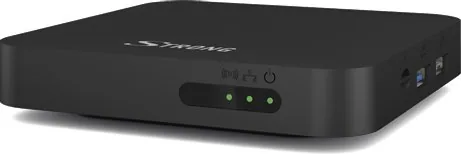
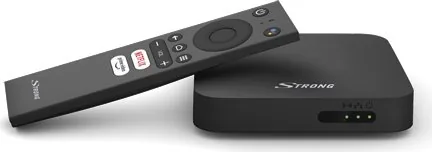
Strong LEAP-S1 Manual — 4K Ultra HD Android TV Box
The Strong LEAP-S1 is a compact 4K Ultra HD Android TV Box designed to bring streaming, casting and smart voice control to any TV. Powered by an Amlogic S905X2 quad-core CPU, Mali-G31 GPU and Android 10, the LEAP-S1 supports 4Kp60 video decoding (H.265, VP9, H.264), Dolby Audio decoding, Wi‑Fi dual-band, Bluetooth 4.2, and common connectivity options including HDMI, Ethernet, USB 3.0/2.0, microSD and optical S/PDIF.
Setup is straightforward: connect the included HDMI cable and power adapter, optionally use Ethernet or onboard Wi‑Fi, insert batteries into the voice-enabled remote, and follow the Android Quick Setup steps to pair your Google account, set location and privacy preferences, and enable Google Assistant. The device includes Chromecast built‑in for casting from compatible mobile apps and Chrome, and the voice remote allows queries, playback control and smart searches after Bluetooth pairing.
The package contains the LEAP-S1 box, voice-enabled remote, 12 V/1 A power adapter, HDMI cable, two AAA batteries and installation instructions. The device ships with 2 GB DDR4 RAM and 8 GB eMMC storage; users can expand with microSD or external USB storage (note power limits for unpowered HDDs). Recommended USB 2.0+ devices ensure stable playback; compatibility with all peripherals can’t be guaranteed.
Safety and practical guidance emphasize proper ventilation, avoiding moisture, correct battery handling, secure cable connections, and responsible disposal under WEEE regulations. Troubleshooting covers common issues like no power, no sound, HDMI input selection, network problems and remote pairing. Factory reset and system update options are available under Settings > Device Preferences.
Technical highlights include 4Kp60 decoding, Dolby Digital/Dolby Digital Plus support, dual-band Wi‑Fi, Ethernet, USB 3.0, and Android TV features including Google Play, Chromecast built‑in and Google Assistant. The LEAP‑S1 is suitable for users seeking an affordable, feature-rich Android TV experience with voice control and broad media compatibility.
Notes
- For Google Assistant voice control, pair the Bluetooth remote to the box before use.
- Use quality HDMI cables for best video output and USB 2.0+ storage for compatibility.
- External HDDs may require their own power supply if they exceed the USB output limits.
- Keep firmware updated via Settings > About > System update for best performance and security.
- Dispose of the device responsibly per WEEE guidelines and follow battery safety warnings.
Search for 67,706 Manuals online


Type-in Brand or Model
Lukas Meyer
10 months ago
Does the Strong Android streaming box have enough internal storage for apps, or will it run out quickly?
Manual.ly
10 months ago
The reviews mention that the internal storage can be limited, so some users feel it fills up fast when installing many apps. In that case, you can usually expand practical capacity by using external storage: the box supports adding USB storage and an SD card for additional files/apps where the system allows it. To avoid slowdowns, check the Storage menu, delete unused apps, clear app cache, and keep free space available. If you plan to install lots of apps or store media, using external USB/SD from the start is recommended.