
Strong HELO-PLIGHT Manual
PDF manual · 8 Pages
English



Quick check
Incorrect answer, please try again.
Chat with your Strong HELO-PLIGHT manual using AI
Get instant AI answers from your Strong HELO-PLIGHT manual
Ask anything about the Strong HELO-PLIGHT. Answers come from this manual, with the pages they are based on.
Ask a Question
Do you recommend HELO-PLIGHT?
Yes NoFrequently Asked Questions
No, this device only supports 2.4 GHz Wi-Fi networks. You must ensure your router has a 2.4 GHz band enabled or use a separate SSID for the 2.4 GHz frequency.
Is this answer helpful?
First, add the device in the Helo by Strong app. Then, open the Alexa app, search for the Helo by Strong skill, enable it, and link your account. Finally, say Alexa discover devices to sync them.
Is this answer helpful?
The maximum power supply is 3680 Watts with a single outlet current limit of 16 Amperes. Do not exceed these limits to prevent damage or safety hazards.
Is this answer helpful?
Yes, as long as both your phone and the plug are connected to the internet, you can control the device anytime and anywhere through the Helo by Strong app.
Is this answer helpful?
If Easy Mode fails, try AP Mode. Hold the power button until the light flashes quickly, then hold it again until it flashes slowly, and follow the specific steps in the app.
Is this answer helpful?
Advantages and Disadvantages
Advantages

- Seamless integration with Amazon Alexa and Google Home for voice control
- Supports both Easy Mode and AP Mode for flexible Wi-Fi setup
- High power capacity of 3680 Watts suitable for various appliances
- Secure WPA2 encryption protects user data and network integrity
Disadvantages

- Requires a 2.4 GHz Wi-Fi network and does not support 5 GHz bands
- Initial setup may require multiple attempts if the signal is weak
- Limited to single outlet current of 16 Amps maximum per socket
Product Specification
Type
Sensor, Actuator
Standard
WLAN (802.11b/g/n)
Function
Switched Outlet (on/off), Power Measurement Function
Dimensions
2.09x2.09x3.11 in
Features
LED Lighting (RGB), App Controlled (iOS, Android), Voice Assistant (Amazon Alexa, Google Assistant)
Product Description
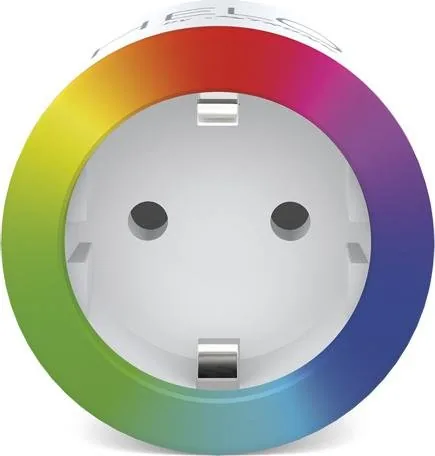
Experience Smart Home Control with the Strong Helo Light Smart WiFi Plug RGB
Transform your living space into a modern, connected environment with the Strong Helo Light Smart WiFi Plug RGB. This innovative device bridges the gap between traditional appliances and smart home technology, allowing you to manage your electrical outlets with unprecedented ease. Whether you are looking to automate your morning routine or secure your home while traveling, this plug offers a seamless integration of style and functionality.
The core of this system is its compatibility with the Helo by Strong app, which serves as a central hub for all your smart devices. With just a few taps on your smartphone, you can turn lights on or off, set schedules, and monitor energy usage from anywhere in the world. The device supports both easy mode and AP mode for Wi-Fi setup, ensuring that even those less tech-savvy can get started quickly. It operates on the standard 2.4 GHz network, making it compatible with most home routers without requiring complex configurations.
Voice control is another standout feature. By linking your Helo account with Amazon Alexa or Google Home, you gain the ability to control your outlets using simple voice commands. Imagine turning on your coffee maker or dimming your bedroom lights simply by speaking. The Strong Helo Light Smart WiFi Plug RGB Manual provides detailed instructions for setting up these integrations, ensuring a smooth experience across different ecosystems.
Built for reliability, the plug handles a maximum power load of 3680 Watts, making it suitable for a wide range of household appliances. Its compact design features a clear LED indicator that shows connection status at a glance. The robust encryption standards, including WPA2, keep your data secure while you enjoy the convenience of remote access. This product is not just a switch; it is a gateway to a smarter, more efficient lifestyle.
Important Notes
- Ensure your router broadcasts a 2.4 GHz signal for optimal connectivity.
- Always reset the device by holding the power button if you encounter pairing issues.
- Check the maximum wattage of any appliance before plugging it in to avoid overload.
Search for 67,706 Manuals online


Type-in Brand or Model