

Strong 4GROUTER350 Manual
PDF manual · 2 Pages
English



Quick check
Incorrect answer, please try again.
Chat with your Strong 4GROUTER350 manual using AI
Get instant AI answers from your Strong 4GROUTER350 manual
Ask anything about the Strong 4GROUTER350. Answers come from this manual, with the pages they are based on.
Ask a Question
Do you recommend 4GROUTER350?
Yes NoFrequently Asked Questions
Open a web browser and navigate to http://192.168.188.1. Use the default login (commonly admin/admin) and change the password after first login to secure the device.
Is this answer helpful?
The factory SSID is typically printed as STRONG_XXXX_2.4GHz and the Wi‑Fi password is printed on the device label. Change both SSID and password during setup for better security and personalization.
Is this answer helpful?
Use the supplied 12 V DC, 1 A adapter. Using an incorrect power supply can cause instability or damage; always confirm polarity and voltage before connecting.
Is this answer helpful?
Yes. The router provides Ethernet (RJ45) ports for wired connections, offering more stable and lower-latency access for devices like desktops, smart TVs, or game consoles.
Is this answer helpful?
Record the IMEI, MAC address, and serial number printed on the device label. These identifiers are required for support requests, registration, and warranty claims with STRONG Austria.
Is this answer helpful?
The Strong 4G LTE Router 350 supports typical browsing and moderate streaming. However, heavy multi-user environments or high-bandwidth applications may exceed its capabilities compared to higher-end or dual‑band routers.
Is this answer helpful?
Contact STRONG support via the email listed on the device or visit the official website (strong-eu.com). Provide IMEI, MAC, and serial number to expedite troubleshooting and warranty assistance.
Is this answer helpful?
Advantages and Disadvantages
Advantages

- Easy plug-and-play setup via 192.168.188.1 with printed default credentials for quick access.
- 4G LTE connectivity provides reliable internet where fixed-line options are limited or as a backup.
- Includes Ethernet (RJ45) for wired devices and stable local network connections.
- Compact, low-power design (12 V DC, 1 A) suitable for small spaces and simple installations.
- Manufacturer support and multilingual documentation plus a 4-year warranty for long-term reassurance.
Disadvantages

- Default credentials (admin/admin) pose a security risk if not changed immediately.
- Single-band Wi‑Fi appears limited to 2.4 GHz which can be crowded and slower than 5 GHz bands.
- Performance is adequate for everyday use but may not meet heavy multi-user or high-bandwidth demands.
- Power rating (12 V DC, 1 A) may limit advanced hardware add-ons or accessories.
- Limited advanced configuration details in basic documentation may require support for complex setups.
Product Specification
Modem
GSM (850/900/1800/1900), UMTS (900/2100), LTE (B1/B2/B3/B5/B7/B8/B20/B38/B39/B40/B41)
Network Standards
GPRS, EDGE, HSPA+
Bandwidth
150Mbps/50Mbps (LTE)
Interfaces
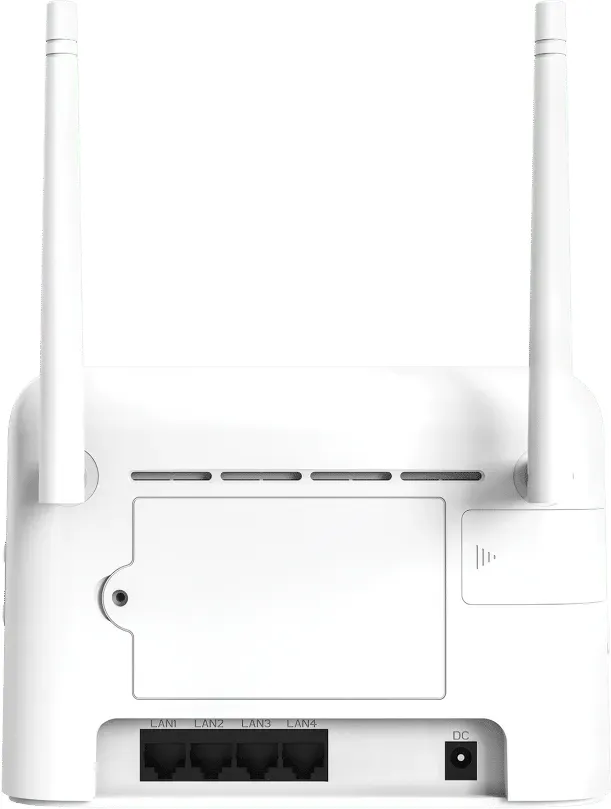
1x USB-A, 4x LAN, Wi-Fi 4 (WLAN 802.11b/g/n)
Dimensions
7.28x5.12x1.56in
Weight
0.71lbs
SIM Form Factor
Micro-SIM
Power Supply
external power supply (barrel jack, 12V/1A/12W)
Special Features
WPS
Product Description
Strong 4G LTE Router 350 Manual
The Strong 4G LTE Router 350 is a compact, user-friendly router designed to bring reliable 4G connectivity to homes and small offices. Equipped with dual-band Wi‑Fi (2.4 GHz), Ethernet (RJ45) support, and simple admin access, it delivers stable internet where fixed-line broadband is unavailable or as a backup solution. The router is powered by a 12 V DC, 1 A adapter and uses a straightforward web interface at 192.168.188.1 for setup and management. Default credentials are typically admin/admin, and the device advertises its wireless network using an SSID like STRONG_XXXX_2.4GHz with a factory Wi‑Fi password printed on the device label.
Key features and setup
Setting up the Strong 4G LTE Router 350 is designed to be quick: insert the SIM, connect the power supply, and access the local IP to configure APN settings and Wi‑Fi credentials. The router supports LTE speeds sufficient for typical browsing, streaming, and remote work tasks. Detailed device identifiers such as IMEI, MAC, and serial number are printed on the unit for registration and support. Manufacturer support is available from STRONG Austria, and documentation is provided in multiple languages.
Performance and reliability
The router is tailored for environments that need dependable wireless access without complex configuration. Ethernet connectivity provides a wired option for stable local networking, while the 4G LTE link offers mobility and resilience during fixed-line outages. Average throughput supports everyday online activities and light media streaming. A 4‑year warranty is listed, highlighting product confidence and long-term support.
Design and usability
The Strong 4G LTE Router 350 features clear labeling of network name, password, IP address, and default admin credentials on its casing. The compact form factor and low-power adapter make it suitable for constrained spaces. Multilingual installation guides make initial configuration approachable for non-technical users.
Notes
- Default admin login: admin / admin; change immediately after first use to secure the network.
- Access the router interface at http://192.168.188.1 for setup and firmware updates.
- Keep the IMEI, MAC, and serial number handy for support and warranty claims.
- Use the supplied 12 V DC, 1 A adapter to avoid power issues.
Search for 67,706 Manuals online


Type-in Brand or Model