


Steinberg UR44C Manual
PDF manual · 39 Pages
English



Quick check
Incorrect answer, please try again.
Chat with your Steinberg UR44C manual using AI
Get instant AI answers from your Steinberg UR44C manual
Ask anything about the Steinberg UR44C. Answers come from this manual, with the pages they are based on.
Ask a Question
Do you recommend UR44C?
Yes No
Hans Mueller
6 months ago
Does this audio interface work with Mac without installing extra software?

Manual.ly
6 months ago
Yes, it is fully compatible with macOS and supports USB-C connection without additional drivers. It works seamlessly with Logic and other audio applications out of the box. Enjoy the high quality and comfortable setup.
Video Manual
UR-C Version 3 Update | USB 3.0 Audio Interfaces
Frequently Asked Questions
Connect the device using a USB 3.0 Type C to Type A cable or a Type C to Type C cable for bus power. Install the Yamaha Steinberg USB Driver software on your computer before starting your DAW. Ensure the power source switch on the back is set correctly to USB or DC before connecting.
Is this answer helpful?
The UR44C supports up to 192 kHz. However, note that Guitar Amp Classics effects are disabled if you select 176.4 kHz or 192 kHz. For best performance use 48 kHz or 44.1 kHz if not using those specific features at high rates.
Is this answer helpful?
Yes the UR44C features +48V phantom power switches for the MIC inputs. Always ensure devices with phantom requirements are connected before turning the switch on to prevent damage. Turn the power off before disconnecting microphones.
Is this answer helpful?
Yes it works with compatible iOS devices like iPhone and iPad with appropriate adapters. iOS devices cannot run on bus power so use the included adapter. Download the dspMixFx app for iOS to manage DSP settings directly from the device.
Is this answer helpful?
Use the INPUT GAIN knobs on the front panel while monitoring the PEAK LEDs. Adjust so the light blinks briefly at maximum volume to avoid clipping. Check the dspMixFx software for digital signal level confirmation during recording sessions.
Is this answer helpful?
Windows users must install the Yamaha Steinberg USB Driver. In your DAW settings select Yamaha Steinberg USB ASIO as the audio device. Access the driver settings via the Control Panel to configure sample rates and buffer sizes for your specific system.
Is this answer helpful?
This device supports a loopback feature in dspMixFx. Enable Loopback in the Master area to send computer audio to the USB inputs. Be careful to disable monitoring to prevent acoustic feedback loops between speakers and microphones.
Is this answer helpful?
Advantages and Disadvantages
Advantages

- 6x4 USB 3.0 configuration with 4 D PRE preamps for professional recording
- Supports 32 bit and 192 kHz audio resolution for high fidelity sound
- Onboard DSP provides latency free monitoring with REV X and Guitar Amp effects
- Includes MIDI I/O ports for connecting external hardware and controllers
- Flexible power options via USB bus or 12V DC adapter for stability
Disadvantages

- Guitar Amp Classics functions are unavailable at high sample rates over 176 kHz
- USB 3.0 bus power may not be sufficient for all devices requiring stable power
- Loopback function can cause audio feedback if not configured correctly
- Requires specific driver settings adjustments for Windows and Mac systems
- Complex DSP setup might be overwhelming for beginners new to recording
Product Specification
Interface
USB-C 3.0
Input Channels
6
Output Channels
4
Microphone Preamps
4
Analog Inputs
2x Mic/Line/Instrument In (XLR/1/4" Combo), 2x Mic/Line In (XLR/1/4" Combo), 2x Line In (1/4" Jack)
Analog Outputs
6x Line Out (1/4" Jack), 2x Headphones (1/4" Jack)
Digital Inputs
No
Digital Outputs
No
AD/DA Converters
32bit/192kHz
Features
Bus powered, DSP integrated, MIDI In/Out
Dimensions
9.92x1.85x6.26in (WxHxD)
Weight
3.31 lbs
Product Description
Review of the Steinberg UR44C Interface
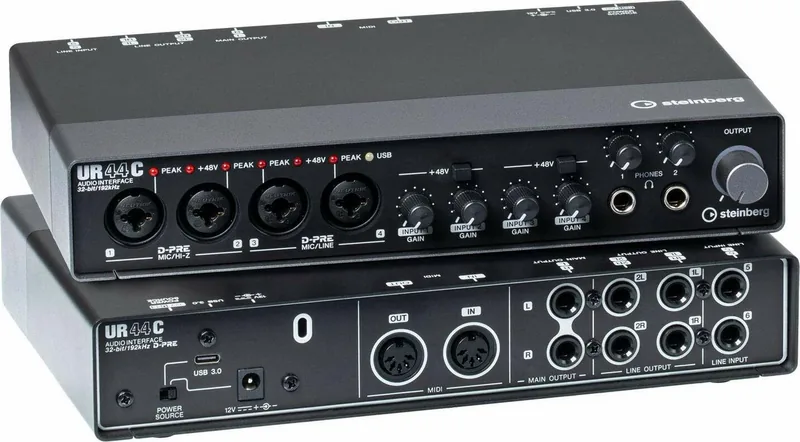
The Steinberg UR44C stands out as a professional USB 3 audio interface designed for serious music production. This device offers a robust 6 by 4 configuration that handles multiple inputs and outputs seamlessly. Users can expect high quality audio capture thanks to the four D PRE microphone preamps found on board. These preamps are renowned for their clarity and low noise floor ensuring your recordings remain pristine.
Connectivity and Performance
The interface connects via a USB Type C port supporting USB 3.0 for high speed data transfer. This connection provides the necessary bandwidth for low latency audio streaming. It also maintains compatibility with USB 2.0 systems though USB 3.0 is recommended. Power options include bus power via USB or external 12V DC supply through the rear panel. This flexibility ensures stability during long sessions without interruption.
Sound Quality and Processing
Audio resolution reaches up to 32 bit at 192 kHz providing exceptional dynamic range. The 32 bit integer format allows for greater precision compared to float formats. The onboard DSP chip powers the dspMixFx application for real time processing without adding CPU load. Users can access REV X reverb algorithms and Guitar Amp Classics simulation directly on the hardware. The Sweet Spot Morphing Channel Strip further enhances tone shaping options during tracking.
Versatile Software Integration
The Steinberg UR44C integrates smoothly with major DAW environments especially Cubase. Specialized windows within the software allow deep configuration of gain and effects. MIDI connectivity is included with four input and four output ports for hardware controllers. Recording and playback workflows are streamlined through the provided audio driver settings. This comprehensive setup supports both computer and iOS device connections.
Setup and Configuration
Detailed setup involves adjusting input gain to use the peak indicators effectively. When connecting condenser microphones ensure the phantom power switch is engaged correctly to avoid damage. Monitoring is handled through dedicated headphone outputs with volume control. The output section allows routing to studio monitors or external line level devices. Configuration steps for ASIO drivers differ between Windows and Mac operating systems. The Steinberg UR44C Manual offers setup tips and troubleshooting steps to ensure stability.
Final Thoughts
The unit features LED indicators for power USB status and signal peaks. Backpanel connections include main outputs and line inputs switchable for professional consumer levels. Signal flow diagrams clarify routing paths for mixes. The dspMixFx software allows scene storage for quick recall of settings between projects. Safety notes emphasize disconnecting devices before toggling phantom power. This interface is a solid choice for home studios and professional environments alike seeking reliability and sound quality.
Search for 67,706 Manuals online


Type-in Brand or Model
Afton Leuschke
8 months ago
Will this work with a Mac (USB-C) and do I need to install any extra software/drivers?
Manual.ly
8 months ago
Yes. Reviewers report it works on Mac via USB-C with no additional software required, and it functions directly with music apps like Logic. Simply plug it in and start using it. If you connect through a USB-C port, you should not need to install special drivers for normal operation. For best results, make sure your Mac detects the device after connecting and that your music software selects the correct input/output. If you run into detection issues, try a different USB-C port/cable and restart the connection.