
SteelSeries Arena 3 Manual
PDF manual · 24 Pages
English



Quick check
Incorrect answer, please try again.
Chat with your SteelSeries Arena 3 manual using AI
Get instant AI answers from your SteelSeries Arena 3 manual
Ask anything about the SteelSeries Arena 3. Answers come from this manual, with the pages they are based on.
Ask a Question
Do you recommend Arena 3?
Yes NoFrequently Asked Questions
Hold the multifunction button for five seconds to enter pairing mode. The LED indicator will turn blue when the Arena 3 is discoverable and connected. Note that Bluetooth audio may mix with other active audio sources.
Is this answer helpful?
The Arena 3 supports a PC audio input (3.5 mm), an auxiliary (AUX) 3.5 mm input, Bluetooth wireless, and a headset jack that mutes the speakers when headphones are plugged in.
Is this answer helpful?
Yes. Arena 3 functions as a plug-and-play speaker system via 3.5 mm or Bluetooth. SteelSeries SoundStage (Windows 10+) is optional for virtual surround and EQ customization but not required for normal operation.
Is this answer helpful?
Arena 3 is designed to accept multiple inputs simultaneously; auxiliary and Bluetooth audio can overlay the primary PC input. To avoid mixing, disconnect unused sources or switch outputs on the source devices.
Is this answer helpful?
Plug your headset into the headset jack to automatically mute the speakers. Press the multifunction button once to toggle audio back to the speakers; the LED will show orange for headset/mute and green for speakers.
Is this answer helpful?
LED colors: Green = speaker output active, Blue = Bluetooth connected, Orange = mute or headset active. The LED can be toggled on/off with a double press of the multifunction button, though brief flashes still occur on mode changes.
Is this answer helpful?
Visit steelseries.com/setup/arena-3 for setup details and steelseries.com/gaming-accessories for replacement parts and accessory information. Support resources and region contacts are listed on SteelSeries’ website.
Is this answer helpful?
Advantages and Disadvantages
Advantages

- Simple plug-and-play setup with included cables and regional power adapter.
- Dual 4" full-range drivers deliver clear midrange and defined highs for desktop use.
- Bluetooth plus wired 3.5 mm inputs provide flexible connectivity for multiple devices.
- Headset jack that auto-mutes speakers and easy toggle back to speaker output.
- Intuitive single-button control and LED status indicators for quick operation.
Disadvantages

- Bluetooth audio can mix with other sources, causing overlapping playback.
- Limited onboard controls—no dedicated EQ or advanced tuning without software.
- Some PCs may need a dual 3.5 mm adapter for separate microphone/headphone use.
- Compact drivers may lack deep bass compared with larger desktop speaker systems.
- LED briefly indicates mode changes even when turned off via double-press.
Product Specification
Type
Speaker set
Channels
2.0
Frequency range
50Hz-20kHz
Audio connectors
2x AUX In (0.14 in jack), Headphones (0.14 in jack)
Wireless
Bluetooth 4.2
Color
black
Composed of
2x Compact speakers
Product Description
SteelSeries Arena 3 — Powerful, Simple Desktop Speakers
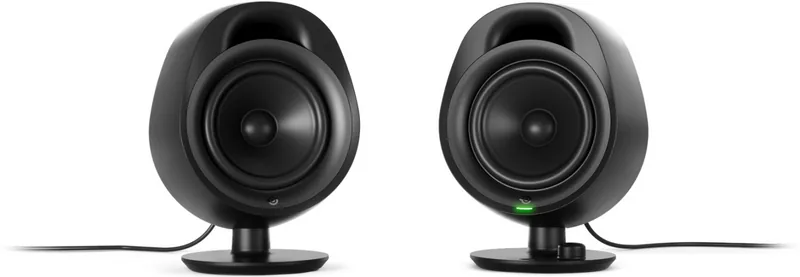
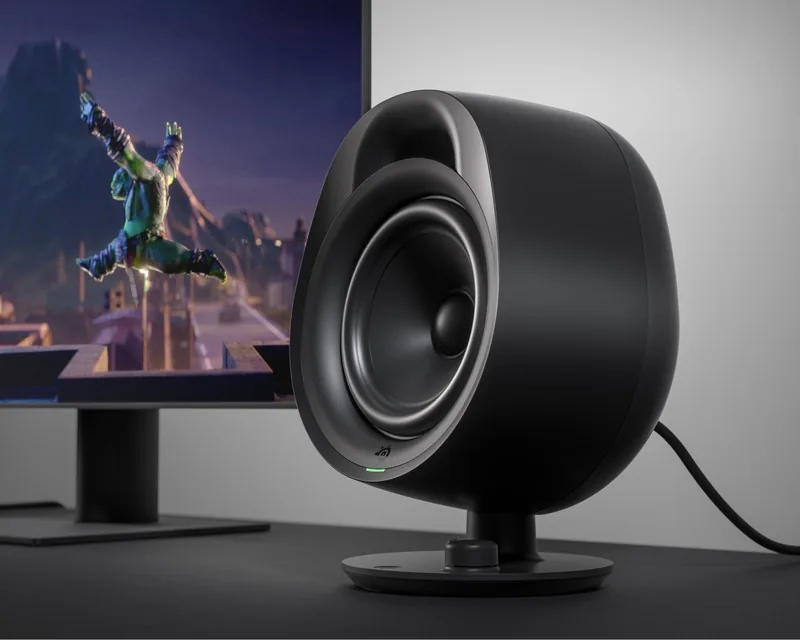
The SteelSeries Arena 3 delivers straightforward, high-quality audio for gaming, music, and everyday use. Featuring dual 4" full-range drivers, the Arena 3 is built to reproduce clear midrange and detailed highs while maintaining a compact footprint for desktops and small setups. With wired 3.5 mm connectivity and Bluetooth pairing, it adapts to a wide range of audio sources from PCs and consoles to phones and tablets.
Design and Connectivity
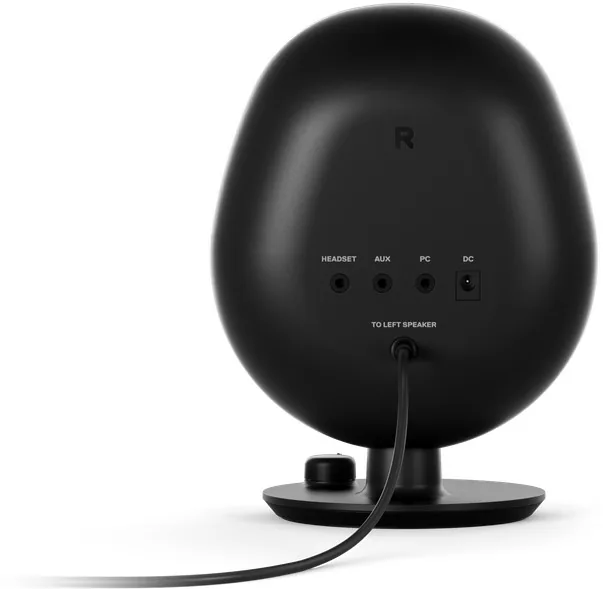
Arena 3’s right speaker houses the primary controls and inputs: PC audio input, power input, volume dial, LED status indicator, and a multifunction button for mute, headset toggle, and Bluetooth pairing. The right speaker connects to the left via an attached 3.5 mm cable. The package includes a regional power adapter and a 3.5 mm audio cable, making the speakers easy to set up out of the box.
Bluetooth pairing is initiated by holding the multifunction button for five seconds; the LED turns blue when connected. An AUX input allows a second wired source to play alongside primary audio sources (note: auxiliary and Bluetooth audio can mix). A dedicated headset jack mutes the speakers automatically when headphones are plugged in and restores output via the multifunction button.
Controls and Usability
Controls are intentionally simple: a volume dial for gain adjustments and a single multifunction button that toggles mute, switches between headphone and speaker output, and manages Bluetooth pairing. The LED indicator uses color cues—green for speakers, blue for Bluetooth, orange for mute/headset—to provide quick status feedback. Double-pressing the multifunction button toggles the LED on or off while brief color flashes still occur when changing modes.
Software and Customization
For users who want deeper audio tuning, SteelSeries SoundStage offers virtual surround, EQ presets, and other customization options on Windows 10 and later via steelseries.com/setup/arena-3. The hardware remains fully usable without software, but SoundStage expands the tuning possibilities for gaming audio and personalized listening.
Who Should Consider Arena 3
Arena 3 is ideal for gamers and casual listeners who want reliable, easy-to-install desktop speakers with both wired and wireless connectivity. Its compact size, headset passthrough, and simple controls make it a solid pick for desks where space and convenience matter.
Notes
- Bluetooth audio can mix with other sources; expect layered input when multiple sources are active.
- Some PCs may require a dual 3.5 mm adapter for separate headphone and mic usage (adapter not included).
- Replacement parts and more setup details are available at steelseries.com/setup/arena-3 and steelseries.com/gaming-accessories.
Quick Specs
- Driver: Dual 4" full-range drivers
- Inputs: PC (3.5 mm), AUX (3.5 mm), Bluetooth, Headset jack
- Controls: Volume dial, multifunction button (mute/headset/Bluetooth)
- Software: SteelSeries SoundStage (Windows 10+)
- Included: Right & left speakers, power adapter with regional plug, 3.5 mm cable
Search for 67,706 Manuals online


Type-in Brand or Model