
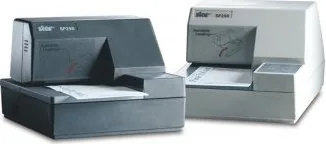
Star Micronics SP298MC Manual
PDF manual · 144 Pages
English



Quick check
Incorrect answer, please try again.
Chat with your Star Micronics SP298MC manual using AI
Get instant AI answers from your Star Micronics SP298MC manual
Ask anything about the Star Micronics SP298MC. Answers come from this manual, with the pages they are based on.
Ask a Question
Do you recommend SP298MC?
Yes NoFrequently Asked Questions
Simply insert the receipt into the side slot until the sensor detects the top edge. The AutoSide Loading feature aligns the paper automatically for printing. Ensure paper is not wrinkled or curled to prevent jams during the initial setup process.
Is this answer helpful?
The printer stops immediately to protect internal components and prevent data loss. Once power is restored, you may need to reset the device to resume operations. Check status lights to ensure normal function returns before sending new print jobs.
Is this answer helpful?
Yes, a peripheral unit connector accepts a modular plug for cash drawer integration directly. Print commands can trigger the drawer to open after transaction completion automatically. Ensure you use the correct compatible adapter cable for signal transmission.
Is this answer helpful?
Press the release button to unclamp the paper feed roller before attempting removal. Gently pull the jammed paper out without tearing to avoid debris left inside. Insert fresh paper and ensure the release light indicates the correct state for printing.
Is this answer helpful?
Yes, the dot matrix impact mechanism is designed to print on multi-part carbon forms effectively. Ensure ribbons tension is adjusted for optimal impression clarity on lower copies. This makes the device suitable for invoices requiring duplicate records.
Is this answer helpful?
Advantages and Disadvantages
Advantages

- AutoSide Loading sensor automates paper positioning to reduce waste and jams during high volume printing shifts.
- Supports both serial and parallel interfaces for flexible network connection options across legacy and modern systems.
- Emulates Epson standards ensuring compatibility with existing point of sale software and accounting packages.
- Durable metal internal components withstand harsh retail environments better than many plastic thermal printers.
- Clear status indicators on the control panel provide immediate feedback on power and paper conditions.
Disadvantages

- Ribbon replacement is required periodically which adds ongoing operational costs compared to thermal alternatives.
- Mechanical parts can generate noise that might be distracting in quiet office environments or customer areas.
- Setup requires manual cable attachment and driver configuration before the device communicates with the host computer.
- Slower print speeds compared to high-end thermal models impacting throughput during peak transaction times.
- Bulkier physical footprint requires dedicated counter space and careful positioning to avoid obstruction.
Product Specification
Type
Label Printer
Technology
Dot Matrix
Print Resolution
9 Pins
Paper Thickness
0.0035-0.0079 inches
Print Width
7.17 inches
Print Length
10.12 inches
Print Speed
3 lines/s
Memory
8 KB (Buffer)
Interfaces
Parallel
Display
N/A
Emulation
ESC/POS, Star Graphic Mode
Dimensions
7.09 x 5.45 x 7.48 inches
Features
Paper Cutter
Product Description
Star Micronics SP298MC Parallel Review
Operating a robust point of sale system requires hardware that withstands constant daily use without failure. The Star Micronics SP298MC Parallel, Dark Grey, Dot Matrix Manual highlights the engineering behind this slip printer. It stands out for its mechanical simplicity and proven reliability in high volume environments. Users benefit from the front-facing control panel which manages power and paper feed intuitively through dedicated buttons. The parallel interface supports fast data transfer for busy registers requiring immediate transaction processing.
Product Setup and Features
Setting up the device involves securing the ribbon cassette without complex tools. The paper sensor technology automates positioning when inserting receipts, which minimizes waste and operator error during busy shifts. Maintenance is straightforward since the ribbon cassette slides in and out with ease. The control panel indicators provide immediate feedback on paper status and potential errors before they cause disruptions. This visual guidance reduces downtime significantly for service technicians. For developers, the command set offers significant versatility in software integration. It emulates popular Epson standards while maintaining Star Micronics specific features like slip control. This ensures compatibility with legacy and modern accounting software seamlessly. The device handles impact printing environments well thanks to its sturdy build quality. Connectivity options include serial and parallel ports to offer flexibility in various network configurations.
Performance and Maintenance
Safety features protect the internal components during shipping and regular operation cycles. Power surges are mitigated by compliance with FCC regulations ensuring stable performance. The unit fits discreetly under counters due to its compact footprint and design. Business owners value the long-term cost-effectiveness of ribbon-based printing compared to thermal alternatives for multi-part forms. Ultimately, understanding the capabilities ensures maximum uptime. This printer remains a trusted choice for slips and forms where carbon copies are necessary. The automatic paper release mechanism allows staff to clear used receipts quickly. Noise levels remain manageable compared to older models while maintaining print clarity. Durability is enhanced by metal components within the print head assembly. Regular updates to the firmware ensure continued support for new operating systems.
Notes and Tips
Peripheral connections allow cash drawers to trigger directly from print commands. Error recovery procedures are built into the interface allowing quick resolution of mechanical jams without service calls. This reliability makes it essential for retail and warehouse shipping sectors where accuracy is paramount. The dark grey casing blends well into professional office environments without drawing unnecessary attention. Continuous innovation in slip printing technology keeps this model relevant for decades. The auto clamp function helps position paper precisely for consistent alignment. Hexadecimal dump mode assists technicians in diagnosing communication issues effectively. Ribbon tension adjustments ensure uniform print quality across different paper types. The release button facilitates easy removal of printed slips after transactions complete.
Search for 67,732 Manuals online


Type-in Brand or Model