
Star Micronics SM-S201 Manual
PDF manual · 23 Pages
English



Quick check
Incorrect answer, please try again.
Chat with your Star Micronics SM-S201 manual using AI
Get instant AI answers from your Star Micronics SM-S201 manual
Ask anything about the Star Micronics SM-S201. Answers come from this manual, with the pages they are based on.
Ask a Question
Do you recommend SM-S201?
Yes NoFrequently Asked Questions
The device supports a maximum print speed of 80 mm per second for efficient receipt generation.
Is this answer helpful?
The rechargeable battery provides approximately six hours of printing time before needing a recharge.
Is this answer helpful?
Yes, it supports Bluetooth Ver2.1 for wireless connectivity with a standard PIN setup.
Is this answer helpful?
It weighs 300 grams including the battery and roll paper for easy portability.
Is this answer helpful?
Turn on the power while holding the Feed button to check functions automatically.
Is this answer helpful?
No, the area gets very hot after printing so allow it to cool before touching.
Is this answer helpful?
Check for paper jams or open covers and ensure power is connected properly.
Is this answer helpful?
Advantages and Disadvantages
Advantages

- Lightweight pocket size design with 300g weight for true mobility.
- High speed printing up to 80 mm per second with silent operation.
- Dual interface support including RS-232C and Bluetooth Ver2.1 for flexibility.
- Integrated graphic LCD display with Blue LED backlight for status viewing.
- Easy paper replacement with clamshell design for quick roll loading.
Disadvantages

- Battery life is limited to six hours of actual printing time.
- Thermal head becomes extremely hot immediately after use requiring caution.
- Static electricity can damage ports if not powered down before connections.
- No hardware flow control is supported on the RS-232C interface.
- Battery is considered a consumable part with a short warranty period.
Product Specification
Type
mobile receipt printer
Technology
Thermal printing
Print Resolution
203 dpi
Print Width
1.89 inches
Print Speed
3.15 in/s
Connections
serial
Network
Bluetooth
Display
N/A
Dimensions
3.17x4.47x1.81 inches
Weight
5.11 lbs
Features
Battery (Li-Ion)
Product Description
The Ultimate Mobile Printing Solution
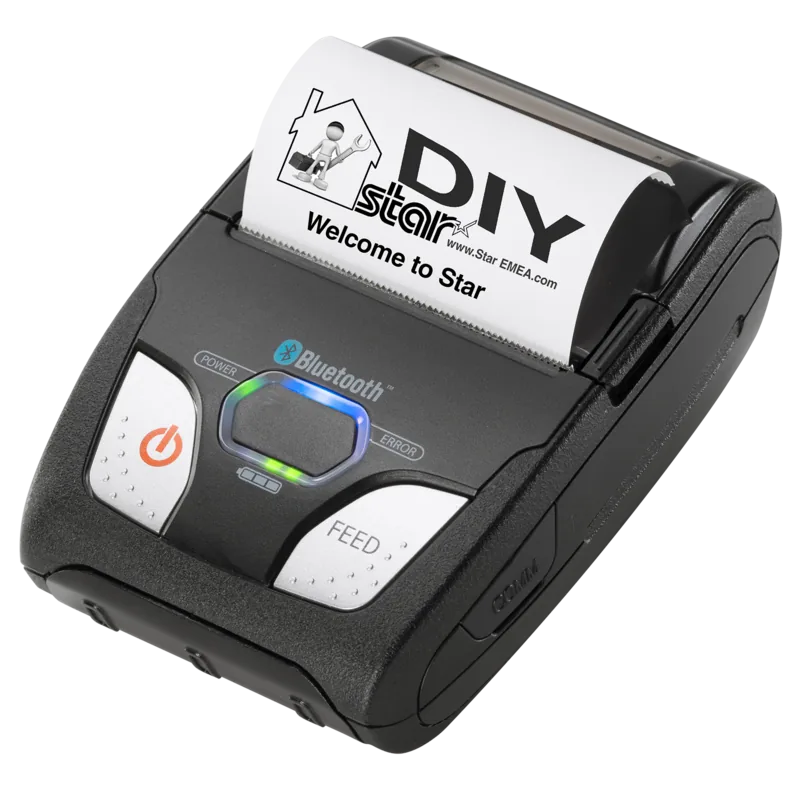
The Star Micronics SM-S201 represents a significant advancement in portable printing technology for today's busy professionals. Designed for mobile banking systems, retail environments, and point of sales setups, this device integrates seamlessly into traveling computing needs. Its pocket size dimensions ensure true mobility, weighing only 300 grams for effortless carrying during daily tasks. This guide highlights the essential features of the SM-S200 Series, often found in the Star Micronics SM-S201 Manual, to help you maximize usability in various settings.
Advanced Connectivity and Performance
Efficiency is key in modern business transactions. This printer boasts a high-speed capability of up to 80 mm per second for rapid receipts. It supports both RS-232C and Bluetooth Ver2.1 interfaces, allowing flexibility in connection methods. Users can easily switch between modes using the control panel buttons located on the top panel. The included graphic LCD with Blue LED backlight displays transmission status clearly. The RS-232C interface utilizes a 5 pin mini USB socket for secure data transmission. Bluetooth communication uses a fixed PIN for basic security, though changing this is recommended by dealers. It supports magnetic stripe reading on the SM-S201 and SM-S202 models for added functionality.
Operational Precautions for Longevity
To maintain peak performance, users must follow specific guidelines regarding environment and handling. Static electricity can damage semiconductor devices, so power off before connecting cables. Avoid direct sunlight or high humidity environments as condensation can occur. The operating temperature ranges from 0 degrees to 50 Celsius consistently. Never open the paper cover during printing to avoid injury or data loss. If the battery pack gets warm during use, this is normal behavior and not a malfunction. Always use clean thermal paper stored in a cool, dry place to ensure print quality remains high. Do not touch connectors during printing transmission.
Maintenance and Specifications
Regular maintenance ensures reliability over many years. The printer utilizes a direct thermal printing method which is very silent for office environments. Paper replacement involves a clamshell design for easier loading without tools. The battery pack requires about four to five hours to recharge fully and offers approximately six hours of printing time. Remember that the thermal head becomes hot after use so allow it to cool. Consult the instructions for setup details to optimize settings like baud rate and data bits. Proper care includes keeping the printer away from strong electromagnetic fields like copy machines. This device complies with FCC Part 15 rules regarding radio frequency interference without requiring testing. Running a self-test checks most functions automatically. Following these steps ensures your mobile printer operates smoothly. Battery life gradually decreases over time as it is a consumable part. Regarding warranty, the battery lasts six months under normal use. Errors indicate no paper or open covers. Immediate shutdown is needed if smoke appears. Do not disassemble the product yourself. Contact your dealer for support. These measures protect your investment.
Search for 67,732 Manuals online


Type-in Brand or Model