
Sportstech F75 Manual
PDF manual · 203 Pages
English



Quick check
Incorrect answer, please try again.
Chat with your Sportstech F75 manual using AI
Get instant AI answers from your Sportstech F75 manual
Ask anything about the Sportstech F75. Answers come from this manual, with the pages they are based on.
F75 Maintenance Schedule
Clean the ground weekly and remove dirt from shoes and other sundries to ensure proper operation and hygiene.
The treadmill must be oiled after 1 year or 100 hours of use. Use non-petroleum silicone oil on the running platform.
The system reminds you every 50 km. Lift one side of the belt and apply silicone oil to the center of the running board.
After 30 days or 30 hours of use, lift the belt and touch the platform surface to check if it is dry and needs oiling.
Clear sweat stains and small impurities from the instrument and other parts using a clean towel and damp cloth.
Regularly inspect all parts of the treadmill and immediately replace any damaged components to maintain safety.
Free maintenance reminders
Timed to your purchase date. Always free, unsubscribe anytime.
Ask a Question
Do you recommend F75?
Yes NoFrequently Asked Questions
Attach the magnetic safety clip to your clothing before starting. If you trip, the clip detaches and cuts power immediately. Ensure the unit is grounded and keep children away during operation.
Is this answer helpful?
The maximum speed reaches 24.8 kilometers per hour. The incline angle adjusts up to 20 percent to simulate mountainous terrain during your training sessions.
Is this answer helpful?
The system tracks distance and alerts you for lubrication every fifty kilometers. You should also inspect the belt tension monthly to prevent slipping or uneven wear on the deck surface.
Is this answer helpful?
Yes, the console supports video files via USB drive up to 32GB maximum capacity. Supported formats include AVI, MPEG, and MP4 for entertainment while running.
Is this answer helpful?
Assembly is structured but requires careful attention. You must attach the base frame, console, and side covers correctly. Following the setup guide ensures all parts fit securely before first use.
Is this answer helpful?
Advantages and Disadvantages
Advantages

- Features a large 14 inch TFT display with touch screen control for intuitive navigation and data access.
- Includes twelve pre-set programs tailored for various fitness levels and goals from fat burning to elderly care.
- Offers landscape mode with real world scenery to maintain runner motivation during extensive cardio sessions at home.
- Supports USB media drives up to 32GB capacity and audio input for entertainment during workouts.
- Includes built-in massage element and dumbbells in the highest configuration for comprehensive home training.
Disadvantages

- Requires a standard 220V to 240V AC ground power outlet for safe operation.
- User must perform manual assembly carefully to ensure all components are correctly secured.
- Belt lubrication is required every fifty kilometers to maintain optimal performance and reduce friction.
- Hand sensors provide heart rate data for fitness purposes but not for clinical medical analysis.
- The device is designed for indoor use only and requires dry environments.
Product Specification
Motor Power
1.97 HP Continuous Power, 4.93 HP Max Power
Speed
0.62-12.43 mph
Incline
0-18% manually adjustable
Running Surface
63.00x22.83 inches
Max User Weight
440.92 lbs
Dimensions
77.17x40.16x54.72 inches
Folded Dimensions
53.94x40.16x61.81 inches
Weight
308.65 lbs
Features
Transport Wheels, Hand Pulse Sensors, Chest Strap Compatible, Water Bottle Holder, USB, Foldable
Product Description
Welcome to the new era of home training
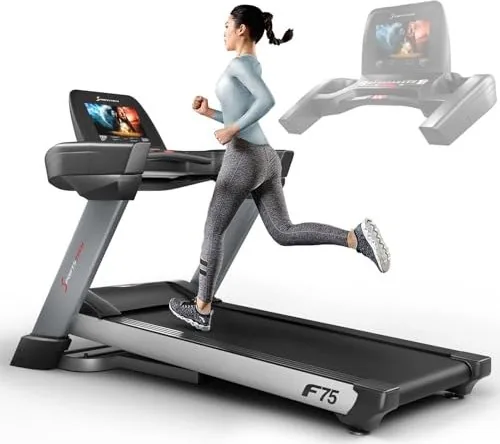
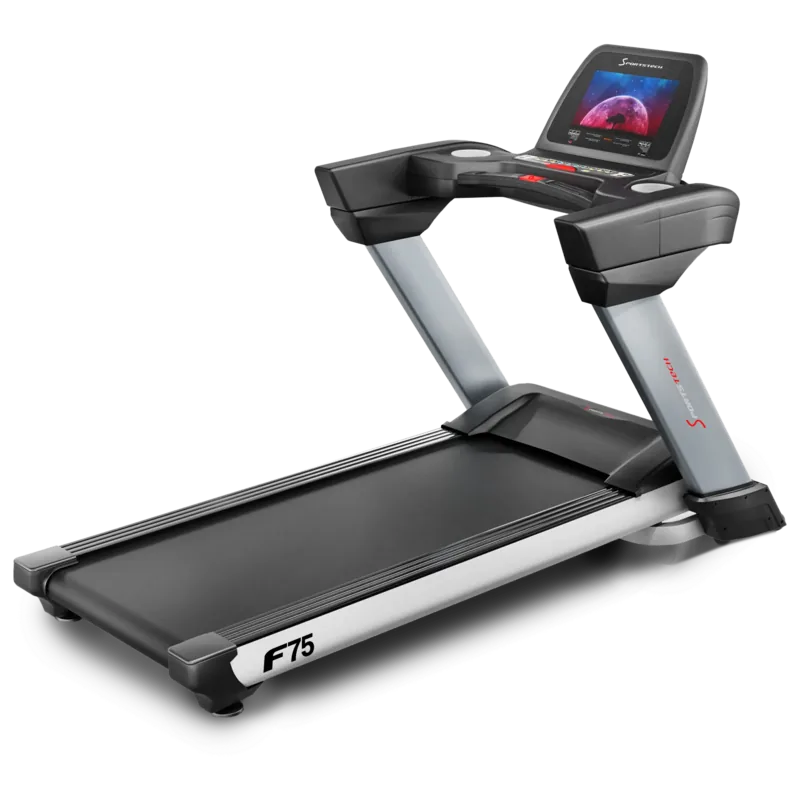
The Sportstech F75 Treadmill stands out as a robust choice for home gyms seeking high performance and advanced technology. This machine features a large 14 inch TFT display that responds to touch commands instantly. Navigating through workout data becomes intuitive with the capacitive sensor screen. Users have access to twelve distinct programs tailored for fat burning or health management. The landscape mode immerses runners in real world scenes ranging from city streets to forest paths. This engagement helps maintain motivation during lengthy cardio sessions at home. Start your fitness journey today with this advanced equipment. It is a trusted companion for daily physical activity.
Proper setup is essential for safe operation
Referencing the guidance found in the Sportstech F75 Treadmill Manual ensures every component is correctly installed. You must assemble the base frame and attach the console securely before use. Never operate the device without the magnetic safety clip attached to your clothing. Should a fall occur, this mechanism cuts power immediately to prevent injury. Keep the area clear of children and pets while training. Ensure the power outlet is grounded to meet the 220V to 240V AC requirement. Always unplug the unit before cleaning or maintenance procedures. Regular checks prevent operational failures. Check your manual instructions regularly.
Maintenance and Features
Long term reliability depends on regular care. The system tracks distance and alerts you for lubrication every fifty kilometers. Apply silicone oil to the deck surface under the running belt to reduce friction. You can adjust belt tension and alignment using a hex tool located at the rear roller. Ensure the environment is free from moisture and debris. The console supports USB media drives with a maximum capacity of 32GB. Enjoy music or videos in supported formats during your run. Maximum speed reaches 24.8 km/h while incline adjusts up to 20 percent. Run at a consistent pace for best results. Space saving design is ideal for small apartments. Transport wheels allow for easy relocation.
Safety and Conclusion
Consult your doctor before starting any new routine. Drink plenty of water during exercise to prevent dehydration. Heart rate monitoring is available via hand sensors though it is not for clinical analysis. The unit includes a built-in massage element and comes with dumbbells included. Space saving design is ideal for small apartments. Transport wheels allow for easy relocation. This versatile machine combines convenience with serious fitness capabilities for diverse users. It simplifies daily exercise tasks significantly. Regularly maintain the device to ensure optimal condition.
Search for 67,706 Manuals online


Type-in Brand or Model