
Soundcast VGtx Manual
PDF manual · 32 Pages
English



Quick check
Incorrect answer, please try again.
Chat with your Soundcast VGtx manual using AI
Get instant AI answers from your Soundcast VGtx manual
Ask anything about the Soundcast VGtx. Answers come from this manual, with the pages they are based on.
Ask a Question
Do you recommend VGtx?
Yes NoDo you recommend VGtx?
Yes NoFrequently Asked Questions
To factory reset the device, press and hold the multi-function power button for ten seconds. The blue and red LEDs will blink rapidly to indicate the pairing memory has been cleared.
Is this answer helpful?
No, the VGtx is a passive transmitter. You must adjust the volume using the connected source device such as a TV, computer, or stereo receiver to control audio levels.
Is this answer helpful?
Yes, it works for TV audio. It supports optical pass-through so you can keep your existing audio system connected while the VGtx transmits to speakers simultaneously.
Is this answer helpful?
The device operates up to fifty meters indoors. For best results, place the transmitter as high as possible on a solid surface to prevent signal blockage.
Is this answer helpful?
The digital input only decodes stereo streams. It will not decode Dolby or DTS encoded streams, though the optical pass-through port will still pass these signals through.
Is this answer helpful?
Enter pairing mode by holding the power button for six seconds until the LEDs flash red and blue. Put your receiving device in pairing mode and wait for the connection confirmation.
Is this answer helpful?
If powered off or disconnected, it will disconnect. Upon rebooting and if in range, it should automatically reconnect to the last paired device within range.
Is this answer helpful?
Advantages and Disadvantages
Advantages

- Long range wireless stereo transmission up to fifty meters
- Support for aptX Low Latency ensures no audio delay
- Compatible with True Wireless Stereo mode for dual devices
- Flexible input options including analog and digital optical
- Automatically reconnects to last paired device when powered on
Disadvantages

- No volume control on the transmitter itself
- Single device pairing memory without multi-device support
- Optical input does not decode Dolby or DTS signals
- Requires 5V USB power adapter for operation
- Antenna positioning is critical for maximum signal strength
Product Specification
Type
Transmitter & Receiver
Signal Transmission
Bluetooth 4.2
D/A Converter
24bit/192kHz
Connectors
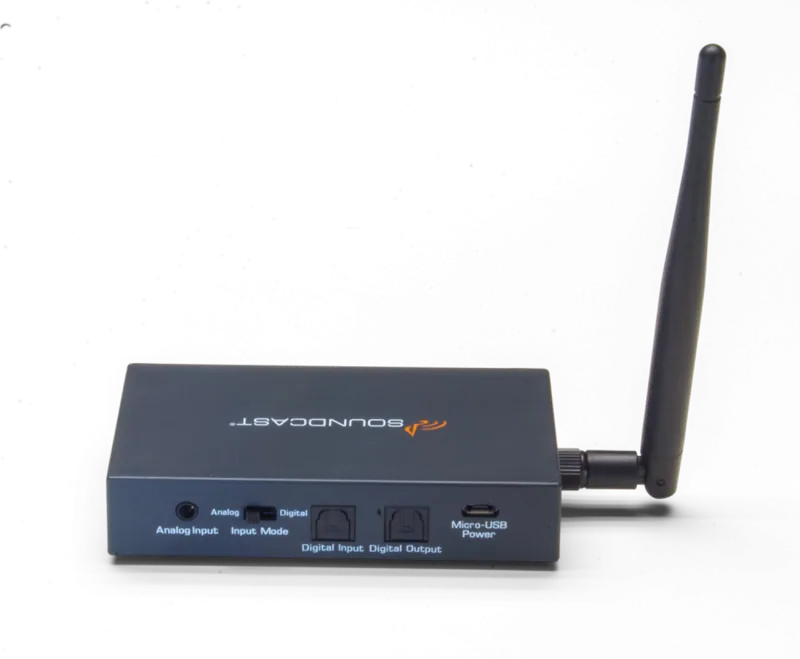
Digital Audio In (optical), Digital Audio Out (optical), AUX In (3.5mm jack)
Power Supply
USB
Features
aptX
Dimensions
4.06x0.83x2.13in (WxHxD)
Weight
3.00 oz
Product Description
Experience Premium Wireless Audio with Soundcast VGtx
Elevate your home entertainment setup using the Soundcast VGtx, a high-performance wireless stereo transmitter. This device is designed to extend wireless range and add connectivity to any audio equipment. By utilizing the latest Bluetooth 4.2 technology, this transmitter ensures a stable connection for your music and media files. The included product information guides users through the setup process efficiently. It transforms wired systems into wireless networks with minimal effort and high fidelity.
Key Features and Performance
The core of this system is its support for aptX Low Latency technology. This feature is essential for watching television or playing video games, as it synchronizes audio with video to eliminate lip sync delays. The operational range reaches up to fifty meters indoors. It also supports True Wireless Stereo mode, allowing two matched devices to stream stereo sound simultaneously. Users can connect the unit via analog 3.5mm ports or digital optical inputs, providing flexibility for various sources like TVs, computers, and stereos. It also supports standard SBC and aptX codecs for broader compatibility with diverse receiver devices. The frequency band operates between 2.402 GHz to 2.480 GHz.
Installation and Setup
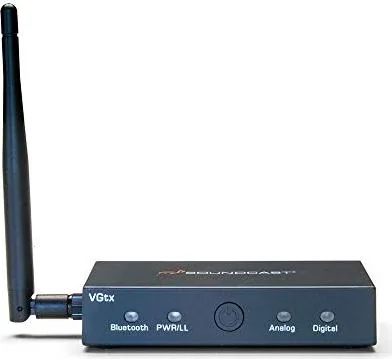
Installation involves attaching the supplied antenna vertically for optimal performance. Power is delivered through a standard USB connection requiring five volts at five hundred milliamps. Pairing a Bluetooth device requires pressing the multi-function button to enter pairing mode, indicated by a red and blue flashing light. Once connected, the light turns solid blue. For factory resets, hold the button for ten seconds. Always consult the Soundcast VGtx Manual for detailed troubleshooting steps regarding signal interference or connection issues. The LED indicators provide visual status updates for power and audio codec activity to confirm connection health. Use the included optical cable for best digital performance.
User Feedback and Notes
Potential users should note that volume control is handled by the source device, not the transmitter itself, as it is a passive unit. Additionally, the optical pass-through allows continued use of the TV audio output even when the unit is on standby. Keeping the device powered on ensures it remembers the last paired device for automatic reconnection. This setup provides a seamless listening experience for enthusiasts seeking flexibility without cluttering wires.
- Maintenance: Avoid liquids and extreme temperatures to prevent circuit damage. Do not drop the unit as it harms internal circuits.
- Safety: Keep antenna upright and away from interference sources like microwaves.
Search for 67,732 Manuals online


Type-in Brand or Model