
Soundcast VG7 Manual
PDF manual · 2 Pages
English



Quick check
Incorrect answer, please try again.
Chat with your Soundcast VG7 manual using AI
Get instant AI answers from your Soundcast VG7 manual
Ask anything about the Soundcast VG7. Answers come from this manual, with the pages they are based on.
Ask a Question
Do you recommend VG7?
Yes NoDo you recommend VG7?
Yes NoFrequently Asked Questions
Enable NFC on your phone and hold it over the VG7 logo until the Bluetooth LED blinks slowly. Press OK to complete the connection.
Is this answer helpful?
TWS allows two VG7 units to pair for synchronized stereo playback. Controls sync between units, and lights show blue and orange when connected.
Is this answer helpful?
Full charge takes approximately two to three hours using the DC 12V power supply. LED solid red indicates charging status.
Is this answer helpful?
Yes, the USB port outputs power to mobile devices. However, this function will reduce the total playtime of the Soundcast VG7 speaker battery.
Is this answer helpful?
Power up the unit while simultaneously holding the Indoor/Outdoor and Mute buttons for three seconds to toggle lockout mode off.
Is this answer helpful?
Solid red means charging, off means charged, blinking red means low battery. Yellow indicates Aux input. Solid blue indicates Bluetooth connected.
Is this answer helpful?
Hold the Bluetooth key for ten seconds to clear all paired devices. A double blink confirms memory is clear. Repeat for TWS.
Is this answer helpful?
Advantages and Disadvantages
Advantages

- Durable industrial design ensures longevity and rugged performance in various conditions.
- TrueWireless Stereo allows dual unit synchronization for extended soundstage coverage.
- Battery life supports 10 to 20 hours depending on listening volume.
- NFC pairing offers seamless smartphone connection without complex menu navigation.
- Indoor and Outdoor EQ modes adjust bass for specific environments.
Disadvantages

- Battery replacement requires a Phillips #2 screwdriver and careful handling.
- Auxiliary connection disconnects Bluetooth functionality automatically.
- Full charging cycle takes between two to three hours.
- Keypad lockout mode requires specific button combination to toggle.
- USB mobile charging reduces total speaker battery playtime significantly.
Product Specification
Power
60W RMS
Display
no
Tuner
no
Frequency Range
55Hz-20kHz
Connections
AUX In (3.5mm Jack)
Wireless
Bluetooth 4.2, aptX, NFC
Power Source
Li-Ion Battery, AC Power
Playback Duration
20h
Features
water-resistant (IP64), Stereo-Pairing, Charging Capability (USB)
Color
black
Dimensions
11.02 x 19.09 x 11.02 in (WxHxD)
Weight
20.94 lbs
Product Description
Soundcast VG7 Audio Experience
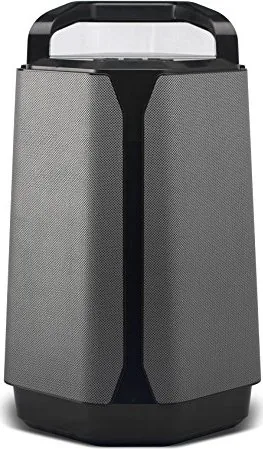
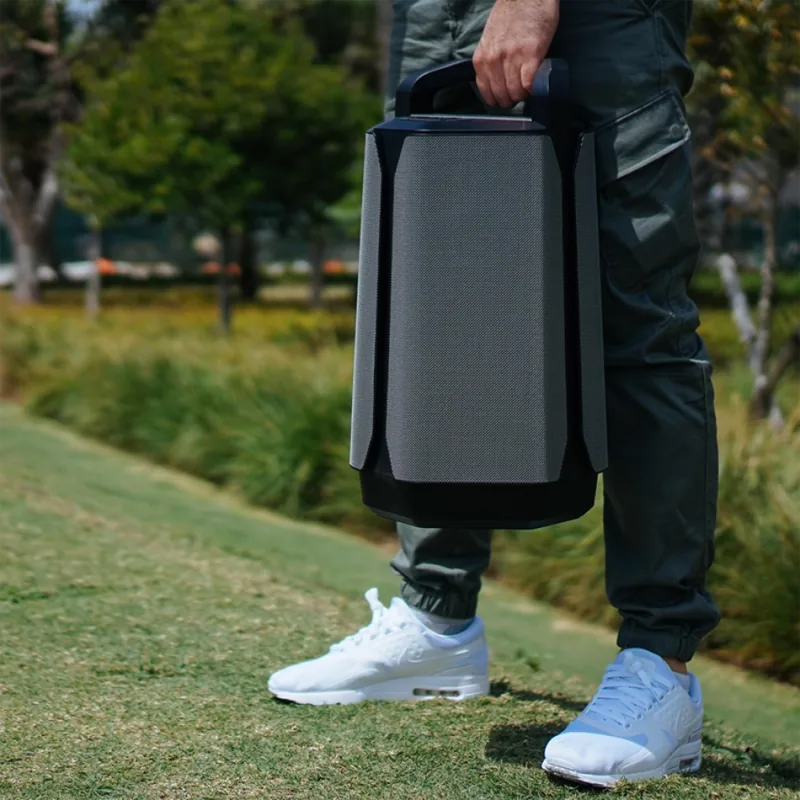
Experience superior audio quality with the Soundcast VG7 Bluetooth speaker. This rugged device is designed for versatile use in both indoor and outdoor environments. The industrial design ensures durability while maintaining a sleek appearance suitable for modern homes or active lifestyles. Equally important is understanding how to optimize the features, which often leads users to consult the Soundcast VG7 Manual for detailed setup instructions found online. The unit features TrueWireless Stereo pairing allowing two units to sync seamlessly for left and right channel playback. Battery performance is robust, offering playtime ranging from 10 to 20 hours depending on volume settings. Charging requires a DC 12V power supply and takes approximately two to three hours for full capacity. LED indicators provide clear status updates regarding charge levels and connection states. NFC technology simplifies the pairing process for compatible smartphones, ensuring quick connectivity without complex menu navigation. The control keypad remains accessible for volume adjustments and track switching. An auxiliary input jack allows wired connections when Bluetooth is unavailable. Indoor and outdoor equalizer modes adjust bass levels to suit the listening environment. To prevent accidental changes, a keypad lockout mode secures all buttons except power. USB mobile charging lets you keep other devices powered on the go. Proper care involves removing the battery cover with a screwdriver and reconnecting the pack securely. Regular maintenance ensures the rubber gasket stays intact for power jack protection when not in use. Whether for a patio gathering or home studio session, this speaker delivers consistent sound. Remember to connect via Aux input to disable wireless modes when needed. The Bluetooth LED changes colors to indicate pairing status, solid when connected, and blinks during setup. Volume management is key, suggesting users set phone volume to 80-90 percent for optimal system performance. TWS modes cycle through stereo, left/right, and off states for flexible listening configurations. Clearing memory involves holding specific keys for designated seconds to reset device associations. The physical buttons respond tactilely for reliable operation in wet or dim conditions. Shipping includes necessary cable adapters for UK, EU, and AU regions to accommodate global users effectively. Installation is straightforward following the provided steps for battery integration involving foam pads and plastic grooves. Powering up while holding specific buttons allows quick access to safety features. Sound quality remains crisp across frequencies when configured correctly for the ambient space. Enjoy the flexibility of a portable powerhouse engineered for connectivity and endurance. The design prioritizes user control with intuitive layouts for frequent adjustments. Pairing involves pressing the button for three seconds until the light blinks slowly. When fully configured, the orange and blue lights indicate successful TWS synchronization. Always charge the battery prior to operation to ensure longevity and maximum performance. The system is licensed under Bluetooth SIG and Qualcomm aptX standards for quality transmission. Following these steps ensures you get the most out of your audio experience. Keep the unit charged for extended sessions. Monitor the battery LED to prevent unexpected power loss. The auxiliary input turns the LED yellow when active. This feature supports non-Bluetooth sources easily. The speaker is a robust tool for entertainment anywhere.
Setup and Connectivity
Maintenance Notes
Search for 67,732 Manuals online


Type-in Brand or Model